Tracking contract costs effectively can save your business money, improve financial control, and prevent costly mistakes. Many small and mid-sized businesses face challenges like manage your contract renewals effectively, hidden fees, and uncontrolled spending. Here’s how you can stay on top of your contract costs:
- Automate Tracking: Use tools like Trackado to centralize contract data, automate reminders, and provide real-time financial updates.
- Monitor Key Metrics: Focus on metrics like Spend Under Management, Cost Variance, and Contract Value Leakage to identify gaps and control expenses.
- Organize Data: Categorize contracts by department, vendor, or financial impact for easy access and analysis.
- Set Alerts: Configure notifications for budget thresholds, renewal deadlines, using a contract renewal planner, and spending anomalies.
- Leverage Reports and Dashboards: Use financial summaries and visual dashboards to track spending patterns and identify savings opportunities.
- Reduce Manual Errors: Automate data entry to avoid mistakes and ensure accuracy.
Setting Up a Centralized System for Financial Tracking
Scattered contract data – whether in emails, spreadsheets, or filing cabinets – makes it nearly impossible to get a clear picture of spending. As Mastt highlights, "When teams track costs in parallel tools, numbers drift, and confidence in reports collapses".
A centralized system solves this by creating a single, reliable source for all contract-related financial information. From procurement to accounting, everyone works from the same verified data, cutting down on errors and miscommunication. The system connects contracts directly to the financial metrics that matter most: budgets, invoices, payments, and forecasts. Beyond consolidating data, it allows for proactive monitoring of cost trends. To make the most of this setup, start by breaking down your contracts and financial data into manageable categories.
Organizing Contracts and Financial Data
To streamline your operations, organize contracts in a way that reflects how your business runs. Categories might include department, vendor, contract type, or financial impact. This structure simplifies finding agreements and analyzing spending patterns.
Each contract should be linked to its associated financial data – like budgets, invoices, and forecasts – for detailed comparisons. For instance, a three-year software subscription should clearly show monthly payments, total contract value, renewal dates, and its effect on your annual technology budget. For businesses managing multiple contract types, organizing by consistent categories, such as software subscriptions, professional services, facilities, or insurance, makes it easier to compare spending across vendors and departments.
Manual data entry, though common, introduces a 1-4% error rate that can skew financial insights. Automating data flows through APIs ensures real-time accuracy across platforms like time tracking, job costing, and accounting systems. Since labor costs often make up 40-50% of total project expenses – and can climb to 60-70% for specialty contractors – accurate data capture is especially critical for businesses with high labor expenses.
Once your data is well-organized, the next step is choosing tools and following a contract automation checklist to simplify ongoing financial tracking.
Choosing Tools to Simplify Financial Tracking
The right contract management tool can centralize storage, automate reminders, and provide full visibility into costs, revenues, and key dates.
Trackado is one such solution built for this purpose. It acts as a centralized hub where all your contracts can be stored, categorized by partner, department, or other criteria, giving you instant insight into financial obligations. The platform uses AI-powered data extraction to automatically pull key details – like payment terms, renewal dates, and cost commitments – from uploaded contracts. Customizable fields let you track the financial metrics most relevant to your business, such as monthly expenses, total contract value, or departmental budget allocations.
Automated reminders help you stay ahead of renewal deadlines and payment due dates, which is essential for businesses operating on tight margins. Features like milestone tracking and task-based approval workflows ensure contracts perform as expected and that spending stays within approved budgets. With everything stored securely in a cloud-based system – complete with SSL encryption and European data center hosting – your team can access live, up-to-date information from anywhere. No more digging through emails or outdated spreadsheets.
For companies ready to move beyond manual tracking, a centralized solution like Trackado turns contract management into a proactive tool for financial control.
sbb-itb-49df6ae
Defining and Monitoring Key Financial Metrics
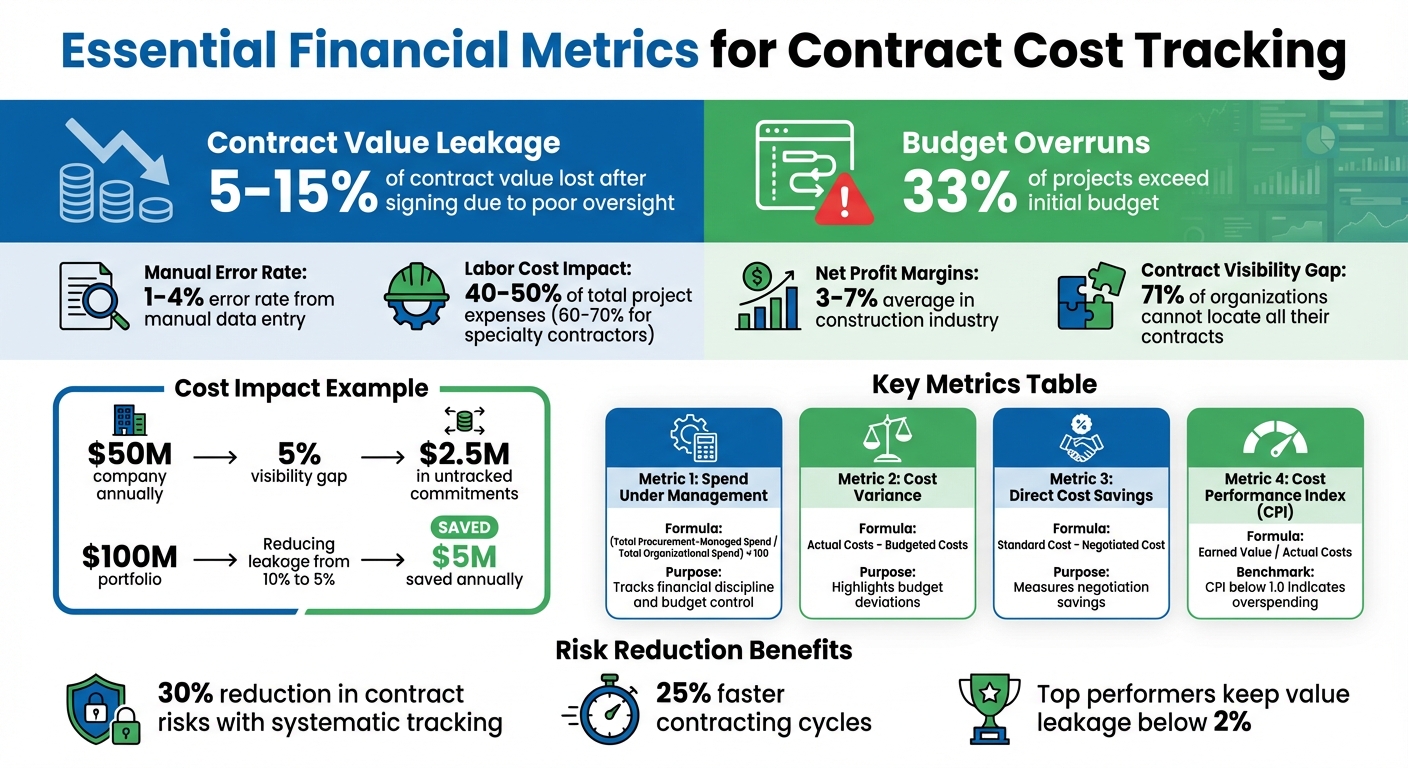
Key Contract Cost Tracking Metrics and Financial Impact Statistics
After centralizing your contracts and financial data, the next step is figuring out which metrics truly matter. Without clear benchmarks, it’s impossible to measure contract performance or spot resource drains.
Start with metrics that directly affect your bottom line, like Spend Under Management, Cost Variance, and Contract Value Leakage. These reveal gaps between expectations and actual outcomes. For example, Spend Under Management tracks how much of your total spending is governed by formal contracts, reducing unauthorized or "rogue" expenses. Cost Variance flags budget overruns by comparing actual costs to planned amounts. Contract Value Leakage measures the difference between expected contract benefits and actual results. Industry data shows that companies can lose between 5% and 15% of a contract’s value after signing due to poor oversight or missed obligations. For a business generating $50 million annually, even a 5% loss means $2.5 million in unaccounted financial commitments.
"Contracts are financial instruments, yet contract managers are often disconnected from their financial impact." – CCM Institute
Other critical metrics include Direct Cost Savings (the difference between standard market rates and your negotiated rates), Profit Margins (gross, net, and operating), and the Project Profitability Index, which compares net profit to total costs to identify high-performing contracts. This is especially important in industries like construction, where net profit margins average between 3% and 7%. Before setting goals, collect baseline data on current cycle times and total contract values to establish realistic benchmarks. Segment metrics by contract type, department, or vendor to pinpoint specific areas of cost overruns.
Key Metrics to Track
Focus on metrics that give actionable insights into spending and performance. For example, the Budget Utilization Rate shows how much of the allocated budget has been spent, while the Cost Performance Index (CPI) compares earned value to actual costs – a CPI below 1.0 indicates overspending. The Estimate at Completion (EAC) calculates the total expected cost based on current progress, helping you predict the final outcome early.
For labor-heavy contracts, track planned versus actual hours to identify deviations. Compare vendor invoiced amounts to accrued costs and approved change orders. A consistent cost code system, like CSI MasterFormat, can make it easier to analyze labor and cost data across projects.
| Metric | Formula | Purpose |
|---|---|---|
| Spend Under Management | (Total Procurement-Managed Spend / Total Organizational Spend) x 100 | Tracks financial discipline and budget control |
| Cost Variance | Actual Costs – Budgeted Costs | Highlights budget deviations |
| Direct Cost Savings | Standard Cost – Negotiated Cost | Measures savings achieved through negotiation |
| Quick Ratio | (Current Assets – Inventory) / Current Liabilities | Assesses liquidity for covering short-term liabilities |
Automated tools like Trackado can monitor these metrics in real time, ensuring you can act quickly to address any issues. Setting up automated alerts for deviations is another way to avoid costly overruns.
Setting Alerts for Financial Thresholds
Manual reviews often delay the discovery of budget issues. By the time a problem is identified, it may already be too late to fix. Automated alerts solve this by notifying you instantly when spending crosses predefined thresholds.
For example, set alerts for contracts that hit 80% of their budget or for tasks where actual hours exceed planned hours by more than 10%. You can also configure notifications for vendor invoices that reach 90% of the approved budget before hitting key milestones. For renewals, use multi-interval alerts at 90, 60, and 30 days to cut costs with automated contract renewals. Roughly 33% of projects exceed their initial budget, but systematic tracking can reduce contract risks by 30% and speed up contracting cycles by 25%.
"Costs rarely explode overnight. They accumulate invisibly, in delayed time entry, misallocated effort, untracked scope creep, or late variance recognition." – Kailash Ganesh, Author, Rocketlane
Effective alerts require real-time integration with time tracking, invoices, and expense claims. Switching from weekly to daily data entry ensures that your alerts are based on the most up-to-date information available. Additionally, tracking contingency and management reserves separately from the main budget provides early warnings when reserves are being used, rather than letting those costs blend into general expenses. Modern platforms can even send alerts directly to Slack, Microsoft Teams, or email, ensuring project leads are notified immediately.
Using Financial Reports and Dashboards
Once you’ve defined the key metrics and alerts for your contracts, the next challenge is turning raw data into meaningful insights. Financial reports and dashboards play different but complementary roles in this process. Reports focus on "what happened", helping with strategic planning, while dashboards emphasize "what needs attention now", ideal for day-to-day operations. This distinction is crucial – 71% of organizations admit they can’t locate all their contracts, leading to significant financial losses due to limited visibility.
Modern contract management tools like Trackado simplify this process. They allow you to capture financial details – like billing transactions and custom fields – and organize contracts by category, business unit, or department. This structured data forms the backbone for creating department-specific financial summaries and pinpointing areas with concentrated costs. Let’s dive into how you can use this data to create actionable reports and visual dashboards.
Creating Custom Reports for Financial Analysis
An effective financial report should include metrics like total committed spend, billing transactions, contract value leakage, and spend against contracted rates. By customizing reports with metadata such as "Custom Properties", "Categories", and organizational units, you can deliver tailored insights to teams like executives, procurement, legal, and sales.
Here’s a quick breakdown of how different dashboards serve unique purposes:
| Dashboard Type | Key Financial/Performance Metrics | Primary Purpose |
|---|---|---|
| Executive | Total contract value, renewal rates, value leakage trends | Monitoring portfolio health and risks |
| Procurement | Spend vs. contracted rates, renewal calendar, vendor value | Managing costs and maximizing vendor value |
| Legal Ops | Cycle time, approval turnaround, workload distribution | Spotting process inefficiencies |
| Sales Ops | Pending contracts aging, time to executed contract | Tracking revenue-related deals |
To start, focus on five core KPIs: contract cycle time, renewal rate, auto-renewal capture rate, value leakage, and pending contracts aging. For instance, if your company earns $50 million annually, a 5% gap in contract visibility could mean $2.5 million in untracked commitments. Similarly, reducing value leakage from 10% to 5% on a $100 million portfolio could save $5 million each year. Filtering reports by contract status – like "Active", "In Negotiation", or "Terminated" – ensures only relevant costs are analyzed.
"Organizations lose between 5% and 15% of a contract’s value after signature due to inadequate management and oversight." – World Commerce & Contracting
Set a reporting cadence that fits the type of metric. For example:
- Review daily metrics like overdue approvals and renewal deadlines in real time.
- Analyze weekly metrics like cycle time trends and approval turnaround averages.
- Reserve monthly or quarterly reviews for bigger-picture metrics like renewal rates and value leakage.
This approach avoids alert fatigue while ensuring critical issues are addressed promptly.
Reading Data Through Visual Dashboards
Dashboards complement reports by offering dynamic, visual insights into your contract data. Unlike static spreadsheets, dashboards provide trend lines and real-time updates. They can uncover patterns such as rising value leakage, departments consistently exceeding budgets, or spikes in cycle times for specific contract types. AI-powered dashboards can even flag anomalies like unusual payment terms, missing liability clauses, or sudden changes in cycle times.
To keep dashboards effective, limit metrics to five to seven key indicators. Include real-time alerts for critical items like upcoming renewal deadlines, overdue approvals, and obligations due within 30 days. Proactive alerts for 30-, 60-, and 90-day renewal windows help you stay ahead of auto-renewals and outdated pricing.
Trackado’s custom properties make it easy to track data specific to your organization, whether that’s spend by project code, milestone payments, or budgeted versus actual costs. Lifecycle fields like start and end dates or notice terms automate renewal tracking, ensuring dashboards always reflect your current obligations. AI-assisted data extraction further streamlines this process, significantly reducing manual data entry and improving consistency across contract records.
"AI-assisted extraction reduces data entry time for contract metadata by 70% to 90% compared to manual processes." – Deloitte
Switching from spreadsheets to live dashboards is a game-changer. Spreadsheets require constant manual updates and quickly become outdated. In contrast, dashboards update automatically as contracts progress, link directly to contract documents, and trigger alerts for deadlines and anomalies. For organizations managing hundreds or thousands of contracts, this scalability is a must – spreadsheets simply can’t keep up.
Using Automation to Improve Cost Tracking
Manual data entry is often where contract cost tracking falters. Spreadsheets can break, invoices get overlooked, and errors creep in. Automation steps in to tackle these issues, removing repetitive and error-prone tasks while streamlining processes. Automated systems manage data extraction, synchronize budgets, and flag potential issues before they spiral into larger problems.
Automation can free up significant time for finance managers and procurement teams – saving hours of manual tracking work each week. Specialized software can go even further, cutting more than 16 hours of repetitive work per project each month. Additionally, digital platforms can replace up to 50 spreadsheets per project, dramatically reducing the likelihood of manual calculation errors. With these efficiency gains, teams can transition to automated data entry and real-time tracking with ease.
Automating Data Entry and Updates
AI-powered tools make extracting financial data from contracts and invoices effortless. Instead of manually entering data, automated systems handle the extraction and populate cost modules for you. For example, Trackado’s AI-driven data extraction slashes the time spent on data entry compared to manual methods.
This automation also reduces manual error rates – commonly between 1% and 4% – ensuring financial tracking remains consistent and reliable. Considering that labor costs often account for 40–50% of total project expenses (and can rise to 60–70% for specialty contractors), even minor errors can add up quickly. By transferring data directly from contracts into financial tracking systems, automation minimizes risks like typos, duplicate entries, or broken formulas.
"Because it’s not an Excel file, it can’t be manipulated to make a number work. It kind of pulls through the true cost."
- Andrew Bowden, Auckland Regional Manager, Colliers Project Leaders
For automation to function effectively, standardizing cost codes is essential. Create a master list of categories – such as labor, materials, equipment, and overhead – so the system can allocate expenses accurately. Once contracts are categorized by department, business unit, or project phase, automated workflows can route invoices through structured approval processes. These workflows verify contract terms and work completion before payments are released, reducing unauthorized spending and ensuring costs are consistently assigned to the correct phase. With accurate data in hand, the focus shifts to real-time monitoring.
Real-Time Monitoring and Notifications
Automation makes cost tracking proactive by enabling real-time monitoring. As invoices are processed or payments made, updates occur instantly. This live view of committed spend versus actuals eliminates the need to wait for monthly reviews to spot budget overruns.
Automated alerts further enhance oversight. For instance, notifications can warn you when spending approaches budget limits, renewal deadlines are near, or obligations are due. Say a contract reaches 80% of its budget – an automated alert can prompt immediate action to investigate and address the issue before it escalates. These timely warnings help safeguard profit margins and maintain strong client relationships.
Mobile access takes this further by allowing team members to update contract data and flag issues directly from wherever they’re working. This ensures financial data reflects real-time conditions, avoiding delays caused by end-of-day administrative updates. Such tools are especially valuable for time-and-material contracts, where accurate labor tracking directly impacts billing and profitability.
Real-time data transforms contract management by shifting from reactive to proactive decision-making. Instead of addressing issues after they’ve hurt your bottom line, you can make adjustments on the fly, ensuring financial performance aligns with your project goals. This shift not only protects margins but also keeps projects on track.
Analyzing Contract Performance for Cost Savings
By combining centralized financial tracking with automation, analyzing contract performance turns raw data into actionable insights for identifying cost-saving opportunities. Side-by-side contract comparisons reveal which vendors provide value and which may be draining resources. Additionally, historical data helps uncover patterns that lead to smarter negotiations and better decision-making.
Comparing Performance Across Contracts
Start by setting clear financial baselines for every contract. Establish planned gross profit and expected profit margins upfront, then track actual results against these goals. Use unit cost benchmarking to measure efficiency across vendors or projects. For instance, calculate costs per measurable unit, like cost per user, per transaction, or per service hour, to determine which vendors offer the best value. If unit costs are higher for similar quality, it’s time to reassess pricing or renegotiate terms.
Variance tracking is another crucial step. Compare estimated costs with actual spending to identify areas of overspending. Labor costs, which often account for 40% to 50% of total project expenses (and can climb to 60%–70% for specialty contractors), are especially critical. Even a small 10% discrepancy in labor tracking can lead to a 4%–7% increase in overall project costs.
For service or software contracts, comparing the contract’s value to actual usage rates can shed light on underutilized investments. These insights make it easier to pinpoint inefficiencies and uncover opportunities for cost savings.
Finding Cost-Saving Opportunities
Once you have accurate, real-time data, analyzing contract performance becomes a powerful tool for identifying targeted savings. One major area to watch is contract value leakage. On average, organizations lose between 5% and 15% of a contract’s value after it’s signed. However, top-performing companies keep this leakage below 2%.
"Organizations lose between 5% and 15% of a contract’s value after signature due to inadequate management and oversight. The primary causes are missed obligations, untracked commitments, and failure to enforce favorable terms."
- World Commerce & Contracting
To recover lost value, compare contracted terms with accounts payable and receivable records. Look for missed early payment discounts, uncollected penalties for non-performance, or incorrectly applied price adjustments. These discrepancies often represent revenue that can be reclaimed.
Start reviewing upcoming contract renewals well in advance. This allows time to negotiate better terms or cancel underperforming agreements before auto-renewal. While contracting costs have risen by 40% over the past six years, the most efficient teams have kept that increase to just 9% by using data to refine templates and reduce negotiation time. Aim for a 95% auto-renewal capture rate to ensure renewals are intentional and financially sound.
Tools like Trackado simplify this process. By organizing contracts by partner, category, or department, you gain a comprehensive view of costs, revenues, and critical dates. With centralized data and automated reminders, spotting cost-saving opportunities becomes much easier – helping you act before they pass you by.
Key Takeaways for Tracking Contract Costs
Tracking contract performance metrics isn’t just about keeping tabs on expenses – it’s about staying ahead of potential risks before they escalate. With real-time insights, you can make smarter decisions and strengthen trust with stakeholders. The difference between staying on budget and overspending often hinges on whether you’re actively monitoring costs as they occur or simply reacting after the fact.
A centralized system plays a crucial role here. By consolidating all data into a single source of truth, you eliminate discrepancies and ensure everyone is working with accurate, verified information. This approach helps uncover hidden costs that can quietly drain resources. Automation further enhances this process, reducing manual errors and sending real-time alerts when something needs attention. In fact, using real-time cost tracking has been shown to boost efficiency by 15% to 20% on average.
Budget overruns are common – about one in three projects goes over budget. A proactive way to manage this is by tracking committed costs, like purchase orders and subcontracts, even before invoices are received. This gives a clearer picture of future financial exposure. Labor costs, which often account for 40% to 50% of total project expenses (and even up to 60% to 70% for specialty contractors), are particularly critical. Poor labor reporting alone can lead to a 4% to 7% increase in overall costs. Staying on top of these details is essential for keeping contracts financially healthy.
Daily performance analysis turns raw data into actionable insights. Monitoring costs daily, rather than weekly, ensures higher data accuracy. Separating productivity metrics from rate changes helps pinpoint whether cost overruns are due to inefficiencies or external market factors. Aligning spending with project milestones ensures that every dollar spent corresponds to actual value delivered. This disciplined approach not only strengthens current project management but also lays the groundwork for more precise bidding and proposals in the future.
Tools like Trackado make this process more manageable by centralizing contract information, automating reminders, and delivering financial insights in one place. These tools provide a clear view of costs, revenues, and deadlines, organized by partner, category, or department. With this level of visibility, you can identify issues early and act before opportunities slip away. The result? Better forecasting, stronger accountability, and decisions driven by live, up-to-date data. Adopting these practices ensures contract management stays agile and financially secure.
FAQs
Which contract cost metrics should I track first?
Tracking labor, materials, and equipment costs is crucial for keeping project expenses in check and staying within budget. Beyond these, it’s essential to keep an eye on commitments, cost changes, and variances. Monitoring these elements provides a clearer picture of financial performance throughout the project, helping to maintain control over costs and make informed decisions.
How can I stop surprise auto-renewals and hidden fees?
To steer clear of surprise auto-renewals and hidden fees, it’s important to keep a close eye on your contract terms and associated costs. Regularly checking renewal dates and fee details can help you stay in control and avoid unexpected expenses.
A centralized tool that organizes contracts and sends automated reminders can be a game-changer. It allows you to negotiate or cancel renewals well ahead of time. Additionally, features such as milestone tracking and real-time updates can help you spot and address hidden charges before they catch you off guard.
How do I connect contracts to invoices, budgets, and forecasts?
Integrating contract data into your financial management processes can bridge the gap between contracts, invoices, budgets, and forecasts. By using tools equipped with analytics and reporting, you can break down contract terms – such as payment obligations and vendor agreements – and use this information to predict revenue and expenses. These insights help align your financial plans with contractual commitments, offering clearer visibility into spending, income, and overall financial health.