Contract management often operates in isolation from financial systems, leading to inefficiencies and errors. By integrating tools like Trackado with financial platforms such as QuickBooks or ERP systems, businesses can:
- Automate processes like invoice generation, payment tracking, and revenue recognition.
- Access real-time financial insights, improving forecasting and reducing missed obligations.
- Ensure compliance with standards like ASC 606 through structured, searchable contract data.
- Eliminate manual data entry, cutting errors and saving time.
For example, AI-powered tools can extract key contract details – like payment terms and renewal dates – with over 95% accuracy, enabling seamless integration into financial workflows. This approach not only improves accuracy but also enhances audit readiness by maintaining detailed approval trails and timestamps.
How Contract Management Connects to Financial Data
Every contract you sign carries financial terms that directly influence revenue recognition and cash flow. For example, a $120,000 annual subscription billed quarterly dictates how revenue is recognized, when invoices are issued, and how cash flow is projected. Similarly, a three-year vendor agreement with Net 60 payment terms affects accounts payable and working capital calculations.
When finance teams rely on static PDFs, they’re forced to manually extract and input payment details into systems. This labor-intensive process often results in outdated budgets, invoicing errors, and misaligned revenue recognition. This is why organizations are moving beyond simple document storage to systems that treat contracts as actionable financial data.
Modern contract management systems change the game by transforming contracts into structured, searchable data. Key details like start dates, payment schedules, and renewal terms are captured as metadata and integrated directly into financial systems. For instance, unit pricing from a vendor contract can automatically validate purchase orders, while billing milestones from a customer agreement can trigger invoices without manual intervention. This shift – from viewing contracts as static files to treating them as dynamic data – offers real-time financial insights that were previously out of reach.
Financial Data Points Extracted from Contracts
Contracts contain a wealth of financial information, which can be grouped into four main categories:
- Monetary: Total contract value, transaction prices, and standalone selling prices.
- Temporal: Start and end dates, billing cycles, and payment deadlines.
- Obligation-based: Performance obligations, billing milestones, and service level requirements.
- Compliance: Liability caps, indemnification clauses, and penalty terms.
AI-powered tools can extract these details with over 95% accuracy in under 30 seconds per document. To put this into perspective, large organizations like Fortune 1000 companies often manage between 20,000 and 40,000 active contracts at any given time – a volume that makes manual data extraction nearly impossible. By automating this process, the extracted data seamlessly integrates into financial workflows. For example, transaction prices align with revenue recognition standards under ASC 606, payment terms influence Days Sales Outstanding (DSO), and renewal dates enable precise Annual Recurring Revenue (ARR) forecasts.
Take Raiffeisen Bank International as an example. Operating across 14 network banks in 13 markets, the bank implemented AI-driven contract intelligence, achieving a 60% boost in contract output while cutting audit response times from weeks to days. Structured data extraction like this paves the way for automation that reduces manual errors and improves efficiency.
How Automation Improves Data Accuracy
Automation eliminates the common pitfalls of manual data entry, which is prone to errors. Consider the case of JP Morgan: a $6 billion loss was partially attributed to manual copy-paste errors in their risk models.
By automating data transfer, modern systems bridge the gap between contracts and financial platforms. Once a contract is signed, the system can automatically handle tasks like creating prepaid expense entries, calculating monthly accruals, and generating invoices with accurate payment terms in tools like Xero, Oracle, or QuickBooks. Conditional approval workflows also act as safeguards – flagging non-standard terms like unusual discounts or extended payment timelines for finance review before finalizing the contract. This helps prevent revenue loss and ensures compliance with standards such as SOX and GDPR, as the system maintains a complete audit trail with version histories, time-stamped approvals, and e-signature records.
The benefits are measurable. Automated integration can accelerate financial reporting by up to 70% compared to manual processes. Organizations also report 8% to 12% reductions in spend leakage due to improved visibility from automated obligation tracking. On top of that, finance teams using automated systems save 20% to 50% of the time they’d otherwise spend searching for contract terms.
Preparing for Integration: Setting Up Trackado
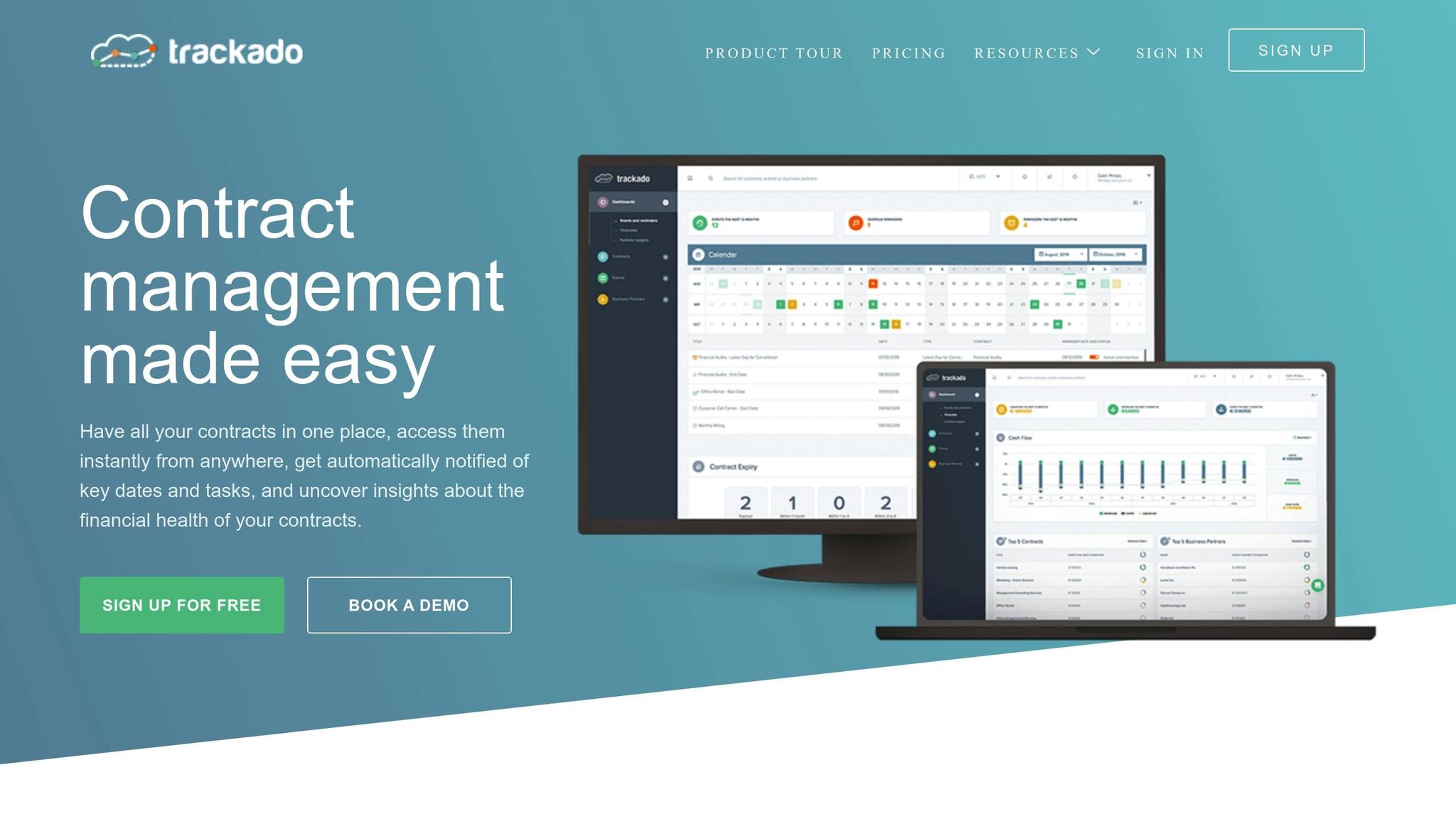
Before linking Trackado to your financial systems, it’s crucial to configure it properly to capture all the essential contract details that will align with your ERP. This ensures that when the integration goes live, the data flows seamlessly into your ERP or accounting software – no manual adjustments needed.
Begin by inputting key contract details like Contract Title, Status, Business Partner, and Contract Number. These details are essential for mapping to vendor accounts, customer records, and reference numbers in your financial system. Next, set up Business Units to reflect each legal entity, such as those in California or Texas. Each Business Unit in Trackado should correspond to a specific legal entity identifier – like a LegalEntityId or company code – in your ERP. This step ensures that contracts are posted to the correct ledger. Additionally, use the Billing Transactions section to record financial terms and create Custom Fields for any extra data your financial system might require. These configurations transform static contract data into actionable financial insights. Once your data structure is ready, move on to securing API authentication for real-time integration.
Setting Up APIs and Authentication
To enable secure communication between Trackado and your financial system, proper API authentication is essential. For example, you can use OAuth 2.0 tokens or API Keys for secure access. Ensure that the API token has the necessary scopes – such as ‘FISVC’ – to handle financial transactions. You’ll also want to configure webhooks to allow real-time updates. With webhooks in place, data transfers are triggered automatically whenever a contract is signed, amended, or hits a billing milestone. This eliminates the need for manual batch uploads and helps keep your financial data up-to-date. Lastly, align Trackado’s contract statuses – like Active, Expired, or Terminated – with the equivalent document statuses in your financial system. This ensures that only legally binding agreements trigger financial transactions.
Once the API connection is secure, the next step is to define clear mappings between contract fields and financial system data.
Mapping Contract Fields to Financial Data
To avoid duplicate records and ensure smooth synchronization, map each field in Trackado directly to its corresponding field in your financial system.
| Trackado Contract Field | Financial System Field | Purpose |
|---|---|---|
| Business Partner | Vendor/Customer Account Number | Identifies the entity for payment or invoicing |
| Contract Number | External Reference / Agreement ID | Links the contract record across systems |
| Business Unit | Legal Entity ID / Company Code | Routes data to the appropriate organizational ledger |
| Start / End Date | Effective / Expiration Date | Defines the financial obligation period |
| Billing Transactions | Invoices / Journal Entries | Transfers financial values for posting |
| Custom Properties | Project ID / GL Code / Tax Code | Captures unique metadata required for accounting purposes |
It’s important to standardize Business Partner names so they match the records in your accounting software. This minimizes posting errors. Additionally, using Trackado’s Contract Number as the External Contract ID in your financial system creates a clear audit trail and prevents duplicate entries. For more advanced integration needs – such as syncing categories, tax codes, or cost centers – consider implementing a Level 4 integration. This deeper synchronization can automate tags, vendors, and accounts, potentially cutting manual data entry by up to 50% compared to basic exports.
Step-by-Step Integration Guide
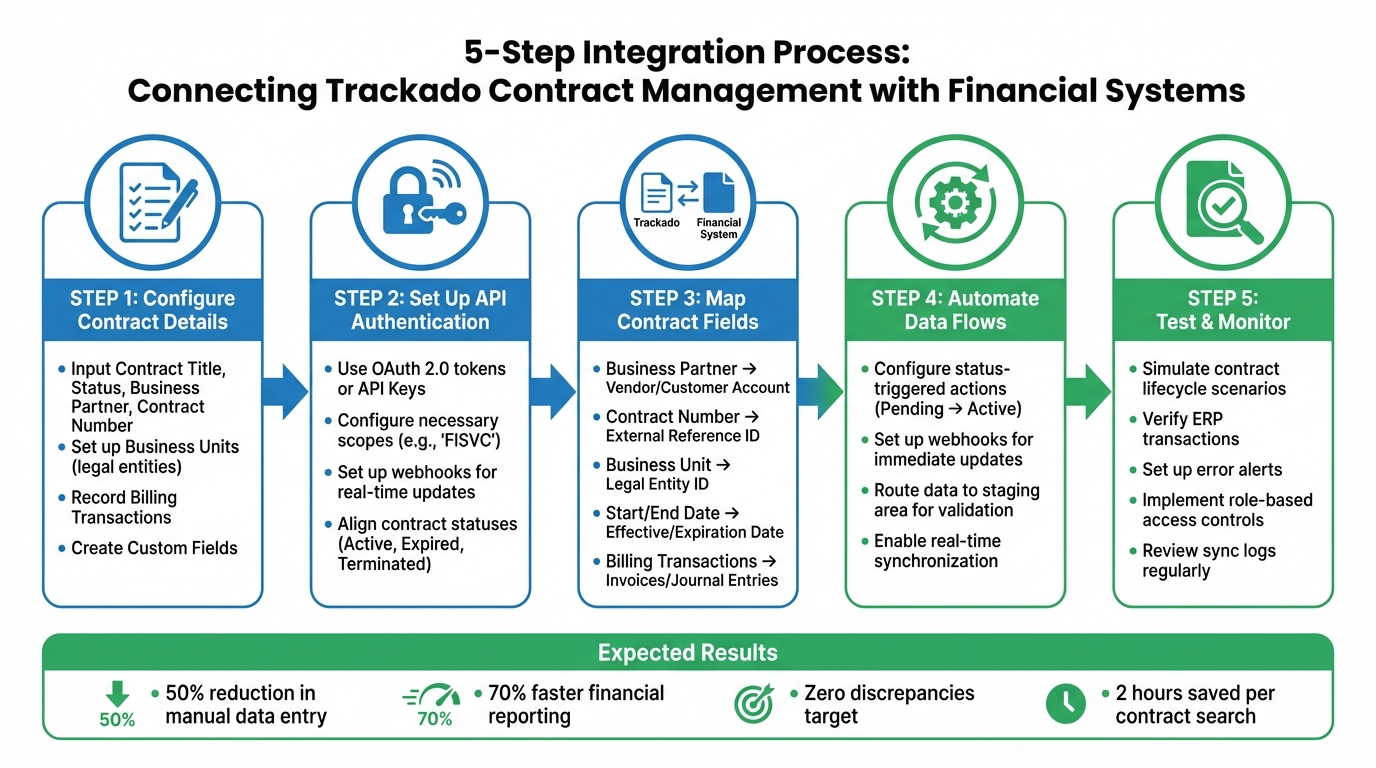
5-Step Process for Integrating Contract Management with Financial Systems
Now that your field mappings are complete, it’s time to bring your Trackado integration to life. These steps will establish automated data flows between Trackado and your financial system, ensuring your contract and financial data stay in sync without manual effort.
Automating Data Flows for Real-Time Updates
Real-time synchronization is the key to ensuring that any contract changes in Trackado are instantly reflected in your financial system. By setting up automated workflows, you can configure Trackado to trigger specific actions in your ERP whenever a contract status changes. For example, when a contract moves from Pending to Active, Trackado can automatically initiate a journal entry or a payment schedule. Trackado’s Billing Transactions section should serve as your go-to source for financial data, such as values needed for invoices or budget line items. To minimize delays, configure webhooks that push updates immediately.
For more advanced use cases, consider routing approved contract data to an intermediate staging area – like a "For Payout" tab – before it enters your live ERP environment. This step gives your finance team a chance to validate the data during the initial rollout phase, catching any discrepancies before they impact your general ledger. Once real-time automation is in place, the next step is to test and verify these workflows using a contract automation checklist.
Testing and Validating the Integration
Before going live, it’s crucial to run comprehensive tests that mimic real-world contract scenarios. Simulate the entire lifecycle of a contract and check the corresponding ERP transactions to ensure everything aligns [22, 24]. Pay special attention to key fields and status triggers. For instance, verify that when a contract moves from In Review to Approved, the system automatically generates the correct payment line item or invoice.
Test with a variety of contract types, including renewals, amendments, and terminations, to confirm the integration can handle edge cases effectively. Also, double-check the syncing of pricing, schedules, and renewal clauses to avoid errors that could lead to manual corrections later on [4, 23]. During this phase, aim for zero discrepancies between Trackado’s contract data and your ERP’s financial records.
Monitoring and Error Handling
Once the integration is live, continuous monitoring is essential to ensure smooth operation. Set up alerts to detect issues early, such as incorrect tax codes, expired API tokens, or missing admin permissions. Configure notifications for failed data transfers so you can respond promptly. When troubleshooting, verify that your API has the necessary scopes, like access to billing or contract data.
To maintain security, implement role-based access controls, ensuring only authorized finance team members can view or edit payment-related contract details. Regularly review sync logs to spot patterns in failed transactions and document resolutions for recurring issues. This proactive monitoring not only keeps your integration running smoothly but also helps maintain data accuracy across both systems.
sbb-itb-49df6ae
Getting More Financial Insights with Trackado
Once integrated, Trackado becomes a powerful hub for managing financial data, consolidating everything from costs and revenues to commitments in one place. This streamlined approach is further enhanced by its detailed reporting tools.
Trackado’s Financial Reporting Tools
The Billing Transactions section in Trackado serves as a central dashboard, tracking payment schedules, unit pricing, and revenue streams. This creates a clear picture of how contracts impact your finances. Contract statuses, such as "Expired" or "Prolong automatically", are updated automatically through lifecycle settings, ensuring your financial data stays up to date. Additionally, by organizing contracts into Categories and Business Units, you can create detailed, customized financial reports that suit your needs.
These tools have delivered real-world benefits. For instance, Yiannis Karavassilis, COO of CloudKid, used Trackado’s automated email notifications for expiring licenses to proactively engage with partners. This approach not only helped secure additional revenue but also avoided potential disruptions.
Using Trackado with ERP Systems
Trackado’s reporting capabilities are taken to the next level when integrated with ERP systems. This connection bridges gaps between legal, procurement, and finance departments, syncing critical data like payment schedules, renewal clauses, and unit pricing directly into your financial system. This integration creates a single, reliable source of information, speeding up financial close processes and reducing manual errors.
The advantages are clear: faster revenue recognition, improved cash flow, fewer rework costs, and reduced penalties. These efficiencies directly translate into better ROI and recovered revenue.
Andrew Parkinson, Procurement Manager at Good Energy, shared: "Trackado is the best value product we have. In terms of being value for money, it’s the best value we’ve invested in".
Conclusion: The ROI of Integration
Bringing together contract management and financial systems delivers measurable benefits that can’t be overlooked. Automated data flows cut down on manual tasks, saving an average of 2 hours that would otherwise be spent searching for key terms. Finance teams benefit from real-time insights into liabilities, spending, and revenue recognition – all consolidated into a single, reliable source.
This integration also helps avoid costly mistakes like overpayments from missed rebates or duplicate invoices. It ensures all billable obligations are captured, while automated workflows handle prepaid expense entries and monthly accruals, feeding them directly into your general ledger. The result? Faster revenue recognition and better cash flow management. By turning static contracts into actionable data, businesses shift from reactive reporting to proactive financial oversight.
Tools like Trackado simplify this process even further. With AI-powered data extraction and seamless API integration, Trackado auto-populates contract fields and syncs them with ERP and CRM systems. Automated alerts help avoid unexpected auto-renewals that could throw off your budget. Plus, custom fields and real-time lifecycle updates ensure financial forecasts stay accurate and up-to-date.
FAQs
How does integrating contract management with financial systems enhance forecasting accuracy?
Integrating contract management software with your financial system turns static contracts into actionable financial data, offering finance teams accurate, up-to-the-minute insights for forecasting revenue and expenses. By automatically syncing crucial contract details – like payment dates, amounts, renewal terms, and penalties – with accounting or ERP systems, organizations can eliminate manual data entry and minimize errors.
This seamless connection establishes a single source of truth for financial planning, allowing teams to confidently predict cash flow, allocate budgets, and explore different financial scenarios. With real-time updates, finance leaders gain complete visibility into upcoming obligations and income, helping them avoid unexpected issues, manage working capital more effectively, and stay on top of renewal or escalation deadlines. Tools such as Trackado make this process easier by automating data extraction and syncing, transforming contract information into practical financial insights.
What are the main advantages of automating contract data extraction?
Automating contract data extraction can save a lot of time by slashing manual review efforts – sometimes by as much as 50%. Beyond just speed, it ensures a higher level of accuracy and consistency, helping to avoid the costly mistakes that often come with manual processes.
On top of that, automated tools deliver real-time insights based on data and can even flag potential risks early on. This means businesses can act quickly, make smarter decisions, and stay on top of critical deadlines and responsibilities.
How does Trackado help ensure compliance with ASC 606 financial standards?
Trackado takes the hassle out of ASC 606 compliance by turning contract data into an organized, audit-ready system. With its AI-driven tools, it pulls out crucial details from contracts – like performance obligations, billing milestones, variable pricing, and renewal terms – and stores them in structured, customizable fields. This setup ensures all the necessary data aligns perfectly with ASC 606 standards for revenue recognition, tracking contract assets, and identifying transaction prices.
The platform’s automated workflows and integrated e-signature capabilities create a clear, time-stamped audit trail, meeting the documentation requirements of the standard. Finance teams also benefit from alerts that notify them when billing conditions are met, allowing for accurate and timely reclassification of contract assets to receivables – without the risk of manual errors. On top of that, Trackado’s real-time analytics shed light on unbilled obligations, milestone payments, and pricing variances, making it easier to reconcile contract terms with financial statements. By centralizing contracts and automating critical processes, Trackado not only simplifies compliance but also minimizes reporting risks.