
Streamlining contract approvals can save time, reduce errors, and boost efficiency. Here’s how:
- Map the current workflow: Identify each stage, key players, and bottlenecks causing delays.
- Define roles and criteria: Assign clear responsibilities and approval thresholds based on contract value and risk.
- Standardize templates: Use pre-approved templates to minimize repetitive reviews and ensure compliance.
- Automate processes: Set up automated notifications, parallel reviews, and escalation rules to keep things moving.
- Monitor and improve: Track metrics like cycle time and SLA compliance to refine the process over time.
Tools like Trackado can simplify this by centralizing workflows, automating approvals, and providing real-time visibility. With the right approach, you can cut approval times by 50%-70% and reduce risks tied to manual processes.
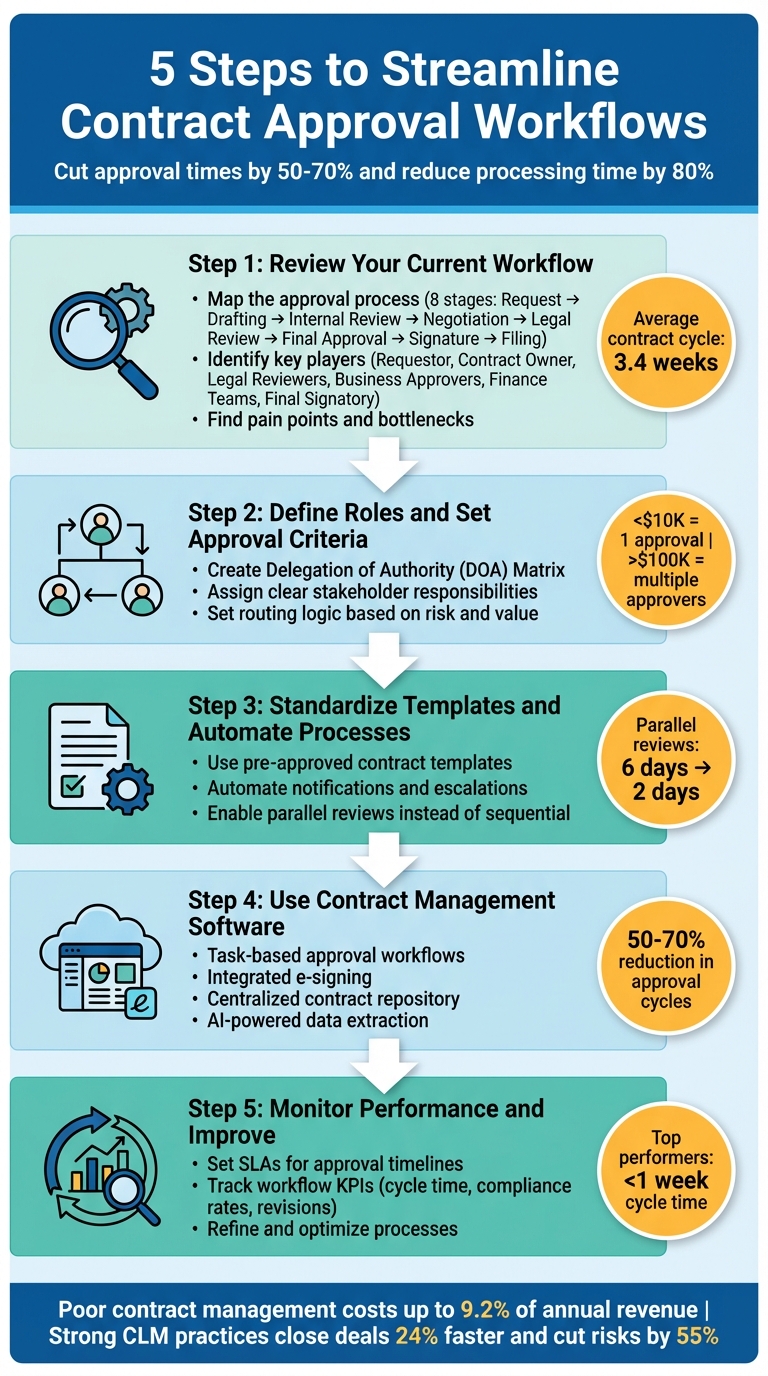
5-Step Contract Approval Workflow Optimization Process
Step 1: Review Your Current Workflow
Before making any changes, take a close look at your current contract approval process. Skipping this step and diving straight into contract management software features or rules can backfire – essentially speeding up existing problems rather than solving them. To make real improvements, you need to fully understand the process you’re working with. Automating a flawed workflow only makes delays happen faster.
On average, it takes 3.4 weeks for a contract to move from draft to signature. Surprisingly, most of this time isn’t spent negotiating with the other party – it’s tied up in internal approvals. Contracts often get stuck in inboxes, sent to the wrong person, or delayed because no one knows who should review them next. For example, a one-week delay on a $100,000 annual contract can cost roughly $1,900 in lost revenue.
Map the Approval Process
Start by breaking your workflow into its main stages: Request, Drafting, Internal Review, Negotiation, Legal Review, Final Approval, Signature, and Filing. Document each step, including any informal tracking methods like shared spreadsheets, messaging apps, or email threads.
Key players in this process often include:
- Requestor: Typically from Sales or Procurement
- Contract Owner: The person responsible for moving the contract through the process
- Legal Reviewers: Focus on risk and enforceability
- Business Approvers: Ensure commercial accuracy and terms
- Finance Teams: Review financial details
- Final Signatory: The person authorized to sign off
To streamline things, create an Approval Matrix (also called a Delegation of Authority). This tool clearly outlines who can approve specific types of contracts and at what value thresholds.
It’s also crucial to distinguish between internal review (focused on business terms) and legal review (focused on risk). Determine whether these reviews happen separately or overlap, and consider whether running them in parallel might save time.
"In many cases, a particular version of the contract might be approved. But the required stakeholders might not have access to that version, and they work on older versions."
- Igor Poroger, Director of Legal, EMEA, Vectra AI
Once you’ve mapped everything out, start looking for areas where delays occur.
Find Pain Points
Now that you have a clear picture of the process, it’s time to identify bottlenecks. Measure how long each stage takes to figure out where contracts are getting held up. Pay close attention to departments or steps that consistently cause delays, like Legal or a specific approval stage.
Look at handoff points to ensure smooth transitions and avoid issues like version control errors. Be on the lookout for "floating versions", where different copies of the same contract are scattered across devices or buried in email threads. Talking to stakeholders can also reveal where they experience the most frustration or have to spend time chasing updates.
Here are some common bottlenecks and their impacts:
| Bottleneck Type | What It Looks Like | Why It Matters |
|---|---|---|
| Unclear Ownership | No one follows up on stalled contracts | Contracts sit idle in inboxes for weeks |
| Sequential Review | Legal waits for another department to finish first | Review times stack up, slowing the process |
| Manual Handoffs | Exporting Word docs to upload into e-sign tools | Risks using outdated or incorrect versions |
| Authority Confusion | Uncertainty about who needs to sign | Causes unnecessary delays and escalations |
| Lack of Visibility | Endless "Where is this?" emails | Delays go unnoticed until they create big problems |
Finally, track your first-pass approval rate to assess the quality of initial drafts. A high rate suggests fewer revisions, while a low rate could point to issues in the drafting stage.
sbb-itb-49df6ae
Step 2: Define Roles and Set Approval Criteria
After identifying where your workflow tends to break down, the next move is to clarify responsibilities. Confusion about who handles what is one of the leading causes of delays in contract approvals for mid-market and enterprise organizations. Without clearly defined roles and authority, contracts often sit in limbo.
To address this, consider using a Delegation of Authority (DOA) Matrix. This document lays out a clear map linking contract types, dollar amounts, and risk levels to specific roles. By doing so, you eliminate the guesswork and ensure that each contract follows a structured path. For instance, contracts valued under $10,000 might require only one approval, while those exceeding $100,000 may need input from multiple stakeholders, including executives.
Assign Stakeholder Responsibilities
Clearly defining roles at every stage of the approval process can make a world of difference. Here’s an example of how responsibilities might be divided:
- Requestor: Often from Sales or Procurement, this person initiates the contract request and provides the necessary business context.
- Contract Owner: Responsible for staying on top of timelines and resolving any internal disagreements that might arise.
- Legal Reviewers: Focus on assessing risk, compliance, and enforceability.
- Business Approvers: Ensure the contract aligns with commercial goals and accuracy.
- Finance or Procurement Teams: Confirm budget allocation, payment terms, and vendor qualifications.
- Final Signatory: The individual authorized to sign off on the contract, determined by value thresholds.
"One of the most common sources of approval delay is ambiguity about who needs to review or approve a given contract."
To minimize confusion, document these roles in a centralized playbook. Also, assign backup approvers to keep the process moving smoothly if the primary stakeholder is unavailable.
Once roles are clear, the next step is to refine how contracts are routed through the workflow.
Set Routing Logic Based on Risk and Value
Not every contract requires the same level of scrutiny. By implementing tiered approval thresholds, you can expedite standard or low-value contracts while reserving more comprehensive reviews for high-value or complex agreements. For example, a standard NDA using a pre-approved template might bypass legal review, but an NDA with custom terms would automatically route to legal counsel.
Another time-saver is enabling parallel reviews instead of sequential ones. If legal, finance, and business teams review a contract simultaneously, what might take six days in a sequential process could be cut down to just two days. Automated contract workflows can make this even more efficient, with some organizations reporting a reduction in approval cycles by 50% to 70%.
| Routing Criterion | Low-Risk / Streamlined Path | High-Risk / Comprehensive Path |
|---|---|---|
| Contract Value | Below $10,000–$50,000 | Above $100,000–$500,000 |
| Paper Type | Standard company template | Counterparty or third-party paper |
| Contract Type | Standard NDAs, simple renewals | MSAs, IP licensing, SOWs |
| Terms | Pre-approved or unmodified clauses | Non-standard liability or indemnity |
| Vendor Status | Existing, high-performance vendor | New vendor or high-risk jurisdiction |
Finally, establish service-level agreements (SLAs) for each stage of the process. For example, you could set a goal of completing legal reviews within three business days. Regularly track performance against these SLAs to identify bottlenecks. Quarterly audits can also help you adapt to organizational changes or new product lines that might shift approval responsibilities.
Step 3: Standardize Templates and Automate Processes
Cutting down on repetitive review cycles can significantly speed up contract approvals. By leveraging templates and automation, you can streamline these processes and eliminate unnecessary delays. Redundant legal reviews of standard language, for instance, often slow things down. Standardizing templates and automating tasks helps prevent such bottlenecks.
Use Pre-Approved Contract Templates
Once roles are clearly defined and routing paths are established, standardized templates come into play to speed up reviews. A library of pre-approved templates allows reviewers to focus on the unique terms of each deal rather than revisiting standard language. This approach can reduce approval times by over 50%.
To get started, identify the 5–10 most common document types your team uses – like NDAs, statements of work (SOWs), or vendor agreements. Create standardized templates for each one. With these templates in place, you can implement tiered approval paths. For example:
- A standard NDA template might bypass legal review entirely and go straight to a department head for approval.
- Contracts with non-standard terms or third-party language would automatically route to legal for further scrutiny.
"Portland Community College, the largest higher education institution in Oregon, centralized its contract management using automated workflows and standardized templates. The result was a reduction in administrative overhead and an improvement in contract approval speed by over 50%".
Similarly, Eastern Virginia Medical School (EVMS) adopted automated workflows and reduced their total contract processing time by more than 30%.
Standardized templates offer more than just speed – they also ensure compliance. Contracts generated from pre-approved templates include all required clauses, minimizing risks associated with outdated or incomplete language. This consistency not only safeguards your organization from legal issues but also ensures alignment with internal policies.
Automate Notifications and Escalations
One of the biggest reasons contracts get stuck is because they sit unnoticed in someone’s inbox. Automation solves this by keeping the process moving without requiring manual follow-ups. Automated workflows notify the next approver as soon as the previous step is completed and send reminders if no action is taken within a set timeframe. For example, a 24/48/72-hour rule can trigger initial reminders, follow-up alerts, and escalations to a manager. Organizations using automated workflows have reported cutting approval cycles by 50% to 70% compared to manual methods.
Parallel reviews are another game-changer. Instead of routing a contract sequentially – first to legal, then finance, then a department head – automation allows all relevant parties to review it simultaneously. What used to take six business days in a sequential process can now be completed in just two days.
| Feature | Manual Process | Automated Process |
|---|---|---|
| Routing | Email-based, no tracking | Rule-based, automatic routing |
| Review Method | Sequential (one by one) | Parallel (simultaneous) |
| Visibility | "Black hole" status | Real-time dashboard tracking |
| Reminders | Manual follow-up emails | Automated alerts and escalations |
| Audit Trail | Reconstructed from emails | Automatically generated at every step |
With automation and real-time dashboards, contracts no longer disappear into email threads. Instead, everyone involved can instantly see where a contract is in the approval process. This level of transparency integrates seamlessly with predefined workflows, ensuring a smoother and faster approval process.
Step 4: Use Trackado for Approval Workflow Optimization
Once you’ve established standardized templates and automated processes, the next logical step is to adopt a platform that can streamline your entire contract lifecycle. Enter Trackado – a cloud-based tool designed to replace cumbersome spreadsheets and endless email chains with a more intuitive, centralized system. Unlike traditional enterprise software that often takes months to implement, Trackado can start delivering results in just a matter of days. As Kieran Lynch, Head of Legal and Compliance at Rakuten Europe, puts it:
"Without Trackado… going through the different stages of business input, drafting, approvals and signature was difficult without a formalized process and tool."
By tackling common bottlenecks like unclear responsibilities, manual handoffs, and limited visibility, Trackado ensures contracts move seamlessly through every stage of the approval process.
Task-Based Approval Workflows
Trackado supports a comprehensive set of approval workflow features, enabling you to configure workflows that automatically route contracts based on criteria like value, risk level, or contract type. The platform keeps an eye on key milestones, sending timely notifications to help you avoid missing renewals or expirations. Plus, it centralizes all billing details and even includes an "email-in" feature for direct document uploads.
Integrated E-Signing and AI-Powered Data Extraction
Trackado’s e-signing capabilities are top-notch, scoring 12 out of 13 on integration. Its mobile-friendly interface lets stakeholders review and sign contracts from anywhere, while analytics tools highlight bottlenecks in the signing process. On top of that, AI-powered data extraction automatically pulls key details – like dates, parties, payment terms, and renewal dates – from uploaded contracts, reducing manual data entry. The platform also uses Optical Character Recognition (OCR) to simplify data extraction and make contracts easily searchable, cutting down on manual data entry.
Centralized Contract Repository
Trackado’s centralized repository gives you real-time insights into contract status, including details like the current holder and time spent in approval. Supporting a broad range of standard repository features, it offers advanced search tools that can pinpoint specific contracts or clauses in seconds. A secure, unalterable audit trail ensures compliance and simplifies dispute resolution. This is a critical component of contract compliance, as it provides a clear record of all actions taken throughout the contract’s life. You can organize contracts by partner, department, category, or custom attributes, and exporting data for audits is quick and easy. Andrew Parkinson, Procurement Manager at Good Energy, highlights its value:
"Trackado is the best value product we have. In terms of being value for money, it’s the best thing we ever brought into the business."
With features like task-based workflows, integrated e-signing, and a centralized repository, Trackado significantly reduces delays and boosts efficiency compared to manual processes. Starting at just $39/month for the Starter Plan (covering 3 users and 60 contracts) and offering a 30-day free trial with no credit card required, Trackado is an accessible choice for businesses adopting their first contract management system.
Step 5: Monitor Performance and Improve Over Time
Improving your contract approval workflow isn’t a one-and-done task. It’s an ongoing effort that requires regular monitoring and adjustments. The key lies in tracking performance, identifying bottlenecks, and making data-driven updates to keep things running smoothly over time.
Set SLAs for Approval Timelines
Start by establishing service-level agreements (SLAs) for every step in the approval process. For instance, you might allocate 48 hours for legal review, 24 hours for finance approval, and 72 hours for executive sign-off. These timeframes set clear expectations, create accountability, and help flag delays before they cause bigger problems. If a contract exceeds its SLA at any stage, automated escalation rules should take over – alerting managers or reassigning tasks to keep things moving. Consider tiering SLAs based on factors like contract value or risk.
Once SLAs are in place, you’ll need to monitor key performance indicators (KPIs) to measure how well your workflow is functioning.
Track Workflow KPIs
Metrics provide the insights you need to fine-tune your processes. One of the most important metrics is contract cycle time, which measures the duration from contract initiation to final signature. While the industry average is 3.4 weeks, top-performing teams manage to cut this down to under a week. To dig deeper, track the time spent at each stage – legal review, finance validation, or executive approval – to identify where delays are happening.
Other useful metrics include compliance rates (to ensure contracts meet internal and regulatory standards), renewal rates (with 80% or higher being a strong indicator of customer retention), and the number of revisions per contract. Frequent revisions often point to a need for better templates or clearer initial requirements.
The stakes are high: inefficient contract management can cost companies up to 9.2% of their annual revenue, and 83% of legal teams admit their processes are too slow. On the flip side, organizations with strong contract lifecycle management practices close deals 24% faster and cut contract-related risks by 55%. As ZiaSign aptly puts it:
"What gets measured gets improved".
Refine and Optimize Processes
Use the data from your metrics to refine and improve your processes. For example, if finance approvals are consistently slower than other stages, investigate the root cause. Is the team understaffed? Are they missing key details upfront? Similarly, if certain clauses frequently lead to drawn-out negotiations, update your templates to include more widely accepted language that reduces back-and-forth.
Regular performance reviews help you spot trends early, allowing you to shift from reacting to problems to proactively preventing them. Establish baseline metrics to clearly demonstrate the ROI of your improvements. Keep an eye on SLA compliance rates (aim for at least 90%) and throughput – the number of contracts processed in a given period – to ensure you’re handling increased volume efficiently without adding more staff.
As Forbes contributor Kate Vitasek wisely notes:
"True process optimization requires a mindset of continuous review and improvement. This can be especially important in the period after implementing changes to your process".
Conclusion
Improving your contract approval process doesn’t have to be complicated. By focusing on five key steps – clarifying roles, standardizing methods, and introducing automated alerts – you can transform your workflow into a more efficient system.
Studies show that streamlined workflows can slash approval times by 50%–70% and cut total processing time by as much as 80%. Considering that poor contract management can drain up to 9% of a company’s annual revenue, making these changes isn’t just smart – it’s crucial.
Trackado provides a central solution to help achieve these results. With features like task-based workflows that automatically assign contracts to the right stakeholders, built-in e-signing to eliminate manual steps, and AI-powered data extraction to handle tedious data entry, your team can operate from a single, reliable source. This reduces version confusion, ensures compliance, and eliminates the need for constant manual oversight.
"Mastering the contract approval process transforms legal teams from bottlenecks into a strategic advantage for the business".
Start by mapping out your workflow, setting clear approval thresholds (like requiring executive sign-off for contracts over $500,000), and defining service-level agreements (SLAs) for each stage. With the right tools and a focused strategy, you can shrink approval timelines from weeks to just days – or even hours.
FAQs
What should I measure to identify contract approval bottlenecks?
To identify bottlenecks in contract approval, focus on two key metrics: workflow process time and contract in-process status. Measure how many days it takes to approve each contract and keep an eye on where contracts are within the approval process. These insights can highlight delays and reveal specific stages causing slowdowns, giving you the opportunity to adjust and simplify your workflows.
How do I set approval thresholds by contract value and risk?
When setting approval thresholds, it’s important to establish clear criteria based on factors like contract value and associated risk levels. For instance, contracts that exceed $50,000 or include high-risk clauses can be automatically flagged for review by senior management or legal teams.
Using automation simplifies this process by applying rules for conditional routing. This ensures compliance, reduces bottlenecks, and allows lower-risk contracts to move forward without unnecessary delays.
How can Trackado reduce approval time without losing control?
Trackado shortens approval times while keeping everything under control through task-based approval workflows and automation. These tools simplify processes, cut down on delays, and ensure quick responses. By combining centralized contract management with automated reminders, it’s easier to monitor key milestones and stay on top of everything. This approach speeds up approvals while maintaining transparency and oversight.