
Manual contract approvals slow deals, miss reviewers, and create risk. If poor contract handling can eat up 9% of annual revenue, then routing contracts by clear role-based rules is one of the simplest ways I can cut delays and tighten control.
Here’s the short version:
- Role-based rules send contracts to the right team automatically
- Approval limits are tied to value, type, and risk
- Parallel review helps Legal, Finance, and Procurement review at the same time
- Escalation rules stop contracts from sitting with one person for days
- Automatic logs create a clear audit trail without extra work
If I’m running approvals through email, spreadsheets, and shared folders, the same issues show up again and again:
- no clear owner
- missing stakeholders
- duplicate drafts
- weak records
- stalled approvals when someone is out
A contract automation checklist makes the setup simple: define who reviews what, set dollar thresholds like under $10,000, $10,000 to $50,000, and over $50,000, and add rule-based checks for terms like auto-renewal, liability changes, privacy terms, or IP transfer.
A few core ideas drive the whole process:
- Route by role, not person
- Use intake fields like contract value, type, term, and jurisdiction
- Set backup routing after set SLAs, such as 48 hours
- Require legal or security review only for flagged terms
- Log every approval, version, and status change
For SMB teams, this means fewer black-hole delays, less time chasing approvals, and tighter control over vendor, sales, and property-level contracts. Tools like Trackado support this with workflow steps, role-based access, metadata extraction, and activity logs.
That’s the main point: clearer approval rules lead to faster, safer contract reviews with less manual work.
The main problems in manual contract approval workflows
Unclear routing and inconsistent approval thresholds
When there’s no set approval path, contracts get sent to whoever happens to be free. That’s not a process. It’s guesswork. And it forces approvers to spend time piecing together context instead of reviewing the contract itself.
The bigger issue is inconsistency. A high-value or high-risk contract can end up getting less review than a routine one just because no rule says where it should go. If approval thresholds aren’t tied to contract value, type, or risk, the level of review comes down to individual judgment. That’s a shaky way to handle legal and financial risk.
Missing stakeholders, duplicate versions, and weak audit trails
In email-based workflows, key stakeholders often get pulled in too late – sometimes after a contract has already gone through several rounds of review and revision. By that point, major clauses may already have been approved without the right people involved. That opens the door to compliance issues and financial exposure.
Version control is another problem that sneaks up on teams. Once edits start bouncing around by email, it’s easy to end up with multiple drafts that don’t match. Then there’s the audit trail problem: scattered email threads make it hard to trace who approved what and when. Those are the exact gaps role-based rules are meant to stop.
How approval delays create cost and compliance exposure
Manual workflows often run in a fixed, one-person-to-the-next chain. If one person is out, the whole thing stalls. There’s no backup routing, no escalation path, and not much visibility into how long the contract has been sitting there.
That slowdown creates another issue. When low-risk and high-risk contracts get pushed through the same sluggish process, teams either rush the deals that need close review or burn too much time on routine ones. The result is pretty simple: delays push revenue out and add compliance risk. Role-based rules remove that bottleneck with automatic routing and escalation.
sbb-itb-49df6ae
How role-based rules improve the approval process
Role-based automation clears out approval bottlenecks by turning routing into repeatable contract workflows. It works with simple if-then logic: if a contract meets a condition, the system sends it to the right role on its own. And routing to roles instead of named people keeps work moving when someone is out, on vacation, or no longer with the company.
Route contracts by role, value, type, and risk
Rules can be triggered by contract metadata like value, type, and risk factors. That means different contract triggers can send agreements to different approvers and escalation paths without anyone having to sort them by hand.
| Trigger | Approver Role | Escalation Role |
|---|---|---|
| Contract value < $50K | Department Manager | – |
| Contract value $50K–$250K | Director | Finance Lead |
| Contract value > $1M | CFO | CEO |
| Non-standard IP or liability | Legal Counsel | General Counsel |
| Auto-renewal clause present | Procurement Lead | – |
The payoff is simple: the same rule runs every time, so similar contracts get the same review instead of bouncing around based on who happens to be available.
Use permissions, parallel reviews, and escalation rules
Role-based permissions decide who can view, edit, or approve a contract at each stage. For example, a department lead might be able to view a contract without having the power to approve it above a set threshold. That split helps protect sensitive terms while still giving people enough context to do their part.
Parallel review can save a lot of time. Instead of waiting for Legal to finish before Finance even gets a look, both teams can review the contract at the same time. For standard agreements, that can cut down review cycles.
Escalation rules also keep contracts from stalling when an approver doesn’t respond within the set window. If no action happens within a set number of business days – say, 48 hours – the system can reassign the contract to a backup or a higher-level role on its own. No manual follow-up, no chasing people down in email.
Build a stronger audit trail without extra admin work
These rules also create a full record of each approval step. Every approval is logged automatically, which closes the audit-trail gap that email-based workflows often leave behind: who approved, when they approved, what version they reviewed, and the contract’s status at each stage. The audit trail is created automatically.
So instead of piecing together approval history from scattered email threads, the full record is already there – timestamped, organized, and ready if it’s ever needed for an internal review, a compliance check, or a post-signature dispute.
How to design practical role-based approval rules
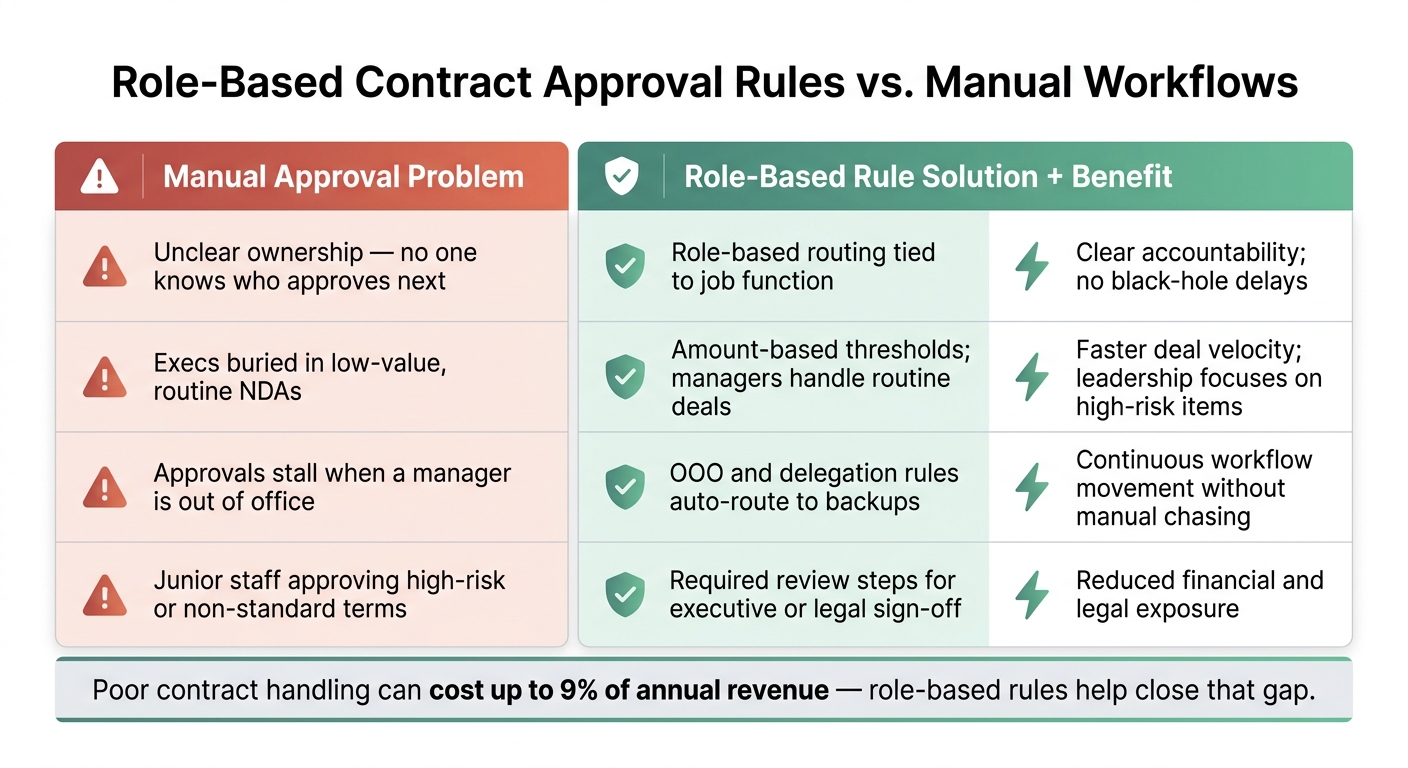
Role-Based Contract Approval Rules vs. Manual Workflows
Start with a simple approval matrix
Once approval roles are set, put them into a simple matrix people can use without stopping to ask, “Who signs this?” Start with three value tiers, give each tier one main owner, and add risk-based exceptions only where they’re needed. That cuts down the guesswork that leads to delays and missed approvals.
| Contract Type / Trigger | Value Threshold | Primary Approver | Secondary Approver |
|---|---|---|---|
| Standard NDA / Templated SOW | Any | Department Manager | No approval needed |
| Routine vendor or sales agreement | < $10,000 | Department Manager | Finance (notification only) |
| Mid-market contract | $10,000–$50,000 | Director or VP | Finance and Legal |
| Enterprise / High-Value Deal | > $50,000 | CFO or CEO | Legal and Security |
| Non-standard terms, such as indemnity or privacy clauses | Any value | Legal Counsel | Security / DPO |
This matrix can also double as a Delegation of Authority (DOA) record. It shows which roles can approve which contract values.
From there, the job is to map these rules to the contract fields that control routing.
Use contract metadata to trigger the right workflow
Capture contract type, value, risk, term, and jurisdiction at intake so routing works without someone sorting contracts by hand. When those fields are standardized at intake, contracts are less likely to land in the wrong approval path.
Pre-approved templates and standard fields help keep routing automatic. That’s the whole point: the contract should tell the system where it needs to go.
Add escalation paths and mandatory checkpoints
Once routing is in place, add deadline and exception rules so approvals don’t get stuck. Set a clear SLA for each step – for example, 48 hours for manager-level reviews – and spell out what happens if that time passes with no response. The contract should auto-route to a backup approver or move up the chain, with no manual follow-up.
Escalation keeps things moving when an owner is out, and mandatory checkpoints stop risky contracts from sliding through unchecked. Use those checkpoints only for exceptions that must always go through legal or security review, no matter the dollar amount. Examples include agreements with cross-border data transfers, unusual liability terms, or intellectual property transfers.
| Manual Approval Problem | Role-Based Rule Solution | Resulting Benefit |
|---|---|---|
| Unclear ownership; no one knows who approves next | Role-based routing tied to job function | Clear accountability; no "black hole" delays |
| Execs buried in low-value, routine NDAs | Amount-based thresholds; managers handle routine deals | Faster deal velocity; leadership focuses on high-risk items |
| Approvals stall when a manager is out of office | OOO and delegation rules auto-route to backups | Continuous workflow movement without manual chasing |
| Junior staff approving high-risk or non-standard terms | Required review steps for executive or legal sign-off | Reduced financial and legal exposure |
What SMB teams gain from role-based rules and where Trackado fits
Benefits for finance, procurement, legal, and hotel property teams
Once your rules are in place, the payoff shows up in everyday approvals. And each team feels it a bit differently.
Finance teams get tighter control over pricing, discounts, and payment terms. If a contract goes past a set dollar threshold, the workflow can trigger an approval step on its own. That helps protect revenue and cash flow without relying on someone to catch it by hand.
Procurement teams can route vendor agreements based on contract value, so the level of review matches the level of financial exposure. Bigger deals get more oversight. Smaller ones can move with less friction.
Legal teams get mandatory review points for risky terms, even when the contract amount is low. That matters because non-standard indemnity or liability language can create problems long before anyone notices the dollar value.
For hotel property operations, role-based rules are especially useful. Business Units can separate contracts by property or department, which makes it easier to send F&B, maintenance, and insurance agreements to the right people at the right location.
How Trackado supports structured approval workflows
Trackado turns these rules into a repeatable process for SMB teams. Its Workflows module routes contracts through defined review and approval steps, replacing messy email chains with a process people can actually follow. When a contract reaches someone’s step, they get notified automatically, so it doesn’t sit there waiting for a manual nudge.
Trackado supports both unanimous approval and first-response approval workflows. Business Units help organize contracts by property or department, which supports role-based access and routing. Its AI can extract key contract metadata for routing and review, helping teams capture the fields they need with more consistency. Every action is logged in the Activity section, which gives teams a clear audit trail.
Conclusion: clearer rules lead to faster and safer approvals
Manual approval workflows tend to break down when ownership is fuzzy, routing changes from one contract to the next, and records live in too many places. Role-based rules solve that by tying approvals to roles, thresholds, and exceptions, while also creating a complete audit trail.
FAQs
How do role-based approval rules work?
Role-based approval rules send contracts to the right people automatically, like Legal Counsel or Finance Manager, instead of leaving teams stuck with manual email forwarding.
The system uses preset logic to decide who should review each contract based on details such as contract type, dollar amount, or certain clauses. For example, contracts over $50,000 might go to the CFO, while IT agreements are routed to the Head of IT.
That means clearer accountability, better separation of duties, and fewer bottlenecks when someone is out of office or unavailable.
What contract fields should trigger approvals?
Trigger approvals based on contract fields that point to more risk or more money on the line, so the right people can review the agreement before it moves forward.
That usually includes:
- Contract value
- Contract type
- Risk factors like non-standard clauses, auto-renewals, or data privacy terms
- Term length, especially agreements over 24 months
This setup helps route each contract to the people who should weigh in. For example, a higher-value deal may need finance review, while terms tied to privacy or unusual legal language may need legal or compliance to take a closer look.
How do escalation rules prevent delays?
Escalation rules help stop delays by making ownership clear and keeping contracts moving when a reviewer is unavailable or doesn’t respond.
Here’s how it works: the system uses set time-based triggers to watch pending tasks. If no one takes action within a set window, like 48 or 72 hours, it automatically sends the task to a manager or backup approver.
That means less manual chasing, fewer stalled reviews, and a faster way to clear bottlenecks.