
Event triggers automate contract renewals, saving time and reducing costly errors. Instead of relying on manual tracking, they monitor key dates, send timely reminders, and initiate workflows. This prevents missed deadlines, avoids auto-renewals, and helps businesses negotiate better terms. For example:
- Automated Alerts: Notifications start 90 days before deadlines, ensuring ample time to act.
- Workflow Automation: Triggers assign tasks, generate documents, and escalate delays to managers.
- Cost Savings: Early renegotiations can save 15–30%.
Manual methods like spreadsheets are prone to errors and inefficiencies. Automated systems, such as Trackado, centralize contract data, calculate deadlines, and integrate with tools like calendars for seamless management. These solutions eliminate risks, save time, and improve renewal outcomes for businesses managing multiple contracts. This is especially critical when establishing contract management for small companies looking to scale.
What Are Event Triggers in Contract Management?
Definition of Event Triggers
Event triggers are automated rules designed to kick off specific actions when certain events occur – like uploading a document, submitting a form, or hitting a critical contract milestone. In the world of contract management, these triggers are often tied to important dates, such as contract start or end dates, or deadlines for cancellations. Once these dates are entered into the system, the trigger takes over, tracking the milestone automatically and removing the need for constant manual oversight.
How Event Triggers Work
Event triggers are all about keeping contract milestones on track in real time. Here’s how it works: the system monitors contract details, document statuses, and time-based conditions. When a trigger event happens – say, a contract is 90 days from its expiration – it automatically carries out a pre-set action. This might mean sending an email reminder, routing a document for approval, updating a connected system like a CRM or ERP, or assigning a task to a specific team member. It’s a smooth, automated process that keeps everything running efficiently.
For instance, if a contract’s value exceeds $500,000, a trigger could notify a senior executive for approval. Or, if a renewal review task isn’t completed after the first reminders, the system might escalate the notice to a supervisor to ensure nothing is missed.
The benefits are clear: automation in contract management can cut the time spent on related tasks by up to 75%. Plus, companies using smart contract tools can reduce their management costs by 60%.
sbb-itb-49df6ae
How Event Triggers Simplify Contract Renewals
Event triggers take the headache out of contract renewals by turning a traditionally reactive process into a streamlined, automated system. Instead of relying on manual tracking, these systems actively monitor contract dates and notify the right people at the right time. This proactive approach eliminates common pitfalls like missed deadlines, overlooked notice periods, and last-minute panic. At the core of this system are automated alerts, starting with pre-renewal notifications.
Automated Pre-Renewal Notifications
One of the biggest advantages of event triggers is their ability to send alerts at carefully planned intervals. Instead of relying on a single reminder, the system delivers notifications at 90, 60, 30, 14, and 7 days before a deadline, ensuring nothing slips through the cracks.
Here’s how it works: the system calculates the notice deadline by subtracting the required termination notice days from the renewal date. For instance, if a contract ends on December 31, 2026, and requires 60 days’ notice to cancel, the system sets the deadline at November 1, 2026. Alerts begin as early as August 3 (90 days out), giving your team almost three months to review vendor performance, negotiate better terms, or plan for a change.
The financial benefits are hard to ignore. Companies that renegotiate before the notice deadline often save 15% to 30%. On the flip side, missing that window can lead to automatic price hikes of 5% to 10%. In fact, industry experts estimate that inefficient renewal processes can cost companies up to 40% of a contract’s value, with global losses from missed renewals reaching billions annually.
Modern systems also assign urgency levels to triggers – Critical (≤14 days), High (15–30 days), Medium (31–60 days), and Info (61–90 days) – helping teams focus on the most pressing renewals. Each alert links directly to the relevant contract and assigns tasks to the appropriate stakeholders, keeping everyone on track.
Automated Document Generation and Approvals
Event triggers go beyond reminders – they kick off entire contract automation workflows automatically. When a trigger activates, it can create a renewal task, assign it to the contract owner, and link to pre-built templates for drafting a new agreement .
The automation doesn’t stop there. For example, once a negotiation date is reached, the system assigns an approval task to the finance team. After approval, the contract is automatically routed for electronic signatures. Using data field variables like document owner or first signee, the system ensures tasks are assigned to the right people, even if someone is out of the office.
This automation is a game-changer for preventing costly mistakes. If a renewal task isn’t completed on time, the system escalates alerts to managers or finance teams, ensuring nothing falls through the cracks.
"Trackado is the best value product we have. In terms of being value for money, it’s the best thing we ever brought into the business." – Andrew Parkinson, Procurement Manager, Good Energy
By automating these workflows, businesses can speed up renewals and avoid expensive oversights.
Preventing Missed Renewals
Missing a renewal deadline can lock a company into another full term – often a year – under unfavorable terms, including automatic price increases. Even a one-day delay can have costly consequences.
Event triggers eliminate this risk by replacing outdated manual tracking with active monitoring. Unlike spreadsheets, which can quickly become outdated and fail to reflect changes in notice periods, these systems continuously monitor contract dates and send alerts well in advance. This ensures critical deadlines are never missed.
"The moment we knew we had made the right choice with Trackado was when we received email notifications that gave us a heads-up when something was ending or renewing. This really helped us to keep on top of things and avoid sticky situations with partners we didn’t want to continue to work with." – Yiannis Karavassilis, COO, CloudKid
Beyond avoiding auto-renewals, event triggers help companies uncover hidden savings. Many businesses find they’ve been paying for unused services simply because they missed cancellation windows.
"With Trackado we finally have all data in one place and get automatically alerted about renewals so that we can focus on building bikes." – Oliver Römer, Managing Partner, tout terrain
How Trackado Uses Event Triggers for Contract Renewals
Trackado takes automated notifications to the next level by introducing milestone-based Events and automated Reminders to streamline contract renewals. Events act as key milestones tied to a contract’s lifecycle – essentially functioning as calendar entries for important dates. Reminders, on the other hand, serve as automatic triggers, ensuring the right people are alerted when action is required.
The platform automatically creates three essential event types: Start Date, End Date, and Latest Day for Cancellation. Among these, the Latest Day for Cancellation is particularly important for contracts with auto-renewal clauses, as it ensures users have enough time to opt out or renegotiate terms. Beyond these standard events, Trackado allows users to set up Custom events for specific tasks, such as performance reviews or internal approval meetings. This flexibility addresses the challenges of manual tracking while integrating seamlessly with the broader contract management strategy.
Features That Support Event Triggers
Trackado’s event trigger system is designed to be both straightforward and effective. Some of the standout features include:
- Default Reminder Settings: Organizations can establish standard notification schedules and lead times, ensuring proven workflows are automatically applied to every new contract.
- Global Expiry Notifications: These alerts make it nearly impossible to miss a contract’s end date, keeping all stakeholders informed.
- Calendar View: This feature provides an overview of all active triggers, with reminders marked as "Active" or "Active and overdue" until they are addressed. This creates a clear audit trail, showing who took action and when.
- Customizable Emails: Users can tailor reminder emails to align with internal processes, while the Event Description field can include renewal instructions or links to key documents.
| Feature | Function in Renewal Management |
|---|---|
| Latest Day for Cancellation | Sends alerts for the final day to opt-out or renegotiate a contract. |
| Custom Events | Tracks unique milestones like internal meetings or vendor evaluations. |
| Reminder Frequency | Manages how often stakeholders are notified until action is taken. |
| Global Expiry Notification | Ensures no contract end date is missed. |
These tools illustrate how Trackado makes the transition from planning to execution seamless, ensuring renewals are handled efficiently and on time.
Example: Automating a Hotel Vendor Contract Renewal
Let’s look at how a hotel finance manager might use Trackado to manage a laundry service vendor contract. First, the contract is uploaded to Trackado’s central repository, creating a single source of truth for all teams. This process relies on secure digital contract storage to protect sensitive vendor data.
Trackado then generates the three system events – Start Date, End Date, and Latest Day for Cancellation – based on the contract’s details. The finance manager sets up reminders for the Latest Day for Cancellation to trigger alerts at 90, 60, and 30 days before the deadline. This ensures there’s ample time to review the vendor’s performance and negotiate improved terms if necessary.
Additionally, the manager creates a Custom event called "Vendor Performance Review", scheduled 60 days before the contract ends. This event is assigned to the operations team, prompting them to evaluate service quality, delivery times, and any issues during the contract term. By using Organizational Units, the contract is categorized under "Finance" and "Operations", ensuring renewal alerts automatically reach both departments.
As deadlines approach, Trackado sends out customized reminder emails at the pre-configured intervals. These reminders remain active in the calendar until dismissed by the finance manager, creating a record of the decision. If the hotel opts to renegotiate, all relevant details – such as property IDs and service level agreements – are readily accessible, removing the hassle of searching for documents or terms at the last minute.
Manual vs. Event-Triggered Renewals
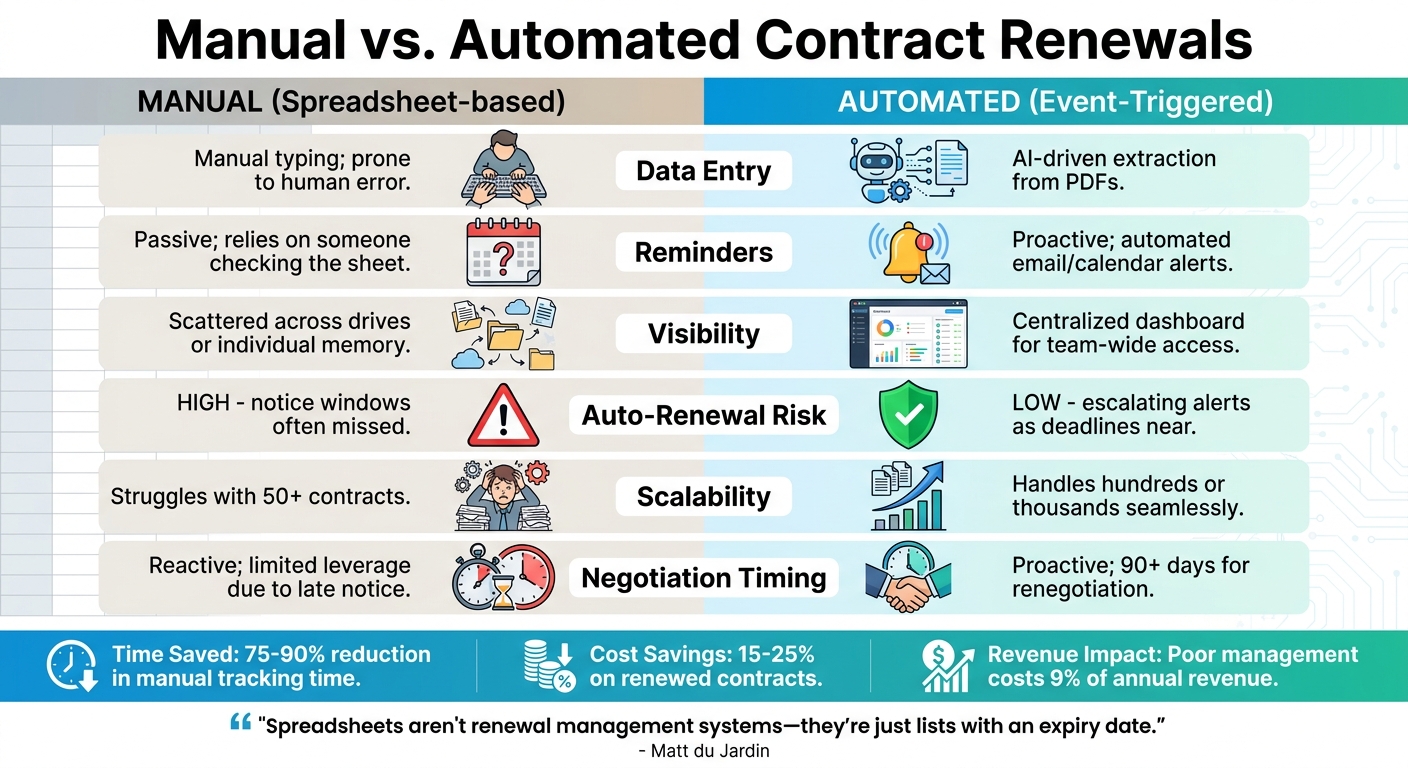
Manual vs Automated Contract Renewal Management Comparison
When it comes to managing contract renewals, manual processes depend heavily on human oversight, while event-triggered systems use automation to handle tracking, extraction, and alerts. This allows teams to focus on bigger decisions, like whether to renew, renegotiate, or terminate contracts. For companies managing more than 50 vendor contracts, manual tracking often becomes unmanageable. Spreadsheets can quickly become outdated, leading to missed renewal deadlines. In contrast, automated systems use AI to extract key dates directly from contract PDFs with with high accuracy. This reduces the risk of errors and saves time spent on double-checking data.
"Before using Trackado, managing contracts without a proper solution was frustrating and inconsistent. We used a spreadsheet, which made it difficult to gain any insights or analysis from the data. There was also little central legal team oversight of key contract dates." – Peter Skeen, Head of Legal, Procurement and Company Secretarial, Good Energy
By implementing automated alert systems, companies can save 15–25% on renewed contracts, largely because they gain the ability to start renegotiations 90 to 120 days before deadlines instead of rushing at the last minute.
Comparison Table: Manual vs. Automated Renewals
| Feature | Manual (Spreadsheets) | Event-Triggered (Automated) |
|---|---|---|
| Data Entry | Manual typing; prone to human error | AI-driven extraction from PDFs |
| Reminders | Passive; relies on someone checking the sheet | Proactive; automated email/calendar alerts |
| Visibility | Scattered across drives or individual memory | Centralized dashboard for team-wide access |
| Auto-Renewal Risk | High; notice windows often missed | Low; escalating alerts as deadlines near |
| Scalability | Struggles with 50+ contracts | Handles hundreds or thousands seamlessly |
| Negotiation Timing | Reactive; limited leverage due to late notice | Proactive; 90+ days for renegotiation |
This table highlights how automation improves efficiency and simplifies the renewal process, acting as a digital contract renewal planner for your team.
How to Implement Event Triggers
Switching to event-triggered systems ensures timely renewals and better negotiation leverage. For companies managing 50–150 contracts, setting up such a system typically takes just a few hours. Start by gathering all active agreements from email, shared drives, and Slack into a single digital repository. Upload these contracts as PDFs to create a centralized database.
Next, identify the critical notice windows for each contract, focusing on clauses like "Latest Day for Cancellation" to avoid unwanted auto-renewals. AI tools can extract these dates automatically, but it’s a good idea to verify their accuracy.
Assign responsibility for each contract to a specific team member, even if they’re not the final decision-maker. This prevents contracts from being overlooked. Then, prioritize alert sequences based on contract value. For instance, high-value agreements might need reminders at 90, 60, and 30 days, while smaller subscriptions might only require a 14-day notice.
Finally, integrate these renewal alerts into tools your team already uses, like Google Calendar, Outlook, or Slack. This ensures deadlines are visible without requiring your team to adopt a completely new system.
Conclusion
Event triggers shift contract renewals from a reactive scramble to a proactive strategy. For small and medium-sized businesses (SMBs) juggling multiple vendor agreements, automated systems not only prevent missed deadlines but also save teams between 12 and 20 hours per week that would otherwise be spent manually tracking contracts. Plus, starting negotiations early pays off – companies that begin 90 days in advance save an average of 49%, compared to just 19% for those waiting until the last 30 days. These time and cost savings allow teams to focus on negotiation and risk management instead of tedious admin work.
Trackado simplifies automation without the complexity of enterprise-level solutions. The platform automatically tracks key dates – like start dates, end dates, and cancellation deadlines – while allowing custom events for unique obligations, such as mid-term reviews. With reminders sent at 90, 60, and 30-day intervals, users gain the visibility and lead time needed to secure better terms or avoid unfavorable renewals.
On the flip side, manual processes can spiral out of control as contract portfolios grow. Poor contract management costs businesses an average of 9% of their annual revenue. Automated alerts, however, cut the time spent on manual tracking by 75–90%, freeing teams to focus on strategic priorities rather than chasing deadlines.
Even better, implementation is quick – typically just a few hours for portfolios of 50–150 contracts. The results? Centralized visibility, proactive risk management, and the ability to renegotiate from a position of strength. For SMBs aiming to scale without expanding their workforce, automation isn’t just helpful – it’s a key to sustainable growth.
FAQs
What contract dates should I set as event triggers?
Setting up event triggers for key contract dates – such as the start date, end date, latest cancellation date, or any other custom dates tied to your contract lifecycle – helps you stay ahead. These reminders enable you to manage renewals and obligations with ease, ensuring nothing slips through the cracks.
How far in advance should renewal reminders start?
Renewal reminders should be sent out early enough to give recipients ample time to review their options and make informed decisions. A good rule of thumb is to start the process 30 to 60 days before the renewal date, though the exact timing may vary based on how complex the contract is and any specific lead times involved.
How do I roll out event-triggered renewals across my team fast?
To put event-triggered renewals into action quickly, consider using a contract management platform like Trackado. Begin by identifying key events, such as renewal dates or important milestones, and set up reminders to notify your team ahead of time. Assign specific responsibilities, create clear approval workflows, and automate notifications to keep everyone on the same page. With the platform’s centralized repository, you can keep all renewal details neatly organized, making it easier for your team to respond promptly and avoid missing critical deadlines.