
If you track contracts in spreadsheets and inboxes, you will miss a date at some point. And one missed notice window can mean another year of spend, late fees, or a service cutoff.
Here’s the fix in plain English: I put every contract in one place, log five dates for each one, assign one owner plus a backup, and set alerts based on the date type. For renewals and notice periods, I use longer lead times like 120, 90, 60, 30, 15, 7, and 3 days. For payments and review dates, I use shorter reminders.
At a glance, the article comes down to this:
- Track renewal dates
- Track notice deadlines
- Track expiration dates
- Track payment due dates
- Track review dates
- Use MM/DD/YYYY for every date
- Give each contract a primary owner and backup owner
- Set escalation rules if no one responds
- Keep everything in one shared contract calendar
A missed renewal can cost $25,000+ per year on a single contract, and the risk goes up fast when dates sit in email flags or mixed-format spreadsheets like 03/04/2026. The main point is simple: dates alone are not enough. You need the date, the owner, and the alert tied together.
Here’s a quick view of the five deadline types and how I’d treat them:
| Deadline type | What it’s for | Alert lead time |
|---|---|---|
| Renewal date | Decide whether to renew, renegotiate, or end | Longer sequence |
| Notice deadline | Last day to send non-renewal or termination notice | Longest lead time |
| Expiration date | When service or coverage ends | Medium lead time |
| Payment due date | Avoid late fees and payment delays | Shorter sequence |
| Review date | Check pricing, usage, and fit | Shorter sequence |
If I had to boil the whole article down to one line, it would be this: use one calendar, one date format, clear owners, and alert rules that match the deadline.
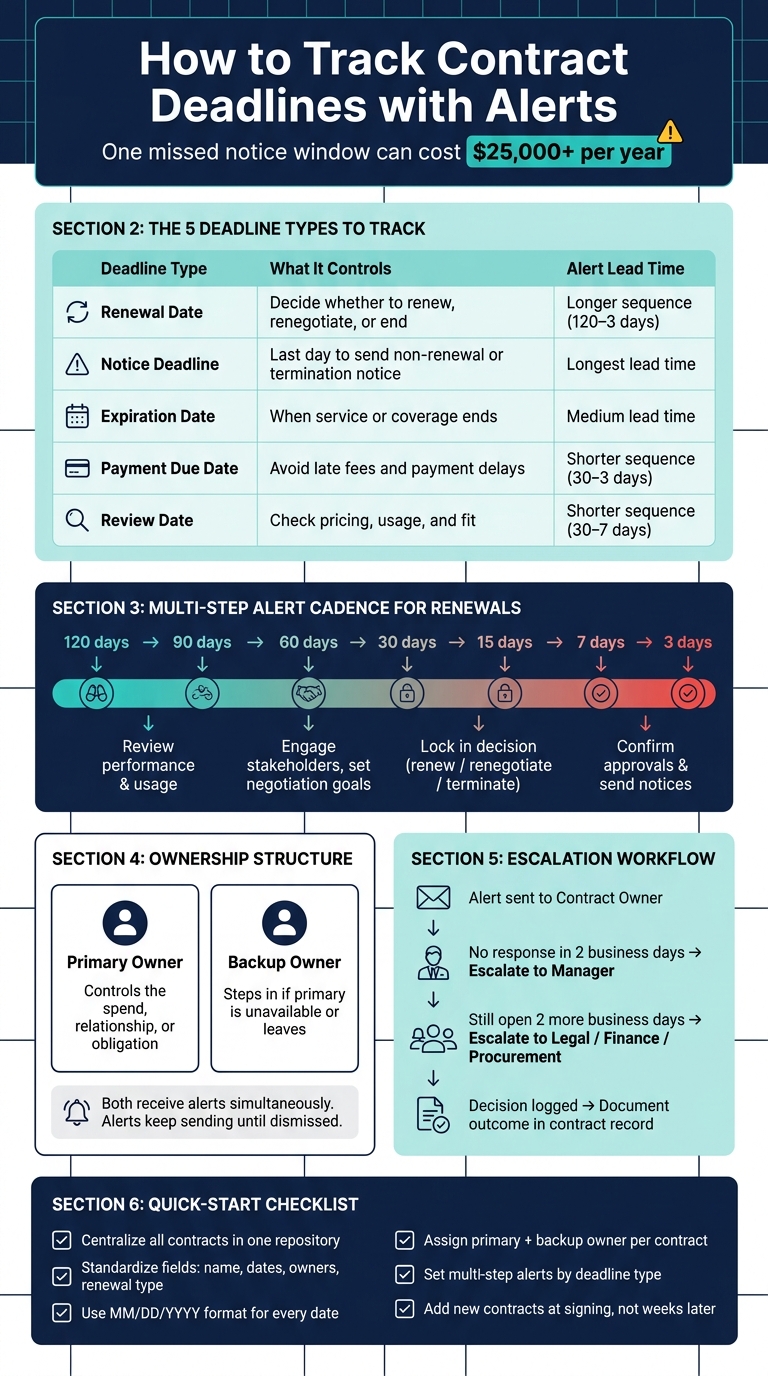
Contract Deadline Alert System: 5 Steps to Never Miss a Renewal
1. Why contract deadline alerts matter
A contract without a tracked deadline is basically a cost problem waiting to happen. For SMB teams handling dozens or even hundreds of live agreements, the danger zone sits between "this renews soon" and "someone owns this and it’s on the calendar." That’s where missed renewals, late fees, and auto-rollovers slip in.
Contract deadlines SMB teams need to track
Most teams zero in on the expiration date. But with auto-renewing contracts, the notice deadline often matters more. That’s the last day to cancel, switch terms, or renegotiate before the contract rolls over on its own.
There are five date types every contract should include:
| Date Type | What It Controls | Example |
|---|---|---|
| Renewal date | When the contract term ends and a decision is needed | Annual CRM subscription renewing every January 1 |
| Notice deadline | Last day to stop an automatic rollover or send formal termination notice | Hotel laundry contract with a 90-day cancellation window; insurance policy requiring 60 days’ written notice |
| Expiration date | When coverage or service formally ends if not renewed | HVAC maintenance agreement lapsing without action |
| Payment due date | Controls cash flow and late fee exposure | Monthly SaaS invoice due on the 15th of each month in USD |
| Periodic review date | Scheduled checkpoint for pricing, performance, or fit | Semiannual review of a linen contract to align with seasonal demand and budget cycles |
Each of these dates should trigger its own alert and have a clear owner. The goal isn’t just to save dates in one place. It’s to turn each date into an alert that belongs to someone.
What goes wrong when deadlines live in spreadsheets and email
The issue with spreadsheets isn’t only that they get messy. The problem runs deeper. One of the most common headaches for U.S. teams is mixed date formats. One person types 03/04/2026 and means March 4. Another types the same thing and means April 3. In a business with more than one location, regional settings can also change dates when someone opens the file. Suddenly, the tracker looks fine but is quietly wrong.
Then there’s ownership. A spreadsheet row with a renewal date doesn’t tell anyone what action to take, who needs to take it, or what happens if nobody does. And when the one person who "just knows" that contract leaves the company, that know-how leaves too.
Email reminders don’t fix this. A flagged message sitting in one inbox isn’t a process. It’s more like crossing your fingers. If that person is out sick, on vacation, or moves into a new role, the reminder goes with them. There’s no audit trail, no escalation path, and no easy way for leadership to check whether a renewal call was made.
Miss one notice window, and you can end up paying for another full year of something you didn’t want, or getting stuck with bad terms. Once your dates are clear, the next move is simple: put them into one shared contract calendar.
sbb-itb-49df6ae
2. Centralize contract dates and required fields
Once you’ve pinned down the key dates, the next move is to standardize every contract record before you set up alerts. Put each contract into a single record and use the same fields every time. That consistency is what makes alerts and escalations work instead of falling apart.
Capture the same milestone fields for every contract
Capture the same fields for every contract, not every detail under the sun. These fields should be required at intake. If data is missing, alert gaps show up fast.
| Field | Why It Matters for Alerts |
|---|---|
| Contract name | Identifies the record in alert emails and calendar views |
| Vendor or customer name | Routes the alert to the right team context |
| Department / owning business unit | Ensures the right team sees the deadline |
| Renewal type (auto-renew, fixed term, evergreen, one-off) | Sets the alert schedule |
| Renewal date | Triggers the renewal decision workflow |
| Expiration date | Fires expiration alerts |
| Notice period | Calculates the last possible termination date |
| Payment date(s) | Drives reminders to Finance or accounts payable |
| Review date | Schedules performance or pricing check-ins |
| Primary contract owner | Takes action on the alert |
| Backup owner | Steps in if the primary is unavailable |
Use MM/DD/YYYY for every date field and export. Stick with clear titles like "Acme Cloud Backup – IT – 2026." Skip vague labels and internal shorthand. If a title makes sense only to the person who entered it, it will cause trouble later.
Assign a primary owner and a backup owner
Ownership should follow business responsibility, not file location. The right primary owner is the person who controls the spend, relationship, or obligation tied to the contract, not the person who uploaded the file.
For example, a SaaS subscription that supports the sales team should sit with the Head of Sales or Sales Operations, even if Legal handled the signing. A vendor services agreement should usually belong to the Operations Manager who manages that relationship day to day. When alerts land with the wrong person, or worse, in a generic inbox, they tend to just sit there.
A backup owner matters too. Without one, a reminder can stall when the primary owner is out of office or leaves the company. Set backup ownership at the contract level and, when possible, at the role level. For instance, the Finance Manager can act as backup for payment-related contracts. If someone leaves, the backup can step in until a new owner is assigned. Trackado allows multiple recipients for a single alert, so both the primary and backup owner are notified.
Alerts keep sending on schedule until someone dismisses them.
Use one shared contract calendar instead of scattered trackers
Once the fields are standardized and owners are assigned, a shared contract calendar gives you one filterable view of every renewal, notice deadline, expiration, payment date, and review date. That’s a lot easier than chasing dates across spreadsheets, inboxes, and side notes.
That said, a shared calendar only works if each date also has an owner and a reminder rule attached to it. Trackado supports this setup with a structured repository, custom fields, milestones, and automated reminders that update when dates change.
Once the fields are standardized, the next step is to match each deadline type to the right reminder cadence.
3. Set alert timing by deadline type
Once dates and owners are set up the same way, the next step is simple: give each deadline type its own alert cadence. One schedule for everything doesn’t work. A renewal date, a notice period, and an invoice due date each need different lead time and different actions.
Use multi-step reminders for renewals and notice periods
For high-value or complex contracts, a multi-step schedule usually works best. A common setup is alerts at 120, 90, 60, 30, 15, 7, and 3 days before the critical date.
Each reminder should push a clear next step:
- At 120–90 days, the owner reviews performance and usage.
- At 60 days, they bring in stakeholders and set negotiation goals.
- At 30–15 days, they lock in the decision: renew, renegotiate, or terminate.
- At 7–3 days, they confirm approvals and notices are done.
Notice period deadlines need a separate alert schedule. They can’t just hang off the renewal date.
Here’s why: if a contract renews on December 31 but needs written notice of non-renewal at least 90 days before that date, the real decision deadline is October 2. A reminder on December 1 is already useless. So the notice deadline needs to live as its own date field, with its own reminder sequence that starts well before the cutoff.
Payment and review dates usually need shorter cadences.
Set shorter alerts for payment and review dates
For invoice due dates, alerts at 30, 15, 7, and 3 days usually give finance enough time to verify the invoice, match it to the contract, complete approval steps, and process payment without a last-minute scramble. The 3-day alert acts as a final guardrail against late fees or service interruptions.
For routine contract review dates, a shorter cadence like 30, 15, and 7 days is often enough. The 30-day reminder tells the owner it’s time to start pulling usage data and stakeholder feedback. By 15 days, the review meeting should be on the calendar. By 7 days, conclusions should be written into the contract record.
Send alerts to the right people for each task
Timing matters. Routing matters just as much.
For renewal and termination decisions, alerts should go to the contract owner because that person is accountable for the business outcome. For payment deadlines, send alerts to finance or accounts payable, plus the contract owner when payment depends on confirmed delivery. For notice period deadlines on strategic contracts, include legal too.
Don’t send critical alerts only to generic shared inboxes with no named owner. When accountability gets fuzzy, high-value reminders slip through the cracks. That can lead to missed auto-renewals and spend commitments no one planned for.
A better setup is to send the first alert to one named owner, then add the backup owner and finance or legal as the deadline gets closer. Trackado supports assigning multiple recipients per alert, so both the primary and backup owner get notified without muddying accountability.
4. Build escalation and review workflows
Alerts only matter if someone acts on them. Each reminder should kick off a clear review path. And once alerts are routed, escalation answers the next question: what happens if nobody responds?
Escalate when the owner does not respond
Start with the contract owner. If they don’t acknowledge or complete the task, move it to their manager, then to legal, finance, procurement, or leadership if the item is still open. The trigger for escalation should be simple: no acknowledgment or no completion.
Use a steady cadence here. Send a follow-up after 2 business days. If the task is still open 2 more business days later, escalate again.
Follow a repeatable renewal decision process
A simple renewal cadence helps teams avoid last-minute scrambles. Review the contract at 90 days, follow up at 60 days, and escalate by 30 days before the notice deadline if no decision has been logged.
| Step | Action | Timing |
|---|---|---|
| Review | Check usage, service quality, pricing, and business need | 90 days before the notice deadline |
| Decide | Choose and record renew, renegotiate, or terminate | 60 days before the notice deadline |
| Approve and notify | Route for internal sign-off and send any required notice | Around 30 days before the notice deadline |
| Document | Log the decision date, approver, notice sent, notice date, effective end date, next renewal date, and any follow-up obligations | Immediately after execution |
For recurring software agreements, use the final 30 days before the notice deadline for legal review, internal approval, and final sign-off. Trackado can keep the workflow, milestones, and reminders in one place.
With escalation rules in place, the last step is keeping every deadline in one shared contract calendar.
5. Replace spreadsheets with a maintainable contract calendar
Once your escalation rules are set, the next step is simple: put every key date and owner into one calendar the team will use.
That’s how you keep the system accurate over time. Spreadsheets and one-off reminders might work for a while, but they tend to drift. People miss updates. Files end up in different places. Before long, nobody is fully sure which date is the right one.
Start with a simple migration plan
The aim here is to move from scattered files and manual reminders to one reliable system without slowing down day-to-day work.
A practical sequence looks like this:
- Inventory active contracts from shared drives, email, and paper files.
- Define standard fields first: contract name, counterparty, category, department, owners, start and end dates, renewal type, notice period, payment schedule, and review dates. These are the minimum fields you need to route alerts and trigger escalations the right way.
- Extract and normalize key dates, fix missing owners, and verify them against the signed contract. Clean data is what makes alerts and escalations work.
- Import into one central repository, using bulk upload where possible to avoid manual re-entry.
- Test alerts on a small batch of contracts before rolling out to everything. Check that reminder timing, recipients, and escalation rules all fire correctly.
Start with the contracts that carry the most risk first. That usually means agreements above $25,000 a year, critical systems like payroll or ERP, and anything expiring within the next 3–6 months. This gives you quick wins and cuts rollout risk.
Trackado can centralize contracts, extract metadata, and automate reminders during migration.
Once the calendar is live, keep it current with a short recurring review. After import, review deadlines due in the next 30–60 days each week and high-value agreements each quarter. And here’s the part that often gets missed: add new contracts to the repository when they’re signed, not weeks later. That one habit helps keep the calendar accurate and stops spreadsheets from going stale.
Key takeaways for staying ahead of deadlines
Centralize everything in one repository so no renewal gets buried in someone’s inbox. Standardize milestone fields across every contract so filtering and reporting work the way they should. Assign both a primary and backup owner to each agreement so accountability doesn’t rest on one person’s memory.
Then set multi-step alerts by deadline type. Renewals and notice periods need longer lead times. Payments and reviews can use shorter ones. Add escalation rules so a missed alert doesn’t turn into a silent failure. From there, stick to a steady review rhythm with a shared weekly and quarterly cadence.
FAQs
How do I calculate a notice deadline?
Subtract the required termination notice period from the contract’s expiration or renewal date. So if a contract ends on December 31, 2026 and calls for 60 days’ notice, your deadline is November 1, 2026.
In Trackado, this Latest Day for Cancellation is calculated automatically. You can also set reminders 90, 60, or 30 days before that deadline.
Who should own contract deadline alerts?
Contract deadline alerts should go to specific people, not whole departments. That way, there’s no confusion about who owns the task and who needs to act.
With Trackado, you can assign alerts to the right stakeholders and send automated reminders at set intervals. If an owner is out, tasks can be routed based on document metadata and escalated to managers when deadlines are missed.
What should I migrate first from spreadsheets?
Start by moving all contracts into one digital repository. Pull agreements out of email, shared drives, and paper files, and put them in one place. That gives you a clear starting point for tracking key dates the same way across every contract.
Once everything is centralized, you can monitor renewal dates, payment schedules, expiration dates, and other milestones in a structured system. Set alerts ahead of time so nothing slips by.