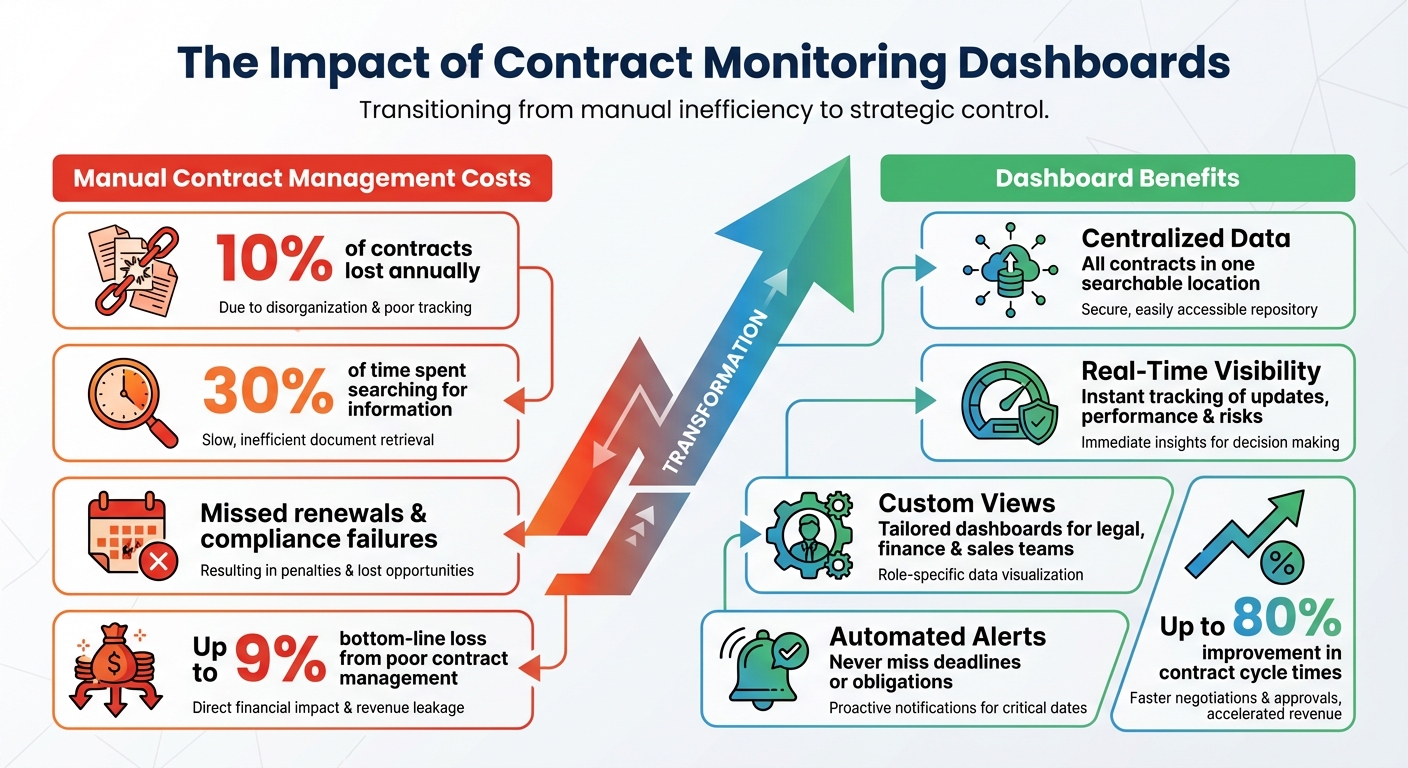
Managing contracts manually is time-consuming, error-prone, and costly. Businesses lose up to 10% of contracts annually, spend 30% of their time searching for information, and risk missed renewals or compliance failures. Contract monitoring dashboards solve these issues by centralizing contract data, providing real-time updates, and automating alerts.
Key takeaways:
- Centralized data: Access all contracts in one searchable location.
- Real-time visibility: Instantly track updates, performance, and risks.
- Custom views: Tailored dashboards for legal, finance, and sales teams.
- Automated alerts: Never miss deadlines or obligations. Use a contract renewal planner to stay ahead of key dates.
Dashboards improve efficiency, reduce risks, and help teams make informed decisions. With tools like Trackado, businesses can streamline processes, track financials, and automate workflows for better contract management.
Contract Management Challenges and Dashboard Benefits Statistics
Core Features of Contract Monitoring Dashboards
Contract dashboards transform scattered data into clear, actionable insights. The best systems combine real-time updates, customizable role-based views, and automated alerts, helping teams stay aligned and avoid the pitfalls of manual tracking.
Real-Time Data Updates
With real-time synchronization, every contract update – whether it’s a new signature, a milestone adjustment, or a payment trigger – becomes instantly visible. This ensures teams maintain a full, 360-degree view of performance and potential risks. By continuously monitoring contracts, organizations can address issues like delays or missed obligations before they escalate into costly problems.
These instant updates are incredibly useful for forecasting. For example, teams can quickly access net margins, total contract values, and renewal impacts. Legal teams benefit by tracking turnaround times and negotiation stages as they happen, while sales teams can pinpoint exactly where deals are stuck in the approval pipeline. This visibility makes it easier to identify and resolve bottlenecks, speeding up the entire process.
"It has reduced risk levels significantly by providing clarity and consistency for the organization’s contracts, and driven efficiencies for the business. That is 100 per cent clear." – Vanessa Fagard, Financial Planning & Analysis Manager at Convious
Customizable Views for Different Teams
One-size-fits-all dashboards don’t work. The most effective dashboards let teams customize their views to focus on the 4–8 metrics that matter most to their role. For instance, legal teams concentrate on compliance and risk, sales teams prioritize deal closure speeds, and finance teams focus on contract value and renewals.
This level of customization encourages adoption. When dashboards are tailored to fit how teams actually work, users are far more likely to rely on them instead of reverting to outdated manual methods. A great example of this is Next Insurance. In February 2023, the company introduced a centralized dashboard under the guidance of Legal Ops Manager Nadia Louis Hermez. By creating role-specific views, they not only avoided critical risks but also streamlined their handling of procurement, professional services, and NDAs.
"The importance of simply being able to locate all of the company’s contracts and relevant amendments in one place without significant effort cannot be minimized." – Sterling Miller, author and legal expert
These tailored views also lay the foundation for automation, further simplifying contract oversight.
Automated Alerts and Reminders
Automation takes efficiency to the next level by turning tailored data into proactive action. Automated alerts ensure teams stay ahead of deadlines and obligations. Dashboards can notify users about renewal dates, compliance checkpoints, obligation milestones, and even pending signatures. These reminders help reduce delays and improve cycle times.
For example, Moreland University’s API-integrated dashboard significantly cut down on manual follow-ups. By identifying actionable documents in real time, it reduced delays and ensured nothing slipped through the cracks. This kind of automation prevents costly mistakes, like missing a renewal deadline or overlooking a critical compliance requirement.
Together, these core features – real-time updates, tailored views, and automated alerts – seamlessly integrate into your contract management strategy, helping you make smarter decisions and improve operational efficiency.
How to Set Up a Contract Monitoring Dashboard
Creating a contract monitoring dashboard that delivers actionable insights starts with clear goals, centralized data, and automation. Here’s how to get started.
Identify Your Key Metrics and Objectives
Before diving into setup, pinpoint the key metrics that matter most to your organization. These might include contract value, compliance rate, milestone achievement, renewal rate, or dispute rate. Your specific priorities depend on what success looks like for your team – whether that’s reducing disputes, ensuring timely renewals, or minimizing risks.
Different departments will likely have unique focuses:
- Finance teams might track contract values, invoiced amounts, and payment statuses.
- Procurement teams may focus on supplier performance metrics.
- Legal teams will want to monitor compliance rates and dispute occurrences.
For example, common dashboard metrics include contracts expiring in the next 30, 60, or 90 days, auto-renewal percentages, and overall compliance rates. Reviewing current contracts can help you identify which metrics are most critical for your goals, whether that’s performance, risk management, or renewal timelines.
Once your KPIs are defined, the next step is to organize and centralize your contract data.
Import and Organize Contract Data
Centralizing your contract data is essential for an effective dashboard. You can import contracts through manual uploads, Excel files, or direct integration with cloud storage. Tools like Trackado even offer features like "email-in", which streamline the process of adding new contracts. Daisy Miller, Project Coordinator at Zapmap, highlights this:
"The email-in feature is also something we use extensively… the contract is then uploaded directly to our repository."
- Daisy Miller, Project Coordinator, Zapmap
After importing, organize contracts with clear titles, status indicators (e.g., Draft, Active, Terminated), and categories that suit your needs. Trackado’s AI-powered tools simplify this by extracting key details – like terms, milestones, and obligations – from uploaded contracts. Advanced search and filtering options allow you to sort contracts by type, department, vendor, location, or risk level. Assigning contracts to specific business units or owners ensures accountability and controlled access.
For instance, Rakuten Europe‘s Head of Legal and Compliance, Kieran Lynch, used Trackado’s centralized repository to streamline audits. By exporting a list of new contract partners for the year, Lynch’s team easily met audit requirements and avoided the hassle of hunting down documents.
With your data organized and key terms extracted, you’re ready to implement automation for better oversight.
Set Up Alerts and Workflow Automation
Automation transforms your contract dashboard into a proactive management tool. Set up automated alerts for critical events such as contract expirations (e.g., 30, 60, or 90 days in advance), milestone deadlines, and compliance issues. Trackado supports multiple event types, including Start Date, End Date, Latest Day for Cancellation (system-generated), and custom events tailored to your needs. These alerts help ensure no key dates are missed.
Assign alerts to the appropriate contract owners, and configure end-of-term behaviors like automatically updating a contract’s status to "Expired" or extending it as needed. By automating these updates, you reduce the risk of contracts being overlooked.
Predefined approval workflows can also simplify reviews. For example, low-value contracts (under $10,000) might only need a department manager’s approval, while high-value agreements (over $50,000) could require sign-off from an executive sponsor or even the CEO. Regularly checking the activity log within the workflow module can help identify bottlenecks and address recurring delays.
"With Trackado we finally have all data in one place and get automatically alerted about required renewals so that we can focus on building bikes."
- Oliver Römer, Managing Partner, tout terrain
Automation doesn’t just save time – it can also drive revenue. Yiannis Karavassilis, COO at CloudKid, explains:
"It’s absolutely crucial and can help you generate more revenue by approaching partners whose licenses are expiring specifically."
Benefits of Using Trackado for Contract Monitoring
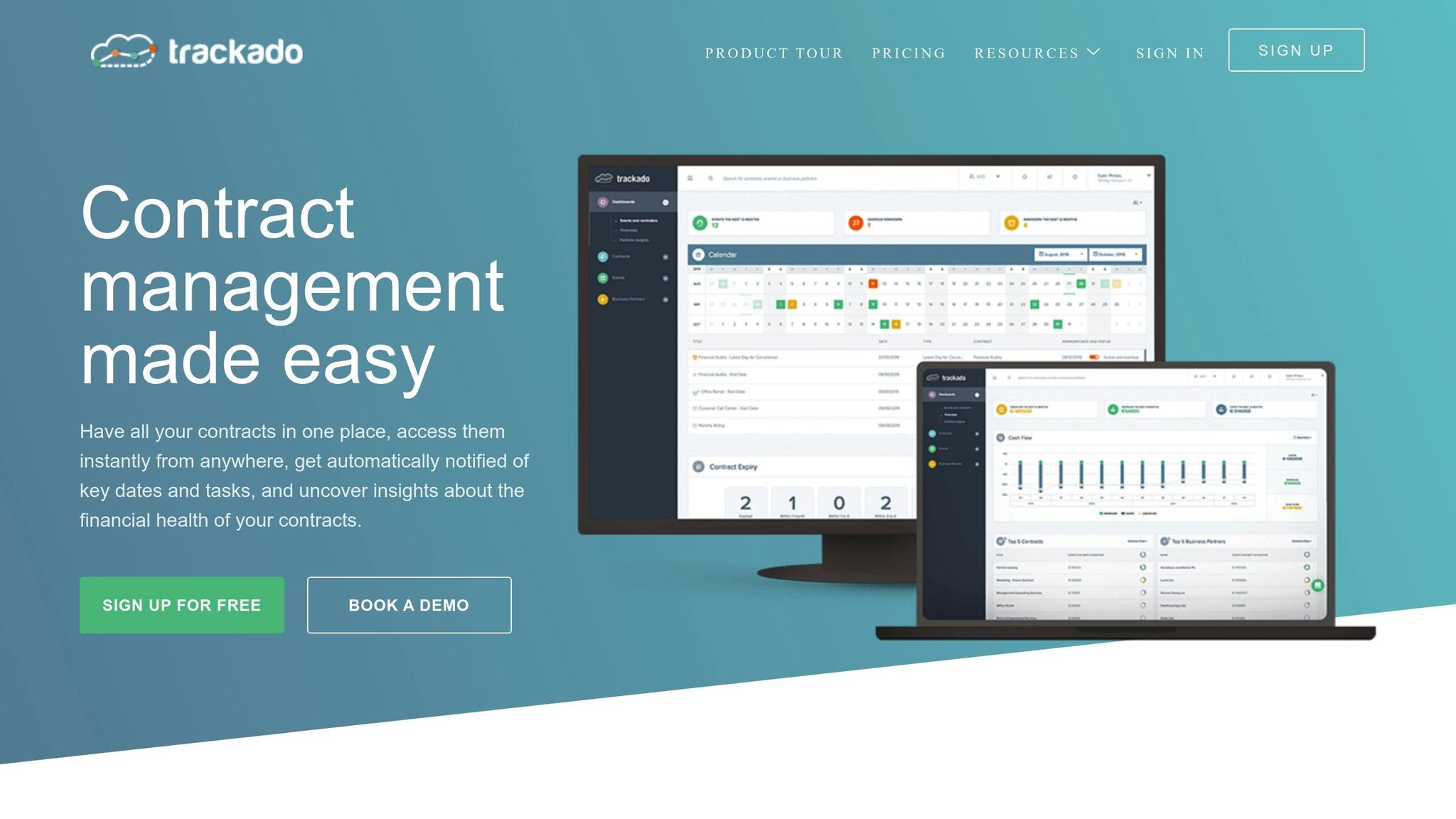
Trackado takes contract management to the next level by combining easy setup with real-time insights, giving businesses full control and visibility over their contracts. With its customizable dashboards and intuitive features, it simplifies even the most complex contract portfolios.
Centralized Contract Storage
Trackado eliminates the chaos of scattered files by offering a single, centralized database for all your contracts. Forget about digging through emails, shared drives, or physical filing cabinets – everything is neatly organized in one place. You can categorize contracts by department, business partner, or tailor them to your company’s specific structure. The platform also supports Business Units and Organizational Units, making it easy to segment contracts by team or legal entity while managing access permissions.
For organizations already using tools like SharePoint, OneDrive, or Dropbox, Trackado provides hybrid storage options. This means you can link your existing storage solutions directly to Trackado, keeping your current authorization and access policies intact. This flexibility ensures you can maintain your document management practices while leveraging Trackado’s powerful features. These storage capabilities pave the way for automated processes that enhance financial clarity and security.
"Trackado is simple and effective." – Alastair Gilchrist, Chief Technology Officer, NRLA
Automation and Financial Tracking
Beyond organizing your contracts, Trackado automates key processes to save time and improve financial oversight. Contracts move seamlessly through their lifecycle – from Draft to Active, Pending, Terminated, or Expired – thanks to automated end-of-term actions. For example, you can set automated contract renewals or update their status upon expiration, reducing the need for constant manual follow-ups.
The platform’s financial analytics dashboard gives you a clear, real-time view of costs, revenues, payment schedules, and potential income. It tracks billing in multiple currencies, monitors contract values, and flags upcoming financial obligations. This level of detail helps your finance team plan budgets more effectively and spot revenue opportunities before they’re missed.
"The moment we knew we had made the right choice with Trackado was when we received email notifications that gave us a heads-up when something was ending or renewing." – Yiannis Karavassilis, COO, CloudKid
Trackado also includes a workflow automation module that streamlines contract review and approval processes. Every action is logged transparently, creating a detailed audit trail – perfect for compliance reviews or tracing approvals.
Security and Ease of Use
Trackado strikes the perfect balance between robust security and a simple, intuitive interface that doesn’t require extensive training. It uses SSL-standard encryption to protect data in transit, encrypts all uploaded files, and hosts information in secure European data centers. With SAML Single-Sign-On (SSO) integration, users can log in quickly and securely.
To further enhance security, the platform offers differentiated access levels, ensuring only authorized team members can view or edit specific contracts. The built-in activity log records every change and approval, making compliance audits straightforward.
As a cloud-based solution, Trackado eliminates the headaches of maintaining on-premise systems. It’s accessible from anywhere, making it ideal for remote teams while maintaining strong data protection. Plus, the platform offers a free 30-day trial (no credit card required) and even has a free plan for smaller teams who want to explore its features before upgrading to a paid option.
sbb-itb-49df6ae
Best Practices for Contract Monitoring Dashboards
Creating a dashboard is just step one. To truly benefit from your contract monitoring system, you need to focus on the metrics that matter, maintain clean and accurate data, and adapt your approach as your business grows. Here’s how to make sure your dashboard delivers results.
Track Metrics That Matter
A common pitfall is tracking too many metrics, which can drown out the insights you actually need. Instead, zero in on key performance indicators (KPIs) that directly impact your business. For example:
- Contract cycle time: How long it takes from request to execution.
- Renewal rates: The percentage of contracts successfully renewed.
- Cost savings: Savings achieved through better terms or renegotiations.
- Payment timeliness: Whether payments are made on time.
For sales teams, focus on metrics like contract closure rates and average deal size. Legal teams, on the other hand, might prioritize workload distribution and frequently negotiated clauses.
"Time kills all deals; you gotta close deals fast." – Sue So, Head of Legal at Hopin
Every metric should contribute to a business goal or prompt action. If it doesn’t, it’s just noise. Stick to a handful of meaningful KPIs and ensure your data is reliable.
Keep Your Data Clean and Accurate
A dashboard is only as good as the data it’s built on. Accurate, up-to-date data is the backbone of any actionable dashboard. Companies using real-time dashboards for contract management see contract cycle times improve by up to 80% – but only if the data is dependable.
Here’s how to keep your data in shape:
- Automate data entry: Use AI tools to extract metadata like dates, parties, and terms. This reduces errors that often occur with manual input.
- Standardize naming conventions: Consistency in labels, tags, and reference IDs helps avoid future cleanup headaches.
- Integrate with other systems: Sync your dashboard with tools like CRM, ERP, and accounting software so customer and financial data updates automatically.
Poor contract management can drain up to 9% of a company’s bottom line. Regularly reviewing your data ensures your dashboard stays relevant and actionable.
Regularly Update and Refine Your Dashboard
As your business evolves, so should your dashboard. Review your KPIs every quarter to ensure they align with your current goals, and validate your data monthly to catch any inaccuracies early. Tailor dashboards to specific roles – sales, finance, legal – so each team only sees the data they need. Use contract analytics and visualizations to pinpoint bottlenecks in your contract process, such as delays in approval, negotiation, or execution, and adjust workflows accordingly.
Assign contract owners to monitor risks and recommend improvements based on dashboard insights.
"Dashboards shouldn’t be static. Periodically review and update the design, metrics, and configurations to meet evolving business needs and user feedback." – Sirion
Conclusion
Key Takeaways
Contract monitoring dashboards bring everything into one place, offering real-time insights and helping to reduce risks. By centralizing your data, you avoid losing contracts or creating data silos. Real-time visibility allows teams to identify bottlenecks and sidestep costly errors, like unintended auto-renewals. Plus, automated tracking ensures you never miss critical deadlines.
Sterling Miller, a legal operations expert and author, emphasizes this point:
"The importance of simply being able to locate all of the company’s contracts and relevant amendments in one place without significant effort cannot be minimized".
These tools empower Sales, Finance, and Legal teams to improve deal closures, enhance forecasting, and stay compliant.
To get started, define your objectives and standardize naming conventions for easy searches. Focus on metrics that lead to actionable insights, use automation to keep data accurate, and review your dashboard quarterly to ensure it aligns with your evolving business needs.
Ready to Begin?
Trackado simplifies contract monitoring with its centralized platform, automated alerts, and financial tracking tools. You can explore its features with a 30-day free trial – no credit card required. Import your contracts, set up renewal alerts, and streamline approval workflows. With AI-powered risk prediction and data extraction and integrated e-signing, manual data entry becomes a thing of the past, and contract execution gets faster. Visit https://trackado.com to see how it can transform your contract management process.
FAQs
How can contract monitoring dashboards help improve compliance and reduce risks?
Contract monitoring dashboards enhance compliance and minimize risks by providing real-time insights into contract obligations and performance. By consolidating all contract data in one place, they simplify tracking critical dates like deadlines and renewals, ensuring nothing important slips through the cracks. This level of visibility helps businesses stay on top of their contractual commitments and steer clear of compliance issues.
These dashboards are also key tools for managing risks. They can pinpoint potential problems, such as unclear terms or high-risk clauses, before they become bigger challenges. With features like alerts for upcoming deadlines or flagged concerns, organizations can act quickly to address issues. On top of that, they encourage collaboration by giving all stakeholders access to a shared view of contract progress. This shared perspective supports smarter decision-making and keeps compliance efforts consistent across the board.
What metrics should teams focus on in a contract monitoring dashboard?
To make contract management effective, different teams need to track metrics that align with their specific responsibilities. For legal and compliance teams, the focus should be on metrics like obligation adherence, compliance tracking, and risk assessment. These help pinpoint potential risks and ensure regulatory requirements are met.
Finance teams, on the other hand, should keep an eye on contract value, ROI, and revenue impact. These metrics provide a clear picture of financial performance and help gauge profitability.
For operations and procurement teams, tracking contract cycle times, milestone completion, and renewal rates is essential. These metrics improve process efficiency and help avoid unnecessary delays.
A well-organized dashboard that combines these metrics can offer real-time insights, enabling teams to act quickly, reduce risks, and get the most out of every contract.
How does automation improve the efficiency of contract monitoring dashboards?
Automation takes contract monitoring dashboards to the next level by cutting down on manual tasks and reducing the chances of errors. It keeps track of crucial contract details – like deadlines, obligations, and renewal dates – automatically. This means businesses get real-time updates and can manage their commitments without missing a beat. With this system in place, the risks of overlooked deadlines, compliance slip-ups, and costly legal or financial penalties drop dramatically.
On top of that, automation connects contract data with other business tools, such as CRM or ERP platforms. This integration creates a centralized hub of information that helps teams make smarter, faster decisions. Automated alerts and reminders ensure stakeholders are always aware of key milestones, so nothing gets overlooked. By simplifying workflows and boosting efficiency, automation transforms dashboards into indispensable tools for accuracy, compliance, and productivity.