
If you review just five contract KPIs every month, you can catch the issues that usually hit finance first: missed renewals, missing owners, approval gaps, bad spend data, and budget drift. That matters because research on contract leakage consistently points to significant revenue loss from poor contract control, and missed auto-renewals remain one of the most common, and most avoidable, finance issues SMB teams face
Here’s the short version: I’d keep the monthly review focused on contract value, renewal rate, budget variance, approval cycle time, and notice deadlines. I’d also check that every active contract has the basic fields filled in, uses one U.S. date and currency format, and shows a clear owner, approval record, and renewal status.
What I’d check each month:
- KPIs stay fixed: same definitions, same formulas, same source fields
- Core fields are filled in: name, counterparty, owner, value, dates, approval status, notice period
- Renewal risk is visible: 30/60/90-day notice deadlines are listed
- Approvals are clean: approver, role, date, and status are on file
- Owners are current: no active contract is left without a named person
- Spend changes are explained: document what changed, why, and next step
A simple checklist works best when it leads to action. So for every gap, I’d assign one owner, one due date, and one next step before month-end wraps up.
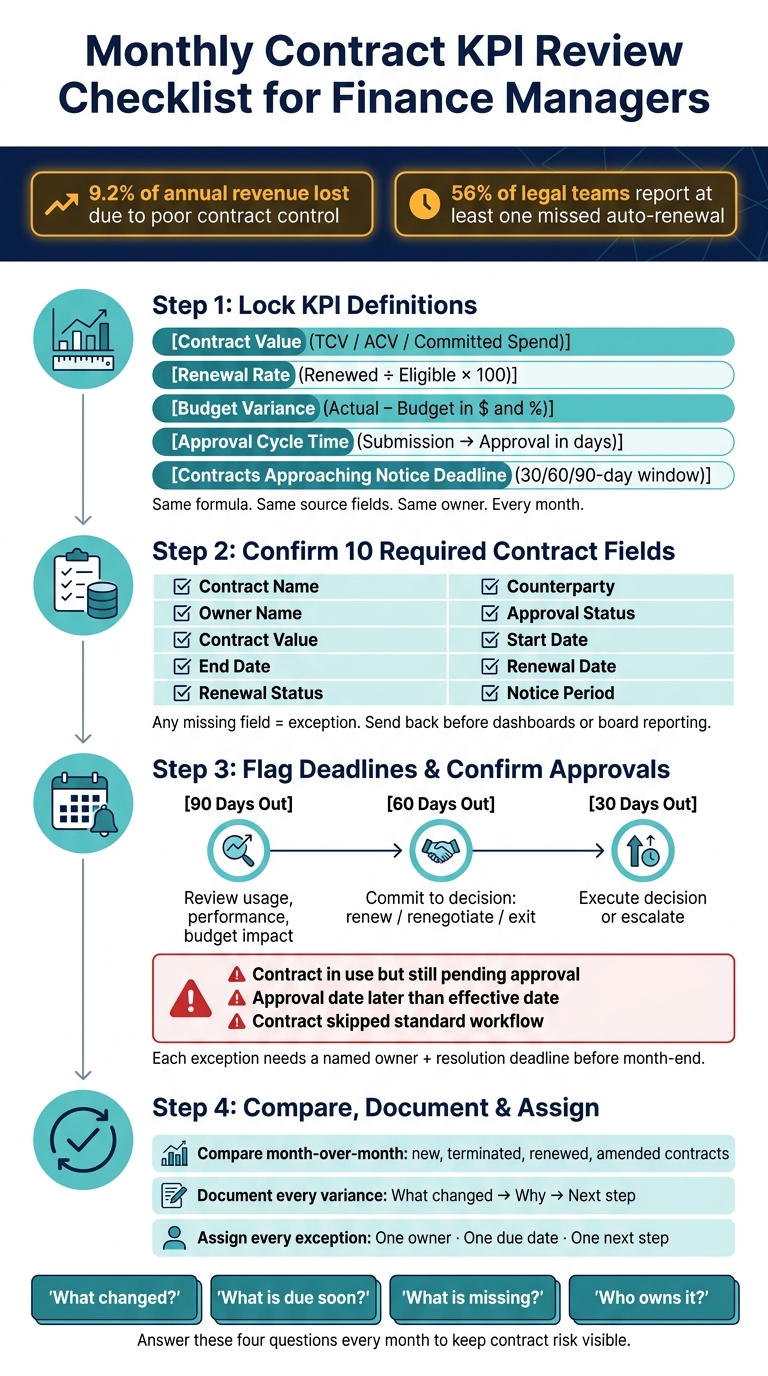
Monthly Contract KPI Review Checklist for Finance Managers
Checklist section 1: Confirm KPI definitions and reporting rules
Set each KPI once, then stick with the same formula, source fields, and owner every month. If the math or field set changes from one report to the next, the numbers stop being useful fast.
Define each core KPI next to its metric
Use these five KPIs as the monthly finance baseline.
| KPI | Definition | Calculation Method | Required Data Fields | Assigned Owner | Monthly Review Status |
|---|---|---|---|---|---|
| Contract Value | The total contract amount for the review period | Sum of fixed fees and variable components; state whether the report uses Total Contract Value (TCV), Annual Contract Value (ACV), or committed spend | Contract ID, vendor name, start date, end date, pricing terms, payment frequency, total or annual value | Assigned owner | [ ] Complete / [ ] Needs Review |
| Renewal Rate | The percentage of contracts renewed during the reporting period | (Renewed contracts ÷ Total eligible contracts) × 100; note whether the report is count-based, value-based, or both | Contract ID, expiration date, renewal status, notice period | Assigned owner | [ ] Complete / [ ] Needs Review |
| Budget Variance | The difference between expected contract spend and approved budget for the same period | Actual or forecasted spend − Budgeted amount; show the result in dollars and as a percentage | Budgeted value, actual invoices, committed spend, reporting period, variance basis | Assigned owner | [ ] Complete / [ ] Needs Review |
| Approval Cycle Time | The number of days from contract submission to final approval | Approval date − Submission date; use calendar days or business days, but use one method consistently | Submission date, approval date, approver name, approval status, exception notes | Assigned owner | [ ] Complete / [ ] Needs Review |
| Contracts Approaching Notice Deadline | Agreements whose notice period cutoff falls within the next 30, 60, or 90 days | Count of contracts whose notice deadline falls within the review window; show both the renewal date and notice deadline | Contract end date, notice period length, notice deadline, owner name, renewal status | Assigned owner | [ ] Complete / [ ] Needs Review |
For Budget Variance, spell out whether the report uses actual, committed, or forecasted spend. That one detail matters. For example, a $120,000.00 forecast against a $100,000.00 budget means the contract is $20,000.00, or 20%, over budget.
Use consistent U.S. formats for values and dates
Use one U.S. format standard across the full report. That means values like $25,000.00 and dates like 07/30/2026 or July 30, 2026. Pick one date style and use it everywhere.
Lock these format rules at the top of the report template and confirm them during this first checklist pass. Then check that the report includes every required contract field feeding these KPIs.
sbb-itb-49df6ae
Checklist section 2: Verify required contract data fields
Next, check the contract fields behind each KPI.
Required fields every contract report should include
Every active contract in your report should have these ten fields filled in before you run a forecast or close the month. If even one field is missing, treat that record as an exception and send it back to the contract owner for correction before it shows up in dashboards or board reporting.
| Required Field | Why Finance Needs It |
|---|---|
| Contract Name | Clear, searchable identifier for reporting and cross-referencing with GL accounts and project codes |
| Counterparty | Vendor or customer legal name for spend aggregation and compliance checks |
| Owner Name | Assigns accountability for renewals and approvals |
| Approval Status | Shows the contract was approved under company authority limits |
| Contract Value | Drives forecasting and spend tracking |
| Start Date | Sets the obligation start date |
| End Date | Defines the contract term |
| Renewal Date | Flags upcoming auto-renewals |
| Renewal Status | Distinguishes active obligations from those requiring a decision, such as Auto-renew, Fixed term, Terminated, or Pending renewal |
| Notice Period | Enables timely action to avoid unwanted renewals or penalties |
Missing fields may look like a small data issue, but they can throw off month-end reporting fast. A contract without a renewal date, for example, can hide an upcoming auto-renewal. A contract without a value can weaken forecast accuracy. That’s why finance teams need these fields locked down before using the data.
Optional fields that improve finance visibility
Once the required fields are filled in on a steady basis, these optional fields add more depth to reporting without making intake messy.
| Optional Field | What It Adds |
|---|---|
| Department / Cost Center | Allocates contract spend to the right budget line |
| Category | Enables spend analysis by type such as SaaS, Facilities, or Professional Services |
| Property Location | Helps multi-site organizations track obligations by site |
| Milestone Dates | Captures price review dates, go-live dates, or step-up pricing triggers |
| Payment Terms | Supports cash flow modeling such as Net 30, Net 60, or milestone-based terms |
| Linked Budget Code | Connects each contract directly to its GL account for cleaner variance reporting |
These fields give finance more context. Department and budget code help tie spend back to the right line item. Category makes it easier to group contracts and spot patterns. Milestone dates and payment terms help when you’re trying to explain changes in timing, cash needs, or spend by period.
Trackado can enforce required fields and support optional metadata such as department, location, and budget code.
With required fields complete, the monthly review can shift away from data cleanup and toward exception tracking.
Checklist section 3: Review renewals, notice periods, and approvals
With the required fields in place, the next step is to check the dates, approvals, and owners that can create month-end risk.
Flag upcoming renewal dates and notice deadlines
A common issue is having an expiration date on file but missing the notice deadline that comes before it. For each contract, calculate the last notice date and compare it with your monthly review window.
Every month, pull a list of contracts coming due in the next 30, 60, or 90 days. Make sure the notice period is recorded for each one. Then sort the list by annual value and review core operational contracts first. If a contract has an auto-renew clause and a notice window of 30 days or less, move it to the top of the list no matter the value.
Use this 90/60/30-day review cadence:
| Days Before Notice Deadline | Action |
|---|---|
| 90 days | Owner reviews usage, performance, and fit; finance checks budget impact |
| 60 days | Owner commits to a decision: renew as-is, renegotiate, reduce scope, or exit |
| 30 days | Carry out the decision; escalate if it is still unresolved |
Confirm approval status and control exceptions
Once renewal risk is clear, verify that each contract was approved the right way.
Every active contract should show the approval status, approver, role, date, and method. If even one of those items is missing, treat the contract as an exception.
Each month, sample new and amended contracts from the prior period and compare the actual approvers with your delegation-of-authority matrix. If approval authority was exceeded, flag the contract as a control deviation, document it, and escalate it.
Pay close attention to three exception types:
- Contracts in pending approval status but already in use
- Contracts where the approval date is later than the effective date
- Contracts that skipped the standard workflow entirely
Each exception needs a named owner and a resolution deadline before month-end closes.
Keep owner names current for every active contract
Next, confirm that each contract has a named owner who can act before deadlines pass.
If a contract does not have a named owner, it is unowned. Every active contract should list a primary owner by name and the responsible department, and both should stay up to date. Each month, check whether any owners have left the company or moved into a role that no longer fits the contract. If that happened, the department head should assign a replacement within 10 business days and update the record.
Named owners are the people who check invoice accuracy, bring forward renegotiation proposals, and flag service credits before they expire.
Checklist section 4: Run the monthly review and close actions
With renewals flagged, approvals confirmed, and owners assigned, it’s time to run the monthly comparison and close out exceptions.
Compare contract values, spend changes, and budget variance
Compare this month’s report with last month’s to spot changes that can affect budget or cash flow. Look for new, terminated, renewed, or amended contracts, along with any usage or spend shifts. The key here is simple: record the driver, not just the delta.
If spend changed in a meaningful way for any contract, document the variance, root cause, and cash flow impact before the review closes. Stick to one note format: what changed, why it changed, next step. For example: Annual support contract increased by $12,000.00 after adding two departments; forecast updated; procurement notified. This creates an audit trail and cuts repeat questions next month.
For each variance, note:
- Whether it is temporary or recurring
- Whether it affects this month or the quarter
- Which contracts are driving the change
Then use those findings to update the record before you close exceptions.
Update records and assign next steps
Before closing the review, update any contract records that changed during the month. Every changed field should be updated: value, renewal date, notice period, approval status, owner, spend estimate, and milestone or obligation dates. Status should also reflect the current approved state, such as renewed, terminated, pending approval, or under legal review.
Every unresolved exception needs an owner, due date, and next step. Common follow-ups include:
- Fixing missing fields
- Securing approval
- Confirming renewal decisions
- Sending non-renewal notices
- Reviewing spend variances with budget owners
Unowned exceptions tend to come back again next month. That’s the part nobody wants.
How a centralized contract repository supports the checklist
Once the review is done, the record system should show that same status. A centralized repository keeps contract values, dates, owners, approvals, and milestones in one place, which makes month-end review faster and cleaner.
Trackado supports this workflow with a structured repository, deadline reminders, custom fields, milestone tracking, and approval workflows.
Conclusion: A simple contract KPI checklist finance teams can use every month
The best contract KPI checklist is the one your team will actually finish every month. So keep it lean, steady, and tied to action, not a long report that gets pushed aside when the month gets hectic.
At the end of each monthly review, run through four checks: confirm KPI definitions, required fields, renewal dates, owner names, and approval status.
Any open exception should have a clear owner, a due date, and a next step. If it doesn’t, the same issues tend to pop up again the next month.
That follow-up is much easier when your records live in one place. Trackado centralizes contract values, renewal dates, owner assignments, and approval status, with reminders and structured fields that make the monthly review repeatable. That helps keep the checklist from turning into just another status report.
Keep the review centered on four questions: What changed? What is due soon? What is missing? Who owns it?
FAQs
Which contract KPI should I fix first?
Fix the notice deadline first. It matters more than the expiration date because it’s your last chance to cancel, renegotiate, or renew before terms are locked in.
After that, focus on upcoming renewals and obligation completion rates to cut financial and day-to-day risk.
How do I handle missing contract data?
Start with an audit to find contracts with missing details. Then move them into a secure repository that serves as your single source of truth.
Use AI-powered data extraction to pull key fields like expiration dates, renewal terms, and payment obligations. This cuts down on manual work and helps reduce errors.
If gaps still remain, assign team members to fill them in and standardize the data. After that, require key fields before activation, and review data quality every month during the first business week.
What should trigger escalation in the monthly review?
Escalate any renewal that is still unresolved within the 30- or 60-day window. Do the same for any contract with fewer than 30 days left if it has no assigned owner or no logged action.
Escalation also applies to repeat problems, such as:
- Budget overruns
- Missed service level agreements
- Overdue reviews with repeated delays
- A primary task owner who does not respond to reminders