
Losing contract data can lead to serious consequences, from financial losses to compliance violations. Cloud backup offers a secure, automated, and efficient way to protect sensitive agreements.
Here’s what you need to know:
- Why it Matters: Contracts are crucial for business operations and legal compliance. Losing them can cost up to 9% of annual revenue and lead to penalties during audits.
- Key Features: Cloud systems secure data with AES-256 encryption, immutability (unchangeable backups), and geo-redundancy (data stored in multiple locations).
- Backup Strategy: Follow the 3-2-1-1-0 rule (multiple copies, different media, offsite storage, immutability, and zero errors) to minimize risks.
- Compliance: Ensure providers meet standards like ISO 27001 and GDPR, with clear SLAs for recovery time and data retention.
Cloud backup not only safeguards contracts from threats like ransomware but also ensures accessibility, even in disasters. Automating backups and testing recovery processes regularly are essential steps for long-term data security.
Core Security Features of Cloud Backup Systems
Data Encryption During Transfer and Storage
Encryption is the backbone of cloud backup security. When transferring data from your local systems to the cloud, protocols like HTTPS and Transport Layer Security (TLS) ensure your information remains safe from prying eyes. While TLS 1.2 is the minimum standard, TLS 1.3 is highly recommended for better security against man-in-the-middle attacks.
Once your data reaches the cloud, it’s typically secured using 256-bit AES (Advanced Encryption Standard). This method, compliant with FIPS 140-2, is considered one of the most secure encryption techniques available. Many providers go a step further with envelope encryption, which involves encrypting your data with a Data Encryption Key (DEK) that is itself encrypted by a Key Encryption Key (KEK). This layered approach minimizes the risk of exposure if a key is compromised.
For added control, some services offer client-side encryption, allowing you to encrypt your data locally with a passphrase before uploading it. This means the cloud provider never has access to your unencrypted files. Organisations in regulated sectors, such as finance or legal services, often benefit from implementing a contract management solution alongside Customer-Managed Keys (CMK). These keys allow full control over the encryption lifecycle, including key rotation and access policies, and provide detailed logs of every decryption event for compliance purposes.
"Encryption fundamentally protects against deliberate attacks and abuse of valuable data and systems."
- Azure Critical Cloud
The importance of encryption can’t be overstated. A 2020 study found that 43% of cloud databases were unencrypted, leaving them exposed to potential breaches. In the UK, non-compliance with GDPR data protection rules, such as failing to encrypt sensitive data, could result in fines of up to 4% of a company’s global annual turnover. To maximize security, consider combining customer-managed keys with platform-managed encryption for a dual-layered defense.
While encryption ensures data integrity, immutable backups add an extra layer of protection against ransomware and unauthorized changes.
Immutability and Ransomware Defense
Immutable backups are a strong defense against ransomware. These backups are designed to be unchangeable for a set period, ensuring they remain intact and unaltered. This concept, often called Write Once Read Many (WORM), guarantees that once data is saved, it cannot be edited or deleted.
Cloud providers use features like S3 Object Lock to implement immutability. This prevents tampering – even by administrators with high-level access – protecting data from both accidental and malicious changes.
Ransomware threats are on the rise, with attacks increasing by 93% in 2023. In response, companies like Wasabi Technologies have invested in infrastructure to support immutable storage. For example, the opening of their Chessington data center (EU-West-3) in October 2024 ensures GDPR-compliant, localized immutable storage for UK-based organisations. When setting up immutability, it’s essential to align the lock period with regulatory requirements and the average ransomware dwell time – the time attackers typically remain undetected in systems.
Geo-Redundant Storage
After encryption and immutability, geo-redundancy ensures your data remains accessible even during regional disruptions. Geo-redundant storage safeguards your data by distributing copies across multiple geographic locations. This protects against risks like natural disasters, power failures, or regional cyberattacks.
Most cloud backup solutions store data across at least two zones, while multi-region setups replicate data across entirely separate regions. This ensures that even if one location is compromised, your data remains accessible from another. For UK businesses, using multiple data centers within the country not only ensures geo-redundancy but also complies with GDPR’s strict data residency rules.
"By spreading your backups across different cloud locations, you minimize the risk of losing access to your backups if one location goes down."
However, geo-redundancy alone isn’t enough. While it replicates changes instantly, accidental deletions or corruptions are also mirrored. To ensure proper protection, combine geo-redundancy with point-in-time recovery features. When choosing a region for storage, confirm that it supports zone separation, with zones located in physically distinct data center campuses. This prevents a single event, like a fire or flood, from affecting multiple zones simultaneously.
sbb-itb-49df6ae
Best Practices for Cloud-Based Contract Data Backup
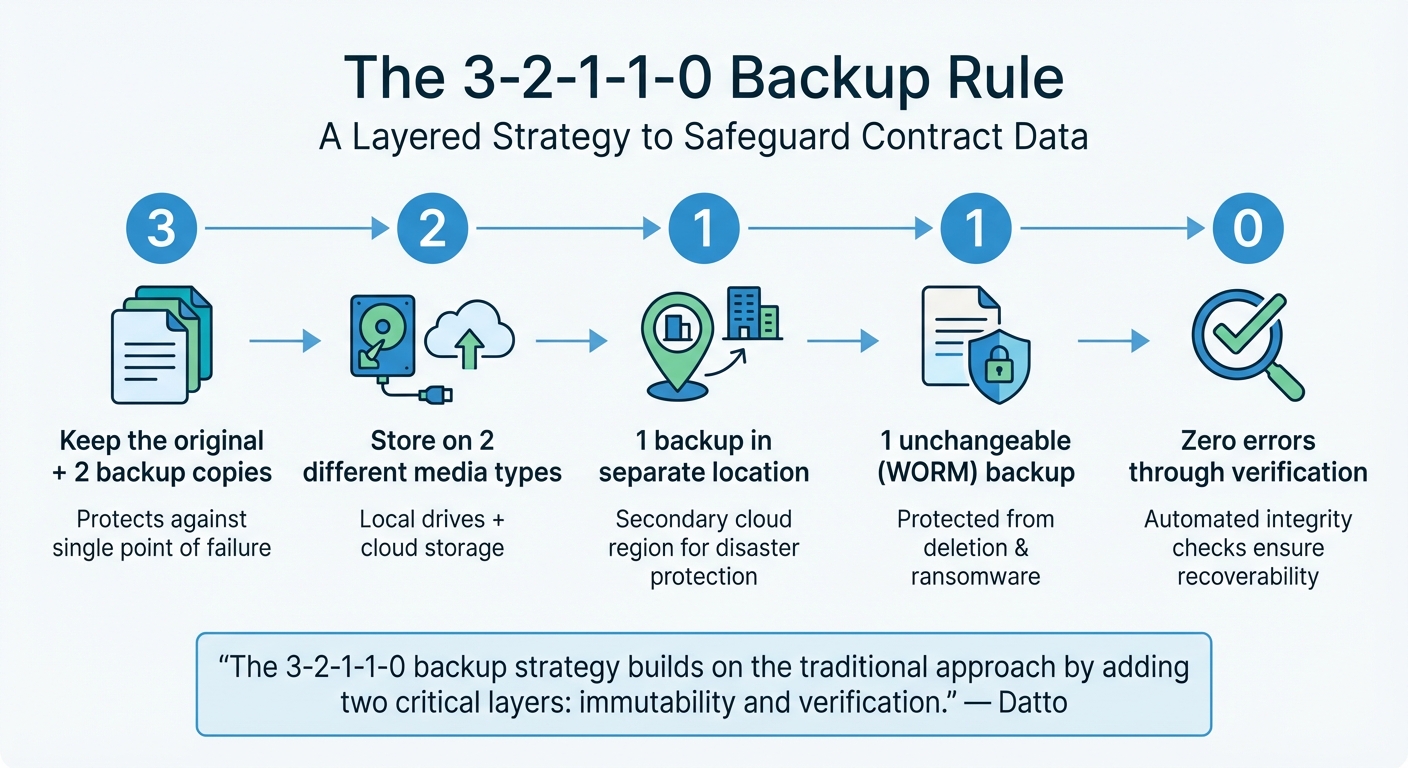
3-2-1-1-0 Cloud Backup Rule for Contract Data Protection
Building on strong security measures, effective backup strategies add another layer of protection for contract data.
Using the 3-2-1-1-0 Backup Rule
The 3-2-1-1-0 rule is a reliable way to safeguard contract data against loss, corruption, or ransomware attacks. It builds a layered backup system that enhances security.
Here’s how it works:
- Three copies: Keep the original and two backup copies.
- Two different media types: Use a mix of storage options, like local hard drives and cloud storage, to reduce the risk of hardware-specific failures.
- One offsite copy: Store one backup in a separate location, such as a secondary cloud region, to protect against localized disasters.
- One immutable copy: Ensure one backup is in a Write-Once-Read-Many (WORM) state, making it unchangeable and safe from deletion or encryption – even by administrators.
- Zero errors: Use automated verification to confirm that backups are intact and recoverable.
"The 3-2-1-1-0 backup strategy builds on the traditional approach by adding two critical layers: immutability and verification." – Datto
To apply this rule for contracts, choose cloud services offering object locking or WORM features. Secure backup accounts with Multi-Factor Authentication (MFA) and restrict devices that can modify backups. Automate integrity checks using tools that validate restorability through screenshot testing or application-level checks. This method shields contract data from both cyber threats and human mistakes.
Setting Data Retention Policies
A solid retention policy ensures compliance with legal requirements while meeting operational needs. Start by classifying contracts based on their sensitivity, importance, and regulatory obligations, such as GDPR or ISO 27001. Different contracts have varying retention periods: Non-Disclosure Agreements may need to be kept for 1–3 years after expiry, vendor agreements and sales contracts for 6–10 years, and intellectual property deeds or real estate leases possibly indefinitely.
Using metadata tagging – like contract type, expiration date, or jurisdiction – can automate retention schedules and make it easier to locate records during audits. This ensures retention policies are tied to meaningful criteria rather than arbitrary deadlines. Organisations must also balance GDPR’s "Right to be Forgotten" requests with legal mandates to retain records for specific statutory periods.
Whenever possible, automate retention enforcement. Manual deletion is prone to errors, while automated systems can securely manage data for the required duration and delete it when the time comes. Ensure your cloud storage agreements include clauses for data return in a usable format and secure deletion upon contract termination. Once retention policies are automated, regular testing of backup integrity becomes even more important.
Testing and Validating Backups Regularly
A backup that doesn’t work when you need it is the same as not having a backup at all. Regular testing helps ensure your contract data is recoverable in emergencies. Use daily monitoring to catch any issues early, instead of finding out during a crisis. Automate integrity checks to confirm backups are intact and free from silent corruption.
Go beyond basic file checks. Application-level validation ensures that critical services and workloads function correctly after a restore. Tools like automated screenshot verification can confirm that backed-up systems can boot properly. For contract data, this means testing that contract management databases or related applications restart without issues – not just the operating system.
"Regular testing is essential. We recommend verifying backup integrity daily and performing full recovery tests periodically to ensure your organisation can restore data quickly and accurately when needed." – CiContinuity
Plan recovery drills to familiarise your team with the restoration process and ensure you meet your Recovery Time Objective (RTO) and Recovery Point Objective (RPO) for accessing contracts. Verify that your cloud provider’s recovery options – like restoring older versions of modified data or recovering deleted files – work as expected. These proactive measures align with the 3-2-1-1-0 rule’s "zero errors" standard, ensuring that even geo-redundant backups are ready for immediate use.
Compliance and Governance Requirements for Cloud Backup
Beyond the technical aspects, keeping your contract data secure goes hand-in-hand with meeting compliance and governance standards. These frameworks ensure that your data not only stays protected but also adheres to legal requirements. For organisations handling personal data, cloud backup systems must align with GDPR and applicable local data protection regulations.
Industry Standards and Certifications
When selecting a cloud backup provider, look for certifications such as ISO/IEC 27001:2022 and SOC 2 — these confirm strong security and backup practices on the part of your cloud provider. Note that Trackado itself operates with ISO 27001-aligned security practices and GDPR-aligned data processing, hosted in secure European data centers. The 2022 update to ISO 27001 introduced Annex A control 8.13, which specifically requires backing up data stored in cloud platforms like Microsoft 365 or Google Workspace.
SOC 2 focuses on five Trust Services Criteria: Security, Availability, Processing Integrity, Confidentiality, and Privacy. Providers meeting these criteria produce an annual attestation report confirming their controls over access, encryption, and data recovery.
Under UK GDPR, personal data in backups must receive the same level of protection as live data. Article 32 mandates that organisations must be able to restore personal data "in a timely manner" following an incident.
"Whenever a controller uses a processor, there must be a written contract (or other legal act) in place… so that both parties understand their responsibilities and liabilities." – ICO
Data residency is another critical factor. If your data is stored outside the EU or EEA requires appropriate transfer safeguards under GDPR, such as Standard Contractual Clauses. Contracts should also grant the right to audit, particularly for FCA-regulated firms, as regulations require unrestricted access to inspect and audit service providers’ premises and systems.
Meeting these standards lays the groundwork for the monitoring practices discussed next.
Audit Trails and Activity Monitoring
Certifications like SOC 2 and ISO 27001 are just the start – detailed audit trails are crucial for ongoing compliance. Cloud backup systems should log all backup jobs, administrative actions, and restore operations. These logs can demonstrate lawful data processing under GDPR, support legal holds, and facilitate regulatory reviews or dispute resolutions.
Accountability is key: every instance of data access or administrative action should be logged. For high-risk actions, such as disabling protections or changing retention settings, implement multi-user authorization to require approvals from multiple authorized users before changes take effect.
Automated alerts can flag issues like failed backup jobs, unauthorized access attempts, or unexpected deletions, enabling immediate responses to potential governance failures. Forwarding backup logs to a SIEM or analytics platform ensures long-term retention and enables deeper analysis. Regularly reviewing access logs and backup reports can also help identify vulnerabilities before they become problems during regulatory audits.
Multi-Factor Authentication (MFA) adds another layer of security, ensuring that only authorized personnel can access backups. Unlike basic shared drives, compliance-grade backup systems maintain tamper-proof logs that hold up under audit scrutiny. With the high costs of data breaches and the risk of GDPR fines, maintaining these tamper-proof records is essential for safeguarding your contract data. These monitoring measures create a secure and compliant environment for managing backups effectively.
How to Choose a Cloud Backup Solution for Contracts
When it comes to protecting your contract data, selecting the right cloud backup solution is a critical step. An unsuitable provider could leave your data vulnerable and compromise recovery efforts.
Key Features to Consider
First and foremost, check that the provider uses AES-256 encryption for data at rest and TLS 1.2 or higher for data in transit. These encryption standards are essential to prevent unauthorized access to your sensitive contract data. Ensure you have control over the encryption keys – if the vendor retains them, your data security could be at risk.
Look for advanced access controls, such as Role-Based Access Control (RBAC) or Attribute-Based Access Control (ABAC), paired with Multi-Factor Authentication (MFA). MFA is particularly important, as it prevents 99.9% of automated attacks, a crucial defense given that 81% of data breaches result from weak or stolen passwords. Additionally, make sure the system offers tamper-proof audit logs and written API provisions to support auditability and data mobility.
Geo-redundancy is another critical feature. Your data should be stored across multiple physical locations within the EU to comply with GDPR data residency requirements. The disaster recovery center should also be located far enough from the primary site to avoid being impacted by the same event.
Lisa R. Lifshitz, Partner at Torkin Manes LLP, highlights the importance of APIs:
"Unless the cloud vendor willingly provides the customer with the necessary application programming interfaces (‘APIs’)… there will be no way that a customer can actually back up the data held by its cloud vendor".
Without these APIs, you may face challenges retrieving or migrating your data, even if the contract includes "shared responsibility" clauses. To avoid vendor lock-in, demand written confirmation of API availability.
Immutability is another must-have feature. This ensures backups remain unchanged for a set period, protecting against ransomware and maintaining data integrity under GDPR. Modern solutions should also include versioning and "always-on" snapshots to safeguard against accidental deletions. For instance, Google Workspace only provides a 55-day window to restore deleted emails before they are permanently removed.
Finally, make sure your provider offers clearly defined service levels to further protect your contract data.
Understanding SLA Commitments
Once you’ve identified the key technical features, focus on the Service Level Agreement (SLA). This document outlines what you can expect from your provider in terms of reliability and recovery. Two critical metrics to look for are the Recovery Time Objective (RTO) – how quickly data can be restored after a failure – and the Recovery Point Objective (RPO) – the maximum amount of data that can be lost, based on the frequency of backups.
The SLA should clearly state the backup frequency (hourly, daily, or monthly) and whether backups are incremental or full. Look for clauses offering service credits – financial compensation if the provider fails to meet agreed uptime or error-resolution standards. Additionally, ensure the SLA requires regular disaster recovery testing, ideally at least once a year, with documentation provided for these tests.
Pay close attention to exit provisions. Many cloud contracts limit data retrieval to a 30-day window or less. Your agreement should ensure service levels are maintained during termination, guarantee your data is provided in an accessible format, and include migration assistance. Without these provisions, you could lose access to your data at a critical moment.
To ensure your backup system is effective, conduct quarterly restore tests. Try recovering a specific folder or document and document the results for GDPR compliance. Remember, a backup is only as good as its ability to be restored. With the global average cost of a data breach now in the millions, having robust SLA commitments is not just a precaution – it’s a necessity for protecting your business.
Conclusion: Securing Contract Data with Cloud Backup
Losing contract data can lead to serious setbacks. Cloud backup systems provide automatic redundancy, high-level encryption, and disaster recovery measures to safeguard your data from hardware failures, ransomware attacks, and natural disasters. In 2021, a staggering 86% of organisations reported experiencing a cyberattack, with ransomware cases more than doubling during the year.
A well-thought-out backup strategy can significantly reduce these risks. Following the 3-2-1-1-0 rule ensures you maintain multiple, unalterable, and error-free data copies. It’s also crucial to define your Recovery Time Objective (RTO) and Recovery Point Objective (RPO), aligning backup schedules and recovery speeds with your operational needs. Additionally, make sure your provider offers API access to meet regulatory demands.
FAQs
How often should contract backups run?
Regularly backing up contracts is essential, with daily backups being the ideal approach. This practice helps safeguard critical data, reducing the chances of loss and ensuring it can be quickly restored if unforeseen problems arise. Consistent backups play a key role in maintaining smooth business operations and protecting vital information.
Who should control the encryption keys?
To ensure security and compliance, it’s crucial for the organisation or business owner to retain control over the encryption keys. Depending on the cloud service in use, you can opt for either provider-managed keys or customer-managed keys. This choice allows you to tailor data protection to suit your specific requirements.
How do I set RTO and RPO for contracts?
RTO and RPO are critical metrics that help define how much downtime and data loss your organisation can tolerate following a disruption.
To establish these for contracts, start by assessing your organisation’s specific tolerance levels. Once you have a clear understanding, configure your cloud backup system accordingly. This involves setting appropriate backup frequencies and mapping out recovery procedures to ensure that contract data can be restored quickly and efficiently.
For precise instructions, consult your cloud provider’s documentation, as it often includes guidance tailored to their platform.