
Standardizing contract templates saves time, reduces legal risks, and ensures consistency across agreements. Instead of creating contracts from scratch, businesses use pre-approved templates for routine agreements like NDAs or vendor contracts. This approach eliminates inefficiencies, minimizes errors, and can reduce contract turnaround times by up to 90%.
Key benefits include:
- Time savings: Cut drafting time by up to 80% and reduce review cycles.
- Cost efficiency: Prevent up to $30,000 in annual inefficiencies per employee managing contracts.
- Risk reduction: Avoid legal issues caused by outdated clauses or inconsistent terms.
- Improved compliance: Ensure contracts meet legal and regulatory standards.
Steps to implement:
- Review existing contracts: Organize and analyze for inefficiencies and risks.
- Set legal standards: Define fixed and flexible clauses with input from legal teams.
- Build templates and clause libraries: Create reusable templates with pre-approved language.
- Centralize storage: Use a single repository with version control to track contracts.
- Automate workflows: Streamline drafting, approvals, and execution with AI tools.
- Train teams: Ensure proper use and regular updates of templates.
With these steps, businesses can simplify contract management, improve accuracy, and focus on high-priority tasks.
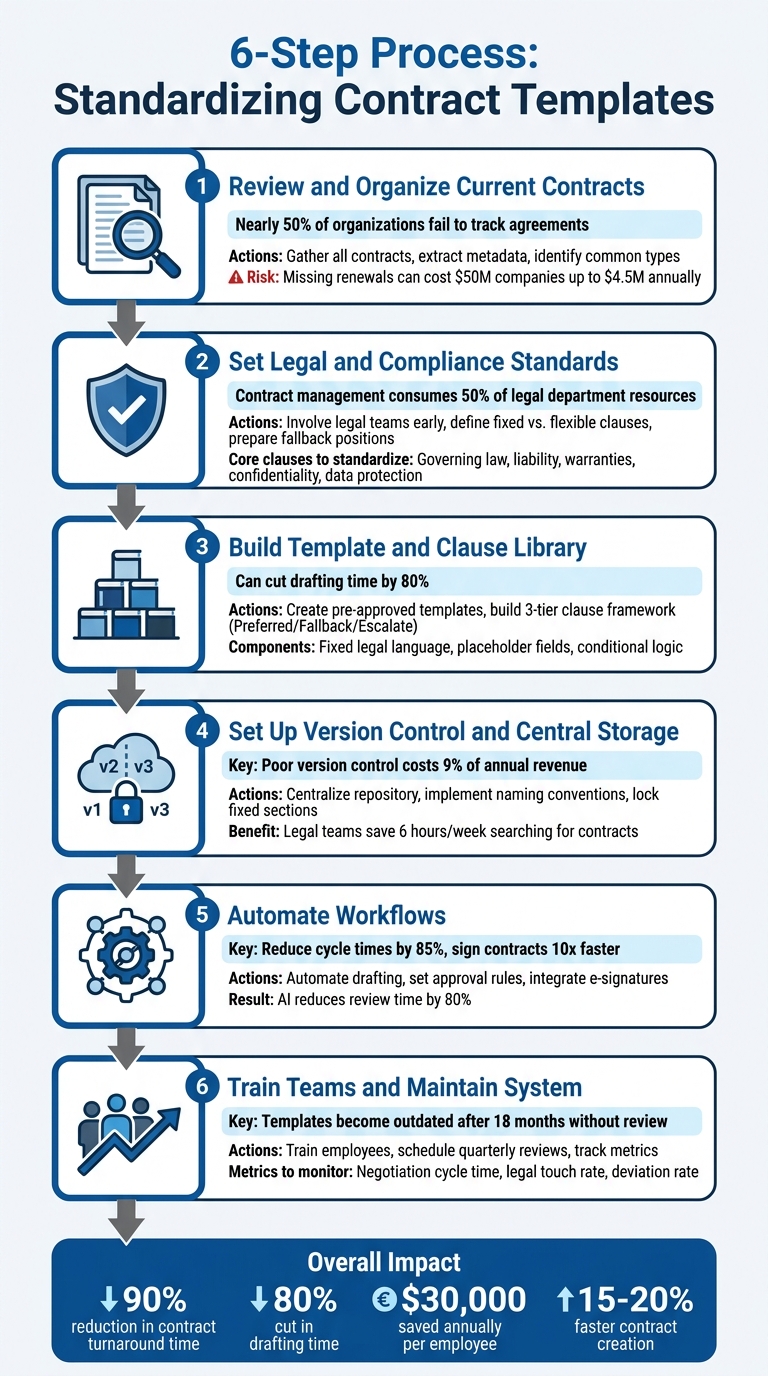
6 Steps to Standardize Contract Templates
Step 1: Review and Organize Your Current Contracts
Taking a close look at your existing contracts is the first step toward creating consistency and reducing risks. To start, you’ll need a complete inventory of all your contracts. Surprisingly, nearly half of organizations fail to effectively track some of their agreements. This lack of visibility leads to what experts call a "blind spot" – you can’t manage what you don’t know exists. To close this gap, gather contracts from every possible source: emails, shared drives, devices, and even physical files. Assign a single point person, like your CFO, COO, or Legal Counsel, to oversee the process. Once you’ve compiled everything, you can begin identifying inefficiencies and extracting key details.
Next, focus on pulling out critical metadata from your contracts. This includes details like involved parties, key dates, payment terms, renewal clauses, and liability limits. Why is this important? Failing to effectively manage your contract renewals, for example, can cost a $50 million company as much as $4.5 million annually. By organizing this data, you can spot patterns and ensure nothing falls through the cracks.
Identify Your Most Common Contract Types
Once your contracts are organized, group them by type and frequency of use. Different departments often rely on specific types of agreements. For instance:
- Sales teams typically handle service agreements, Master Service Agreements (MSAs), and Statements of Work (SOWs).
- HR departments work with employment contracts, offer letters, and freelance agreements.
- Legal and operations teams manage NDAs, privacy policies, and letters of intent.
- Procurement teams focus on vendor agreements and purchase orders.
Start by standardizing high-volume, low-complexity contracts, such as NDAs. These are great candidates for streamlining because they’re used frequently and rarely require negotiation. This approach ensures you focus your efforts where they’ll have the most impact.
Find Gaps and Risks in Current Contracts
Now, dig deeper into your contracts to uncover potential issues. Collect all versions of a specific contract type, like NDAs, and compare them. Look for inconsistencies or clauses that don’t align with company policies. Also, watch out for vague terms like "reasonable efforts" or "standard industry turnaround", which can lead to disputes.
Pay close attention to contract end provisions. Deadlines for auto-renewals, termination clauses, and "survival clauses" (which protect intellectual property after a project ends) are often overlooked. Use a checklist tailored to your industry to ensure all necessary compliance terms are included. If you notice that certain clauses frequently lead to negotiations or redlines, flag them for revision when creating templates.
Finally, consider leveraging AI tools to speed up the review process. These tools can significantly reduce manual review time and improve accuracy, though human oversight remains essential for context-specific nuances. However, don’t skip human oversight – context-specific nuances still require a human touch.
sbb-itb-49df6ae
Step 2: Set Legal and Compliance Standards
Now that your contract inventory is organized, the next step is to establish clear legal and compliance standards. This involves working closely with your legal and compliance teams to determine which clauses must stay fixed and which can be tailored. Without these standards, your templates could expose your company to unnecessary risks or fail to meet regulatory obligations. These standards will serve as the backbone for creating pre-approved templates in the next phase.
Bring in Legal and Compliance Teams Early
Involve your General Counsel or legal team from the beginning. Contract management already consumes up to 50% of a legal department’s time and resources, much of which is spent on repetitive, low-value tasks like drafting. By setting clear standards early, you can free up your legal team to focus on high-priority negotiations instead of constant reviews.
Early collaboration ensures that critical terms – such as liability caps, data residency requirements, or indemnification clauses – are locked in from the start. These non-negotiable terms are essential for minimizing risks and maintaining consistency across agreements. Additionally, your legal team can tailor templates to account for regional laws and compliance requirements.
"The fact that I can standardize contracts is a huge benefit, and I track expiry dates and contract renewals, preventing unnecessary cost." – Okechukwu Eke, General Counsel, Moniepoint
Assign clear ownership of each template to avoid outdated versions from circulating. Your General Counsel should lead efforts to create templates that are balanced and practical. The goal is to produce first drafts that your company would feel comfortable signing if the roles were reversed. This approach not only reduces negotiation friction but also speeds up the contracting process, ultimately improving cash flow.
Define Required Clauses
Your legal team should classify terms into two categories: core protections that must remain fixed and commercial terms that allow for customization. Core clauses to standardize typically include:
- Governing law and jurisdiction
- Limitation of liability
- Warranties
- Confidentiality
- Data protection
- Indemnification
- Termination
These clauses safeguard your business while ensuring compliance with legal and regulatory standards.
To determine which clauses should be standardized, review past contracts for trends. Identify terms that rarely change or consistently face pushback during negotiations. These are strong candidates for standardization. For example, if your contracts always require servers to be located in the EU, make that a non-negotiable standard.
You can also use conditional logic to make templates more dynamic. For instance, a GDPR clause can automatically appear if the counterparty is located in the EU. This ensures compliance without requiring manual adjustments for every contract.
Lastly, prepare pre-approved fallback positions for clauses that might require negotiation. These alternative versions of key terms allow sales or HR teams to negotiate within safe, legal-approved boundaries without needing constant input from the legal team. High-risk agreements, such as data processing contracts or those with liability caps, should be reviewed more frequently – at least annually – to reflect changes in laws or company policies.
Step 3: Build Your Template and Clause Library
Once you’ve established your legal standards, the next step is to create reusable templates and a clause library. These tools allow your team to draft compliant contracts quickly and efficiently.
Create Pre-Approved Templates
Start by designing templates for your most frequently used contracts, such as NDAs, service agreements, employment contracts, and vendor agreements. Each template should include three essential components:
- Fixed legal language for non-negotiable terms.
- Placeholder fields for variable details like names, dates, and contract-specific information.
- Conditional logic to adjust clauses automatically based on specific criteria.
For instance, your template could automatically include GDPR clauses when dealing with EU-based counterparties or adjust liability caps based on the contract’s value. By locking down critical legal terms and limiting edits to variable fields, you can prevent unauthorized changes while still allowing for necessary customization.
A modular structure can further streamline the process. Consider organizing templates into three levels:
- Core terms: These appear in every contract.
- Service-specific modules: These swap in based on the type of deal.
- Order forms: These capture commercial variables, keeping them separate from standardized legal terms.
This modular setup not only accelerates contract creation but also reduces errors. By placing variable details in a front-end order form, you ensure that standardized legal terms remain intact and manageable.
Using structured template libraries can cut contract drafting and review time by up to 80%, helping legal teams reclaim the 60% of their time spent on routine reviews.
Build a Clause Library
A clause library is essentially a toolbox of pre-approved contract language, categorized by type and risk level. It allows you to quickly assemble compliant contracts without constant legal oversight. A three-tier framework can help establish clear negotiation boundaries:
- Tier 1 (Preferred): These are the ideal terms offering maximum protection, presented as your "standard terms."
- Tier 2 (Fallback): These include pre-approved compromises for when counterparties push back.
- Tier 3 (Escalation): These terms fall outside acceptable ranges and require legal or leadership review before approval.
| Liability Component | Tier 1 (Preferred) | Tier 2 (Fallback) | Tier 3 (Escalate) |
|---|---|---|---|
| Direct Damages Cap | Fees paid in prior 12 months | 2x fees paid in prior 12 months | Any cap above 2x or unlimited |
| Consequential Damages | Mutual exclusion | Exclusion with specific carve-outs | Inclusion of consequential damages |
Organize your clauses into functional categories, such as:
- Enforcement: Indemnification, termination.
- Execution: Force majeure, non-waiver.
- Interpretation: Governing law, definitions.
Store all pre-approved clauses in a centralized repository with version control to ensure teams always use the latest versions.
A clause library is a collection of pre-approved contract language organized by type and risk level – enabling any team member to assemble compliant contracts in minutes rather than hours, without waiting on legal review for routine agreements.
Pay attention to which clauses are frequently redlined during negotiations. If a particular term is often adjusted, consider updating it to a more widely accepted position to speed up future agreements. Schedule an annual review of your entire library to ensure it aligns with current laws and your company’s risk preferences. High-risk clauses, such as those in data processing agreements or those with significant liability implications, should be reviewed more frequently.
Once your templates and clause library are ready, the next step is to implement version control and centralized storage.
Step 4: Set Up Version Control and Central Storage
Once you’ve built your template and clause library, the next step is to centralize your contracts. Why? Because nearly half of organizations lose track of some contracts. For a $50 million company, this can translate into losses of up to $4.5 million annually from missed renewals due to poor tracking. The solution? A centralized storage system paired with proper version control.
Store All Contracts in One Central Repository
When contracts are scattered across emails, shared drives, and physical files, it leads to duplicate agreements, missed deadlines, and unnecessary chaos.
A central repository serves as your single source of truth. It ensures that everyone in your organization is working from the same, approved templates. If legal requirements change, you can update the central template, and every future contract will automatically reflect those updates.
Start by identifying where contracts currently reside – whether that’s in email inboxes, shared folders, or even filing cabinets. Once you’ve mapped this out, organize your repository with a consistent structure. For instance, you could group contracts by department (Sales, HR, Procurement), by counterparty, or by type of contract. Add metadata like contract value, renewal dates, and department to make searching quick and efficient. This transforms static files into searchable, actionable data.
To keep things running smoothly:
- Use clear naming conventions (e.g., "Sales – NDA – Mutual" or "HR – Employment Agreement – Full-Time").
- Implement role-based access so that Legal has full visibility, while other teams only see the contracts relevant to their work.
- Archive outdated versions immediately to avoid accidental use, while keeping them accessible for historical reference.
"The fact that I can standardize contracts is a huge benefit, and I track expiry dates and contract renewals, preventing unnecessary cost." – Okechukwu Eke, General Counsel, Moniepoint
This centralized system forms the backbone of effective version control.
Use Version Control
Version control is crucial for avoiding the risks of working with outdated documents. Did you know that organizations lose about 9% of their annual revenue due to poor contract management and version control? On top of that, legal teams spend an average of 6 hours per week – equivalent to 40 working days a year – just searching for contracts across fragmented systems.
Working on the wrong version of a contract can result in confusion and disputes – leaving one party legally bound by terms they never intended to agree to. Version control eliminates this risk entirely.
Automated version control eliminates these issues. It replaces manual file naming with accurate, timestamped audit trails, ensuring compliance and erasing the need to compare files manually.
Here are some best practices for version control:
- Lock fixed sections of your templates. Platforms now allow you to lock down legal boilerplate text while enabling edits to specific fields, ensuring consistency in legal standards while allowing flexibility for business-specific details.
- Use a "snapshot on send" feature. This creates a static version of the contract as soon as it’s sent, so any updates to the template won’t affect contracts already in progress.
Real-world examples show the impact of centralized storage and version control. In February 2026, the Oncode Institute in the Netherlands reduced their contract signature turnaround time from days to just hours by centralizing their contracts and automating tracking. They eliminated delays caused by researchers searching through email threads for multi-party agreements. Similarly, Ruwacon, a construction company, improved project efficiency by giving field teams direct access to the correct versions of subcontractor documents via a centralized repository. This cut down on the time wasted hunting through scattered emails.
Platforms like Trackado make this process seamless. They offer centralized storage with built-in version control, allowing you to organize contracts by partner, category, or department. Features like customizable fields, automated deadline reminders, and AI-powered metadata extraction ensure your team always works with the latest, most accurate versions – no manual data entry required.
With centralized storage and version control in place, you’re ready to move toward automated drafting and approval workflows.
Step 5: Automate Drafting, Approval, and Execution Workflows
Streamlining contract management processes can drastically reduce cycle times – by as much as 85% – and enable contracts to be signed up to 10 times faster. By leveraging AI-powered tools for contract review and drafting, you can cut these times by approximately 80%.
Create Automated Drafting and Approval Workflows
Automating the drafting process eliminates the repetitive task of creating contracts from scratch. Self-service templates with smart fields can pull data directly from systems like your CRM or HRIS, ensuring consistency across contracts. These templates also lock core legal language, reducing the need for manual reviews while maintaining compliance. This approach empowers teams like sales, HR, and procurement to generate contracts independently without compromising legal standards.
The impact can be dramatic. One legal team reported that automated templates reduced the need for manual contract reviews from 100% to just 12%, freeing up legal capacity for higher-value work.
Using conditional logic within workflows takes automation a step further, dynamically adjusting clauses based on factors like jurisdiction, contract value, or billing terms. For instance, a contract exceeding $50,000 might automatically require CFO approval, while smaller contracts could go directly to a department head. Rule-based routing ensures contracts reach the right people at the right time, addressing a common issue – nearly 40% of organizations report confusion about who oversees contract workflows. Built-in reminders and escalation features further prevent delays by flagging unreviewed contracts.
Platforms like Trackado simplify this process by offering customizable approval workflows. These workflows route contracts according to your business rules and include automated reminders to keep everything on track. By eliminating manual intervention, teams can ensure contracts flow through the right channels seamlessly.
Integrate E-Signature Tools
Once approvals are automated, integrating e-signature tools speeds up execution. These tools eliminate delays caused by physical document handling and provide an audit trail with time-stamped signatures, showing exactly who signed and when. Many contract management platforms now include built-in e-signature capabilities or integrate with providers like DocuSign. After signing, the system automatically stores the agreement in a central repository, tagging relevant metadata to avoid manual filing.
For instance, Trackado’s integrated e-signature feature allows contracts to be sent, signed, and stored – all within the platform. Once a contract is executed, metadata is extracted and tracked, ensuring nothing gets overlooked.
Step 6: Train Your Team and Maintain the System
The most well-designed templates won’t work effectively if your team doesn’t understand how to use them or if the templates fall out of date. To achieve lasting success, it’s essential to train employees on the proper use of templates and ensure they remain relevant over time.
Train Employees on Template Use
Start by helping your team understand why standardized templates are important. When employees see how templates can speed up deals, improve consistency, and minimize legal risks, they’re more likely to embrace them. Offer thorough training on how and when to use templates.
Use examples to clarify when a standard template is sufficient and when legal review is necessary. Make sure to explain the limitations of templates and when it’s time to consult legal counsel. For sales teams, incorporate contract training into your sales enablement program. This way, representatives can confidently explain the value of specific terms to customers instead of simply "pushing paperwork". Before finalizing templates, involve non-lawyers in user testing to spot confusing jargon or unclear sections. Also, encourage employees to personalize templates when appropriate, so counterparties feel valued and respected.
Review Templates Regularly
Training alone isn’t enough – templates need ongoing updates to stay effective. If you don’t review templates for 18 months, they risk becoming outdated. Assign someone, like a Legal Ops professional or contract manager, to oversee updates and ensure they align with legal, regulatory, and industry changes.
Set up a formal review process, such as quarterly meetings between legal teams and deal-makers in Sales and Procurement. These sessions can pinpoint clauses that slow negotiations or frequently face objections. Leverage contract management software features to track which clauses are redlined most often, signaling areas that may need adjustments.
When a template is updated, make sure outdated versions are retired immediately to avoid confusion. Keep a detailed change log, noting updates like, "v3 – Updated termination clause to align with 2025 state law changes." Share a summary of these updates with your team, explaining how they affect existing contracts. Use clear naming conventions (e.g., "[ContractType]_[Version]_Template.docx") to help users quickly find the latest version.
Metrics to Monitor
Tracking performance metrics can help you measure success and identify areas for improvement. Key metrics include:
| Metric to Track | What It Reveals | Target Direction |
|---|---|---|
| Negotiation Cycle Time | Time from initial draft to final signature | Decreasing |
| Legal Touch Rate | Percentage of contracts needing legal review | Decreasing |
| Friction Score | Frequency of redlining for specific clauses | Low and stable |
| Deviation Rate | How often standard terms are modified | Low and stable |
Using Technology to Standardize Contracts
Relying on manual processes for managing contracts has its limits. Spreadsheets can’t flag missing clauses, shared drives don’t stop outdated templates from being used, and email threads won’t tell you which terms get redlined most often. Contract management platforms fill these gaps by offering centralized storage, automated workflows, and AI-driven insights that help maintain consistent standards. By integrating such a platform, you can turn these pain points into enforceable, streamlined processes.
How Contract Management Platforms Help with Standardization
Platforms like Trackado provide a centralized hub for all contracts and templates, creating a single source of truth. With centralized templates, teams always work from the latest approved version, reducing the risk of outdated terms slipping through.
Features like locked templates and clause libraries and contract clause generators ensure that non-negotiable terms are enforced while offering predefined fallback options. For example, clause libraries let sales or procurement teams substitute fallback clauses without waiting for legal approval on minor tweaks.
Automated workflows further boost efficiency and compliance. Guided Q&A flows allow non-legal staff to generate compliant contracts by answering simple questions about contract type, term length, or pricing tier. If deviations from standard terms occur, automated approval sequences route the contract for review. This approach has enabled small and medium-sized businesses to cut external legal costs by 40% to 50% in just one year.
AI-powered metadata extraction is another major advantage. Instead of manually entering data into spreadsheets, AI extracts key details – like parties involved, effective dates, renewal terms, and payment schedules – directly from documents. This reduces manual data entry errors by 90%.
These platform capabilities bridge the gap between standardization and deeper analytical insights.
How AI Improves Contract Analysis
AI builds on this foundation by extracting data, spotting patterns, and flagging non-compliant clauses in real time, significantly reducing the manual effort required to review large contract volumes. This is particularly helpful for reviewing legacy contracts or third-party documents, where non-standard language can be buried in dense text.
Advanced AI tools go a step further by benchmarking clauses – like liability caps or termination rights – against industry norms. Instead of simply asking, "What does this clause say?" AI asks, "How does this compare to what’s typical in the industry?" This insight empowers legal teams to make informed decisions during negotiations.
The time savings are substantial. AI can cut contract review time by up to 80%, allowing teams to handle hundreds of documents in the time it would take a person to review just one. Companies using AI-powered tools report contract cycles that are 2.3 times faster. For a $50 million business, this efficiency could prevent up to $4.5 million in annual costs tied to missed renewals or poor tracking.
AI also helps build institutional knowledge by analyzing patterns across your contracts. It identifies frequently redlined clauses, tracks suppliers who often request specific terms, and highlights negotiation points that slow deals down. This feedback supports continuous improvement of templates and strengthens overall contract standards. Together, these AI-driven insights and platform capabilities create a strong framework for maintaining consistent, efficient contract management.
Conclusion
Streamlining contract templates not only saves time but also lays the groundwork for steady growth. By implementing the six steps outlined earlier, small and medium-sized businesses (SMBs) can minimize drafting mistakes, maintain legal compliance, and allow their teams to focus on more strategic tasks rather than repetitive administrative work.
The advantages of standardization are measurable. Top-performing companies report 15–20% faster contract creation thanks to standardized templates, and workflows based on templates can cut contract turnaround times by as much as 90%. For businesses managing large volumes of agreements, this can lead to major cost savings – helping avoid the estimated $30,000 annually lost to inefficiencies from recreating contracts. Beyond improving efficiency, standardized templates provide essential risk management. They safeguard key provisions like intellectual property rights, liability limits, and confidentiality clauses. Additionally, they prevent the inclusion of "rogue clauses" that could conflict with company policies. Uniform language across all contracts ensures compliance with laws and industry standards, which is critical when legal resources are stretched thin.
For lasting success, templates should be treated as living documents. Regular reviews – every 6–12 months – help ensure they stay in sync with changing laws and business goals. Using contract analytics to identify frequently disputed clauses can guide updates, keeping your templates relevant and effective as your business grows. This ongoing refinement process strengthens your standardization efforts over time.
Whether you manage contracts manually or use tools like Trackado to centralize and automate workflows, the core principles remain the same: consistency reduces risk, speed drives growth, and structure builds trust. Start with your most frequently used agreements, involve your legal team early, and set your business up with a solid foundation for contract success.
FAQs
Which contracts should we standardize first?
Start with contracts that are high in volume but low in complexity – those that your organization uses regularly. Think vendor agreements, customer sales contracts, employment templates, and non-disclosure agreements (NDAs). These types of contracts are perfect for standardization because they’re repetitive, need little customization, and can significantly boost efficiency.
Focusing on these first helps ensure consistency, cuts down drafting time, and lowers legal risks. Plus, it sets a solid groundwork for tackling more intricate contracts in the future.
What terms should be locked vs editable in templates?
Lock the parts of a contract that are crucial and non-negotiable, like legal terminology, compliance requirements, and key provisions. On the other hand, make editable fields available for details that can vary, such as names, dates, and monetary amounts.
This approach keeps contracts consistent, minimizes mistakes, and allows for customization when necessary – all while safeguarding the most important terms.
How do we keep templates updated without slowing deals?
To keep templates current without slowing down deal cycles, leverage automation and dynamic tools within contract management platforms. Features like smart templates, reusable fields, and approval workflows help ensure contracts stay compliant and aligned with your brand. Plus, they reduce the risk of errors. These tools simplify the update process, allowing business teams to manage templates independently and maintain momentum without creating delays in the deal workflow.