
If your hotel stores contracts in inboxes, folders, and spreadsheets, you’re likely leaving money on the table. The article’s main point is simple: the best repository is the one that keeps contracts easy to find, locked to the right people, tracked by date, and sorted with clean fields.
I’d sum it up like this:
- Shared drives are cheap and easy, but weak for reminders and reporting.
- ERP attachments work for finance files, but not for a full contract library.
- CRM records help sales teams with account context, but miss many contract tasks.
- Dedicated contract platforms give the most control for multi-property hotel groups.
- For a hotel doing $10,000,000 a year, poor contract handling can mean about $920,000 in lost revenue based on the 9.2% figure cited.
If I were choosing a setup, I’d use this rule: pick the simplest system that still gives you search, access control, reminders, and metadata without constant manual work.
Quick Comparison
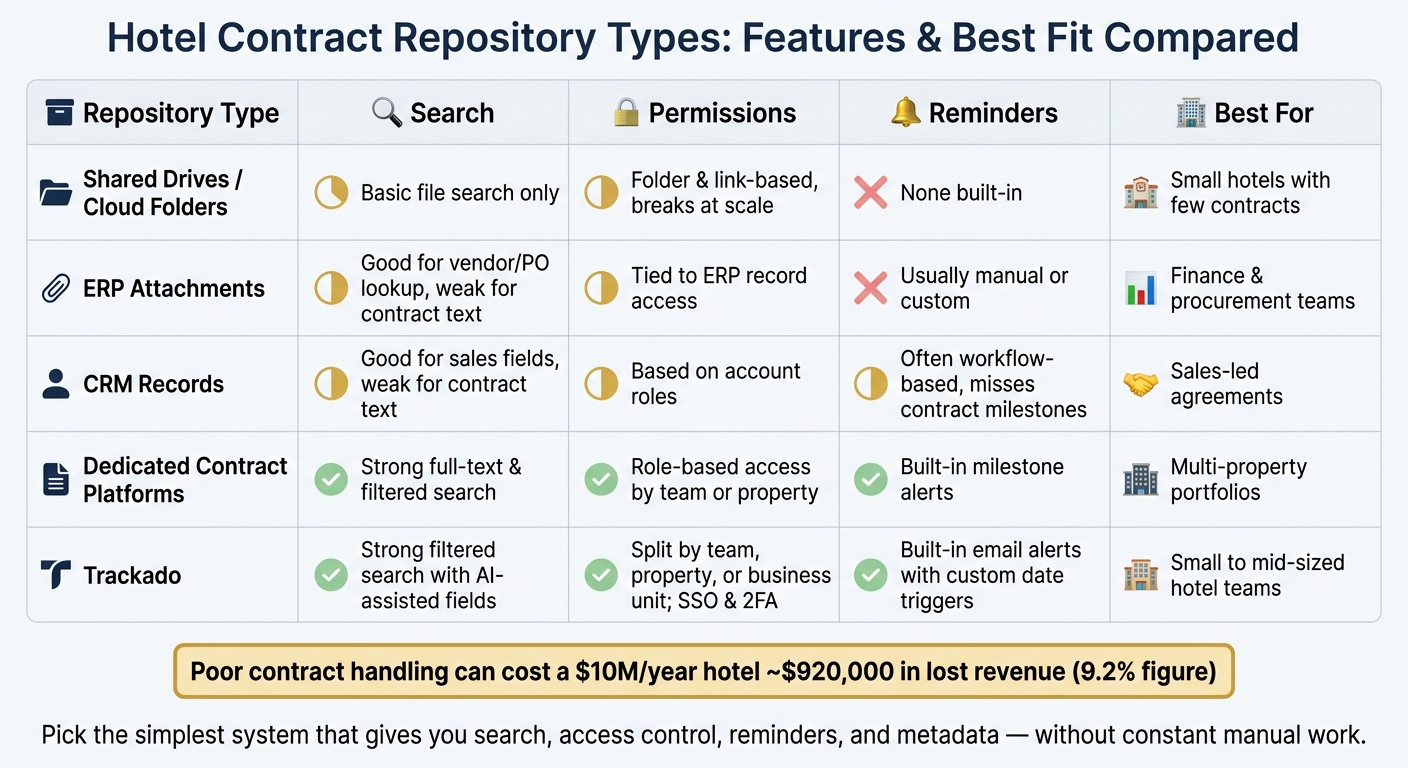
Hotel Contract Repository Types: Features & Best Fit Compared
| Repository Type | Search | Permissions | Reminders | Metadata | Best For |
|---|---|---|---|---|---|
| Trackado | Strong filtered search with AI-assisted fields | Split by team, property, or unit | Configurable email alerts | Custom fields for hotel use | Small to mid-sized hotel teams |
| Shared Drives | Basic file search only | Folder and link-based access | None built in | Very limited | Small hotels with few contracts |
| ERP Attachments | Good for vendor or PO lookup | Tied to ERP record access | Usually manual or custom | Basic unless configured | Finance and procurement |
| CRM Records | Good for sales fields, weaker for contract text | Based on account roles | Often workflow-based | Good for sales data, weak for legal terms | Sales-led agreements |
| Dedicated Contract Platforms | Strong full-text and filtered search | Role-based access by team or property | Built-in milestone alerts | Structured contract fields | Multi-property portfolios |
Bottom line: if your contracts sit across many systems, your team spends more time hunting, planning renewals, and fixing gaps. This article shows the tradeoffs so you can match the repository to your hotel’s size, contract volume, and risk level.
sbb-itb-49df6ae
1. Trackado
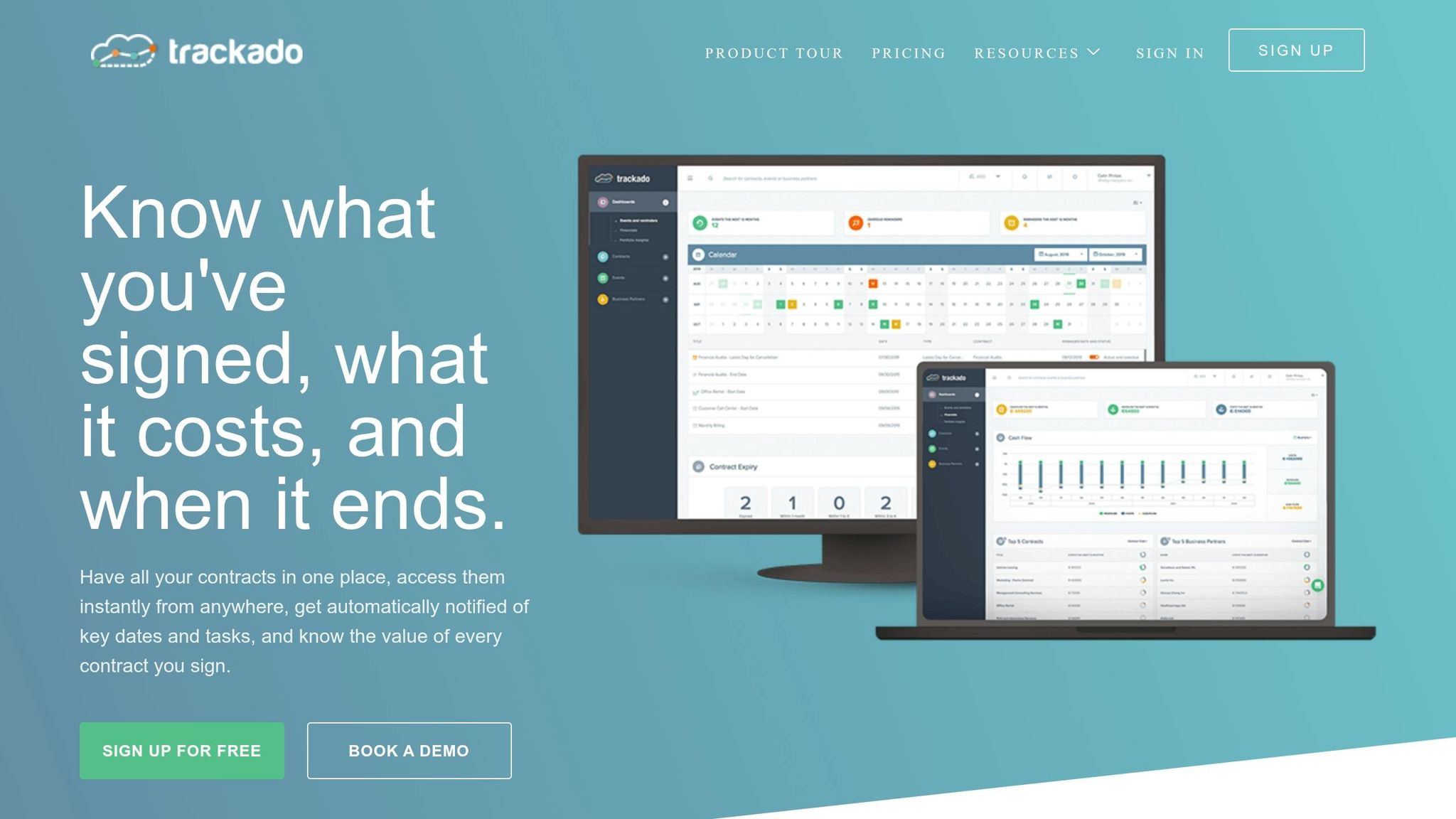
Trackado is a self-serve contract management platform built for small and mid-sized hospitality teams. It offers a free tier, a $39/month Starter plan, and is used across 19 Rosewood hotel properties worldwide. The main issue is simple: are those controls enough for hotel teams that need fast search, clear access, and reliable reminders?
Search
Trackado organizes contracts by partner, category, and department. So instead of digging through folders, a GM can filter for something like FF&E vendors, Property X, 2025.
It also uses assistive AI to pull key metadata, like title, dates, and parties, as soon as a contract is added. That cuts down on messy naming and helps search results stay more consistent over time. For hotel groups with multiple U.S. properties, that means much faster portfolio-wide searches by vendor, contract type, or status.
Permissions
Trackado lets teams split access by department, property, or business unit. In practice, that means a sales manager can view corporate rate agreements while payroll and union contracts stay limited to HR and finance.
It also supports SAML SSO, two-factor authentication, and audit trails. For hotels dealing with owner agreements or incentive structures, that setup helps keep sensitive contracts away from people who don’t need them.
Access control is one part of the puzzle. Dates are the other part, and hotels feel that pain fast when something slips.
Reminders
Trackado sends automated email reminders based on key dates in the system, including renewal windows, notice periods, rate-change effective dates, and compliance deadlines.
A revenue manager can set alerts before annual corporate rate agreements reset on January 1. A purchasing manager can also flag food and beverage vendor renewals before price creep starts to bite. The catch? These reminders depend on accurate date entry, so clean data entry still matters.
Metadata
Trackado goes past AI-assisted extraction and lets teams add custom fields like property code, brand flag, owner entity, fee basis, legal jurisdiction, and contract currency.
That gives hotels a structured way to track the details that matter across a portfolio. For example, a team could pull every vendor contract expiring in Q3 2026 for West Coast properties without piecing it together by hand. That kind of filtering makes reporting faster and helps teams avoid missed obligations.
That baseline helps when you compare Trackado with simpler storage setups.
2. Shared Drives and Cloud Folders
Google Drive, OneDrive, and Dropbox are often the go-to place for contract storage on small hotel teams. The reason is simple: they already sit inside the day-to-day productivity stack, and most teams don’t need to buy extra licenses on top of what they already pay for.
For a small team, that convenience is hard to beat. Someone can upload a contract in minutes with almost no training. But that’s the trade-off: shared drives give you speed, not much control. And once contract volume starts to grow, the main question becomes pretty clear. Can a basic file store handle search, access, reminders, and reporting across a hotel portfolio?
Often, the answer is no. Cheap and familiar doesn’t make a tool contract-ready.
Search
Search is decent if file names are clean and the contracts are saved as text-based PDFs. That’s the best-case version.
In practice, things get messy fast. 43% of organizations report contracts saved in the wrong location, and 39% store them as unsearchable PDFs. That’s a big problem in hospitality, where scanned agreements are common and often need OCR before search can find anything inside them.
There’s also a bigger issue. Shared drives search files, not contract data. So if you want to find every vendor agreement expiring next quarter, or every contract tied to one property, you usually can’t just run a filter and get the answer. You end up opening files one by one, which is slow and frustrating.
Permissions
Shared drives depend on folder permissions and link sharing. That can work fine for broad team access, like giving operations or finance a shared folder.
It starts to fall apart with management contracts, owner agreements, or other files that need tighter limits. A report on Google Drive security found that over 40% of Drive files contain sensitive information, and 34.2% were shared with external contacts outside the company’s domain.
For hotels, that creates an obvious risk. Sensitive terms can end up visible to outside contacts or former staff who should no longer have access.
Reminders
Shared drives don’t come with automatic reminders, deadline alerts, or renewal tracking.
Most teams patch this with calendar entries and spreadsheets. That can work for a while, but only as long as the person who set it up is still on the team and still watching it. Once peak season hits, or staff turns over, those manual systems tend to slip.
Metadata
Shared drives treat each contract like any other file. Beyond the filename, owner, and last-modified date, there isn’t much to work with.
That usually leads teams to track dates, terms, and property details in a separate spreadsheet. Now you have two places to manage the same contract data. One holds the document. The other holds the facts about it.
That split makes reporting much harder than it should be. Something as basic as checking all active vendor contracts across multiple properties turns into a manual, slow task. That’s a big reason many hotels move contract files into ERP attachments next.
3. ERP Attachments
Hotel finance teams often keep vendor contracts inside the ERP as attachments to purchase orders, vendor records, invoices, or project files. That setup makes sense for spend-related agreements because the contract lives right next to the transactions it controls.
So ERP works well as a filing spot for spend. It does not work as a full contract repository.
Search
This setup can help AP check rates fast. But it falls short when someone needs to search across the full contract portfolio.
The main issue is contract-level search. Most ERPs let users search by vendor, PO, invoice, or project code. They usually do not let users search by clause text or the actual content inside the contract.
Permissions
ERP access usually follows record permissions. In plain English, if someone can view the vendor record, they can often see every attachment tied to it.
The reverse issue shows up too. A Director of Rooms who needs to review an OTA agreement may not be able to get into the purchasing modules at all.
Reminders
ERPs are good at tracking invoice dates and PO dates. Renewal dates are a different story.
In most cases, teams need custom fields and manual reports to track renewals. Because of that, many hotels still depend on manual follow-up to catch what the system misses.
Metadata
Out of the box, ERP attachments usually include only basic metadata:
- File name
- Upload date
- Uploader
- A link to the related record
If you want contract-specific fields like term dates, renewal conditions, annual value in USD, or an auto-renewal flag, you usually need custom configuration. Then comes the hard part: entering that data the same way across every agreement.
That’s tough to keep up over time. What you often end up with is a file store filled with partial contract data, which makes reporting and audits more difficult than they need to be.
That finance-first structure works for vendor files, but it leaves customer and revenue agreements outside the ERP.
4. CRM Records
Hotel sales teams keep agreements in the CRM for a simple reason: those files sit right next to accounts, opportunities, and customer history. That setup is great for deal context. You can see who the customer is, what was sold, and what happened before. But when the job shifts from tracking a deal to managing a contract, CRM starts to show its limits.
For hotels, CRM is strong for account context, but weak as the system of record.
Search
CRM search does a good job with structured fields like segment, region, and rate tier. It starts to slip when contracts live as PDF attachments. At that point, getting a portfolio-wide view often means building custom reports instead of pulling answers straight from the system.
That same account-first design also affects permissions, reminders, and metadata.
Permissions
CRM permissions usually follow roles and record ownership. That makes sense for customer data. It gets messy, though, when contracts are scattered across accounts, opportunities, and custom objects. Legal and finance teams often run into a separate problem: controlling who can upload or edit a contract file is not the same as controlling who can view the related account.
Reminders
CRMs are good at account follow-ups, but contract milestones are another story. Notice periods and auto-renewal windows often depend on manual fields and workflows. So a sales manager might get a renewal alert, yet miss the earlier deadline that decides whether the hotel can renegotiate terms or stop an automatic renewal.
Metadata
CRMs store commercial data well, but legal terms don’t fit neatly into fields, requiring specialized extraction and classification to be useful. Hotels often push those details into notes, and that chips away at consistency. So yes, CRM helps with account context. It just doesn’t go far enough to serve as a full contract system.
When contract control matters more than account context, hotels need a more structured repository.
5. Dedicated Contract Platforms
Shared drives, ERPs, and CRMs usually treat contracts like files stuck in a folder or attached to a record. Dedicated contract platforms do the opposite: the contract itself becomes the record.
That changes a lot.
Instead of storing a PDF with a vague filename, these platforms give each agreement its own structured record. That record can include the other party, contract type, start and end dates, value in USD, department, and status. For hotel teams, that setup is especially helpful when handling vendor agreements, franchise terms, group sales contracts, and tech subscriptions.
Search
Full-text search across contracts is pretty standard. But the bigger win is filtered search.
Teams can sort contracts by property, value, date, or status. So if someone needs all active vendor contracts over $50,000 that expire in the next 90 days for one property, they can pull that up without digging through folders or email threads.
Many platforms also use AI to pull key terms from uploaded contracts, such as renewal clauses and notice periods, and turn them into searchable fields. That can cut down the time it takes to confirm rate terms, commission rules, and minimum spend obligations.
Search matters most when access is controlled the same way.
Permissions
Role-based access control helps hotels keep the right balance between local access and corporate oversight.
Corporate legal or finance teams can keep visibility across the full portfolio, while property-level users see only the contracts tied to their location or job. A general manager and director of operations, for example, might access local vendor contracts, while corporate teams still monitor the full set of agreements.
That helps local teams move faster without opening up owner, finance, or HR files to everyone.
Reminders
Dedicated platforms also help hotels avoid missed renewal windows and bad auto-renewals. Teams can set automated reminders for key dates like expiration dates and renewal notice deadlines.
Alerts may go out by email or in-app notification days, weeks, or months ahead of time. In Trackado, users can attach multiple reminders to a single contract, such as 120, 60, and 30 days before renewal, and assign those reminders to named owners like a hotel controller or revenue manager.
Some platforms also show views for contracts renewing this quarter or contracts that don’t have reminders set. That makes routine follow-up much easier.
Those alerts work best when the key fields are already clean.
Metadata
Structured metadata is what separates a contract platform from shared storage.
Out-of-the-box fields often include the other party’s name, contract type, start and end dates, contract value, currency, and status. For hotel use, custom fields can track property, brand, region, department, rate type, occupancy guarantees, F&B minimums, or franchise and management categories.
With clean metadata, a question like "What’s our total annual spend on housekeeping vendors across U.S. properties?" turns into a filter instead of a manual search. And that makes portfolio-level spend and obligation reporting fast enough to use.
Pros and Cons of Each Repository Type
The right setup comes down to a few plain questions: How many contracts are you managing? How many properties are involved? And how much risk can you live with if a renewal slips through or a key clause gets lost in a folder?
For hotel teams, four things matter most: search, permissions, reminders, and metadata. That’s where these repository types start to separate from each other.
| Repository Type | Key Strengths | Key Limitations | Best-Fit Scenario |
|---|---|---|---|
| Shared Drives / Cloud Folders | Low or no cost, familiar to most staff, quick to set up | No structured metadata, no built-in reminders, permission management breaks down at scale | Very small, low-complexity teams with few contracts |
| ERP Attachments | Contracts sit next to financial data; stronger audit controls | Limited search, excludes non-finance staff, weak reminder logic | Finance and procurement teams managing vendor spend and capital projects |
| CRM Records | Sales context built in; easy access for revenue and sales teams | Misses non-sales contracts entirely; reminder logic tied to deals, not contract milestones | Corporate rate, group, and distribution agreements |
| Dedicated Contract Platforms | Full lifecycle management, structured search, automated alerts, approval workflows | Requires migration effort and user adoption | Multi-property portfolios managing high contract volume across departments |
The biggest difference isn’t just where files live. It’s how much control each option gives hotel teams over finding contracts, limiting access, tracking dates, and pulling reports.
A small independent hotel with a handful of vendor agreements can often get by with a shared drive plus a renewal calendar. But there’s a catch: someone has to keep both up to date. If that slips, the whole setup starts to wobble.
Once contracts spread across multiple properties, the manual model gets shaky fast. The same goes for teams managing distribution agreements, franchise terms, and service contracts at the same time. At that point, missed deadlines and buried terms aren’t just annoying. They can turn into direct financial risk.
As contract volume climbs, hotels usually need one system of record for agreements instead of scattered file storage across departments. For growing hotel groups, a hybrid model often makes the most sense: use a dedicated contract platform as the main repository, while ERP and CRM continue handling spend and sales data. That way, each system does the job it was built to do, without forcing contract oversight into tools that don’t handle it well.
Conclusion
There’s no one-size-fits-all repository for every hotel. The right setup depends on your contract volume, how many properties you manage, and how much risk you can live with if a renewal date gets missed.
A good place to start is contract complexity. From there, the choice usually gets easier. Small, single-property hotels can often get by with shared drives. ERP attachments tend to work best for finance-led workflows, while CRM records make more sense for sales-led contracts.
A dedicated contract platform starts to make more sense when agreements are spread across teams or across multiple properties. As contract volume grows, missed renewals and auto-renewals stop being minor admin issues and start turning into operational risk. At that point, a structured contract platform is often the cleanest next move.
Trackado fits that need with a structured repository, automated reminders, and flexible organization by partner, category, or department. The core question is simple: can your repository keep contracts searchable and deadlines visible as the portfolio grows?
Choose the simplest repository that still gives you search, visibility, and reliable reminders. In practice, that means using the simplest system that can still handle search, access, reminders, and metadata well enough for the portfolio.
FAQs
When should a hotel move beyond shared drives?
A hotel should move beyond shared drives when contracts are scattered across email, property drives, or local folders, and teams can’t track versions, key terms, or deadline dates with confidence.
Shared drives often mean more manual work, version mix-ups, and zero automated reminders. That makes it easy to miss notice windows or let auto-renewals slip through without anyone seeing them coming.
If your team needs a structured, searchable repository with controlled access and reminders at 120, 90, and 30 days before key deadlines, it’s time to switch.
What contract data should hotels track first?
Start by putting all contracts in one repository. Then standardize the core fields for every agreement, including:
- contract name
- counterparty
- department
- owners
- start and end dates
- renewal type
- notice period
- payment schedule
- review dates
This gives you immediate visibility into your contract portfolio. It also makes alerts work the way they should, so you can stay on top of renewals, expirations, compliance deadlines, financial obligations, service levels, and renegotiation opportunities.
Can one repository work across multiple properties?
Yes. Trackado can support multi-property hotel teams by keeping all contracts in one repository and tagging each one with standardized property fields.
That setup gives corporate teams a clear way to search and report across properties. At the same time, each property team can be limited to viewing only its own contracts through role-based permissions.
Those standard fields also help with renewal alerts, owner assignment, and cross-property visibility.