
Miss one notice date, and a $25,000 or $50,000 contract can roll into another full term before anyone acts. I’d sum up the article like this: put every contract in one place, track a small set of renewal fields, and set alerts based on the notice deadline instead of the end date.
If I were explaining it in plain English, the article comes down to four things:
- Renewal risk is often a tracking problem, not a decision problem
- Auto-renewals, price increases, and lapsed agreements drain margin
- Multi-site businesses face more risk because contracts sit with different people and locations
- A simple contract analytics setup helps teams see deadlines, owners, and dollars at risk before the lock-in date
Here’s the short version of what matters most:
- Track dates like effective date, expiration date, notice period, and termination deadline
- Track money fields like annual contract value, payment schedule, escalation clause, and minimum spend
- Track accountability fields like owner, backup owner, department, property, and vendor category
- Set alerts at 90, 60, and 30 days before the notice deadline
- Review dashboards each week for contracts due in the next 30, 60, and 90 days
- Sort by highest spend first so your team sees the biggest risk right away
The main point: I don’t need a complex process to cut renewal risk. I need one secure contract repository, clean fields, notice-based reminders, and a dashboard that shows who owns the contract, when action is due, and how much money is on the line.
For hotel groups and other multi-site SMBs, this matters even more. A few missed renewals across Wi‑Fi, laundry, maintenance, insurance, or waste hauling can turn into $100,000+ in extra yearly spend across a portfolio. When contracts are tagged by property and category, finance can see that exposure early and act before the deadline passes.
What Contract Analytics Means for Risk and Renewals
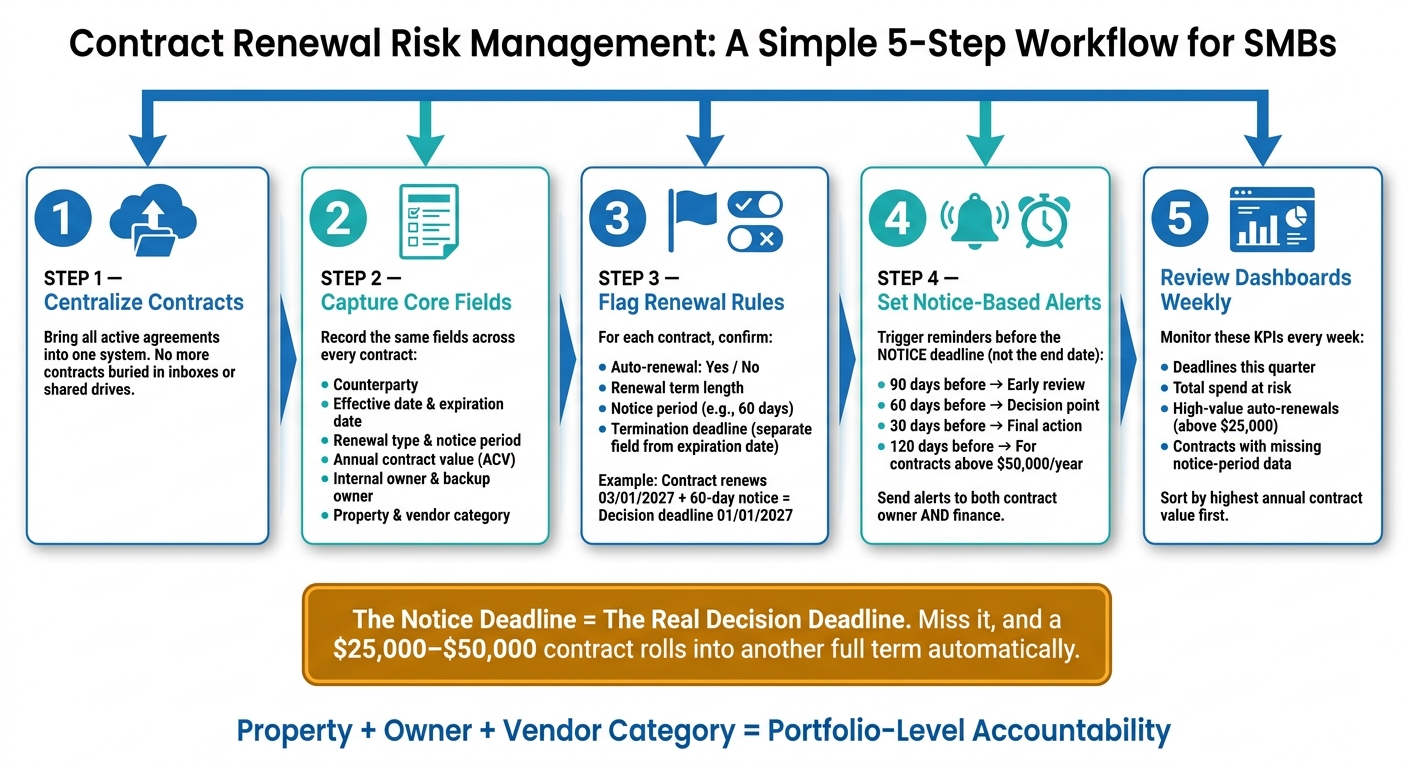
Contract Renewal Risk Management: A Simple 5-Step Workflow for SMBs
Contract analytics turns a pile of scattered agreements into something far more useful: a clear view of renewal timing and risk across the business. It takes contract files and turns them into structured data, so teams can spot renewal deadlines, money at risk, and agreements with no owner before those gaps turn into avoidable costs. It all starts with pulling out the fields that shape renewals and risk.
This only works if contracts live in one place and key fields are captured the same way across every agreement. If the structure is inconsistent, the reporting on top of it will be patchy too. And patchy data is exactly how renewals get missed and surprise costs show up.
From Scattered Files to Usable Contract Data
The big shift is moving from simple document storage to metadata-based tracking. That’s what makes renewal and risk reporting possible. When each contract includes the same set of fields – like effective date, expiration date, notice period, annual value, auto-renewal flag, and assigned owner – you can filter your contracts in seconds.
For example, you can pull up every agreement set to auto-renew in the next 90 days with annual spend above $10,000. Try doing that when contracts are buried in inboxes and shared drives. It’s a mess.
A helpful rule of thumb: treat the notice deadline as the actual decision deadline. If a contract needs 60 days’ written notice and expires on December 31, the cutoff is October 31.
Trackado supports this setup with a structured contract repository, custom fields, deadline reminders, and AI for metadata extraction. For multi-site businesses, that makes it easier to track renewals by property, department, or vendor.
Once contracts are structured, teams can use a simple workflow to keep renewal risk in view.
A Simple Workflow SMBs Can Follow
Getting from scattered contracts to usable analytics doesn’t have to take months. For many SMBs, the process is pretty direct:
- Centralize contracts – bring all active agreements into one system.
- Capture the core fields – use the same fields across every contract: counterparty, effective date, expiration date, renewal type, notice period, annual value, and owner.
- Flag renewal rules – confirm whether each contract auto-renews, the renewal term, and the notice period, then store those details as structured fields.
- Review dashboards every week – set up views for renewals coming up in the next 30, 60, and 90 days, spend at risk from upcoming auto-renewals, and contracts with no assigned owner.
- Assign owners – every upcoming renewal should have one named person responsible for deciding whether to renew, renegotiate, or exit.
Following this workflow, many SMBs can move from a reactive, ad hoc renewal process to a more structured, analytics-driven approach in a matter of weeks instead of months. The next step is deciding which dates, terms, and ownership fields every contract must carry.
sbb-itb-49df6ae
The Contract Fields That Reveal Renewal and Financial Exposure
Focus your field set on the data that controls renewals, cost, and ownership. In plain terms, track the fields that show when action is due and how much is on the line.
Dates and Renewal Terms to Capture on Every Contract
Start with timing. The notice deadline is the point that matters most.
At a minimum, every contract should include these date and term fields:
- effective date
- expiration date
- renewal term
- notice period
- termination deadline
- auto-renewal status
Together, these fields map the full renewal timeline: when the agreement began, when the current term ends, and the last day your team can act before that end date.
Keep the termination deadline in its own field instead of folding it into the expiration date. Then base reminders on that deadline. For example, if a contract renews on 03/01/2027 and needs 60 days’ notice, the decision deadline is 01/01/2027.
Store auto-renewal as a simple yes/no field. That makes rollover risk much easier to spot early.
Financial and Ownership Fields That Show Real Exposure
Once the timing is clear, add the fields that show spend and responsibility. This is where a contract record moves from a basic file to something a team can act on.
The core financial fields are annual contract value (ACV), total contract value (TCV), payment schedule, escalation clause, minimum spend, and penalty terms. A contract with an annual value of $25,000, a 3% annual price escalation tied to CPI, and a minimum spend commitment carries more risk than the base price alone suggests.
The ownership and classification fields are internal owner, backup owner, department, property, and vendor category.
Here’s what each one does:
- internal owner: the person responsible for notices and renewals
- backup owner: coverage when staff changes happen or deadlines slip
- department: the team tied to the budget
- property: the site tied to the contract for portfolio reporting
- vendor category: the supplier grouping, such as linen services, software, food service, or maintenance
That property field matters a lot. Without it, you can’t pull renewal exposure by location. And vendor category helps teams spot spend and renewal exposure by supplier type instead of looking at contracts one by one.
The core message is simple: property + owner + vendor category = portfolio-level accountability.
Here’s what that looks like in one record: renewal date 03/01/2027, notice period 60 days, auto-renewal yes, annual contract value $25,000, payment schedule monthly, internal owner Director of Operations, backup owner Finance Manager, department Facilities, property Miami Beach Hotel, vendor category Laundry Services. One record shows the deadline, the owner, the site, and the spend at risk.
These fields power the reminder rules and dashboard views that bring renewals into view early.
Reminder Rules and Dashboard Views That Help Teams Act Early
Set Reminders Around Notice Periods, Not Just End Dates
These fields only help if they push action before the notice deadline. Put reminders around the notice deadline, not the contract end date. If you miss the notice deadline, the renewal is locked in.
A simple setup is three alerts before the notice deadline: 90, 60, and 30 days before. Send each alert to both the contract owner and finance. That gives the owner time to renew, renegotiate, or exit before spend rolls over. It also gives finance a clear view of upcoming spend before it becomes unavoidable.
For contracts above a set threshold, such as $50,000 per year, add a fourth alert at 120 days. That extra time can make a big difference in negotiations.
In Trackado, reminders can be set around custom date fields like the notice deadline, not just the end date. Alerts can also repeat on a chosen schedule until someone dismisses them, which helps keep unresolved renewal tasks in view. Trackado can generate key milestone dates automatically as well.
Once those alerts are in place, dashboards help teams see what needs attention first.
Dashboard Views for Upcoming Renewals and Spend at Risk
Dashboards turn deadlines into action lists. Use a calendar view for deadlines and a list view for spend at risk.
Filter the list view for the next 30, 60, and 90 days based on notice deadlines. Then sort by annual contract value, highest first. That puts the largest financial exposure right at the top. After that, the filters that matter most are auto-renewal status, contract type, property, and owner.
A query like "auto-renewing contracts above $25,000 with notice deadlines in the next 90 days" gives finance a direct list of spend decisions that need to happen now.
A few dashboard KPIs are worth watching:
- Deadlines this quarter – shows how many decisions are coming up
- Total value at risk – the spend at risk if no action is taken
- High-value auto-renewals – contracts above a set threshold that will roll over without intervention
- Missing notice-period data – a data quality flag that points to blind spots in the system
That last metric is easy to miss, but it matters. A contract with no notice period recorded is basically invisible to reminder rules. Tracking incomplete records gives teams a way to fix gaps before they turn into missed deadlines.
In Trackado, contracts can be grouped by partner, category, and department. Those same groupings can power dashboard filters without extra setup. For hotel groups, the property filter makes it easy to see renewal risk across the portfolio, not just at one site.
Putting This Into Practice: Hotels and Other Multi-Site SMBs
Example: Portfolio-Level Renewal Tracking Across Hotel Properties
A 15-property hotel group can only spot renewal risk across the portfolio when contracts are tagged by property and service category. Without that setup, each location handles its own agreements for laundry, elevators, pest control, Wi‑Fi, waste hauling, and insurance, while finance sees the spend only after it lands on the P&L.
Once contracts are tagged this way, risk across the portfolio comes into view instead of sitting in local files. A portfolio dashboard can show contracts by property and service category, along with annual spend, next renewal date, notice period, auto-renewal flag, and escalation clause details. So if three properties have elevator maintenance contracts renewing in November, the team can see the $180,000 in combined annual spend and spot price escalators above 5% before those terms roll forward. The same goes for pest control: if four vendors overlap across nearby properties, with $45,000 in combined annual spend and no volume-based pricing in place, that gap is hard to ignore.
This same view makes timing much easier to manage. If four laundry contracts and two waste contracts all renew in March, totaling $320,000 in annual spend, finance can plan cash flow for that quarter and start vendor talks early enough to negotiate instead of just taking the terms as-is. And when several properties share an open notice period in the same quarter, finance has a shot at a group rate before renewals lock in.
Hospitality teams, including 19 Rosewood hotel properties worldwide, use Trackado to centralize contracts and tag each one by property, service category, and internal owner.
The takeaway is simple: portfolio visibility turns renewal deadlines into decisions, not surprises.
Conclusion: The Minimum System SMBs Need to Manage Renewal Risk
The minimum system is simple:
- One centralized repository
- Standard fields
- Notice-based reminders
- A portfolio dashboard that shows deadlines, owners, and spend together before the notice window closes
When renewal exposure is visible across the full portfolio, one missed deadline does not turn into a portfolio-wide cost.
FAQs
How do I calculate the notice deadline?
Review the contract to find the required cancellation notice period, then save it in Trackado as a Notice Term. Once that’s in place, the system will automatically calculate the final date you need to act.
You can also set automated alerts 30, 60, or 90 days before that deadline. That gives your team time to review the terms, renegotiate, or decide what to do next.
Which contracts should we prioritize first?
Start with the contracts that pose the biggest financial and day-to-day risk.
That usually means agreements worth $25,000+ per year, contracts tied to core systems like ERP or payroll, and anything set to expire within the next 3–6 months.
You should also move these to the front of the line:
- Contracts marked Critical or High
- Contracts expiring in the next 90 days
- Contracts with no assigned owner
Why does that last group matter so much? Because contracts without a clear owner are more likely to miss key dates or slip into auto-renewal.
How can multi-site teams keep contract data consistent?
Centralize all agreements in a secure digital repository so your team has a single source of truth. Set up a standard hierarchy, like portfolio, region, and property, and use the same core fields, categories, and statuses across every location.
Give each contract a primary owner and a backup owner so accountability is clear. Trackado helps with customizable fields and automated metadata extraction, which cuts down on manual entry errors.